
How to Manage Tasks for Multiple Clients Without Losing Track
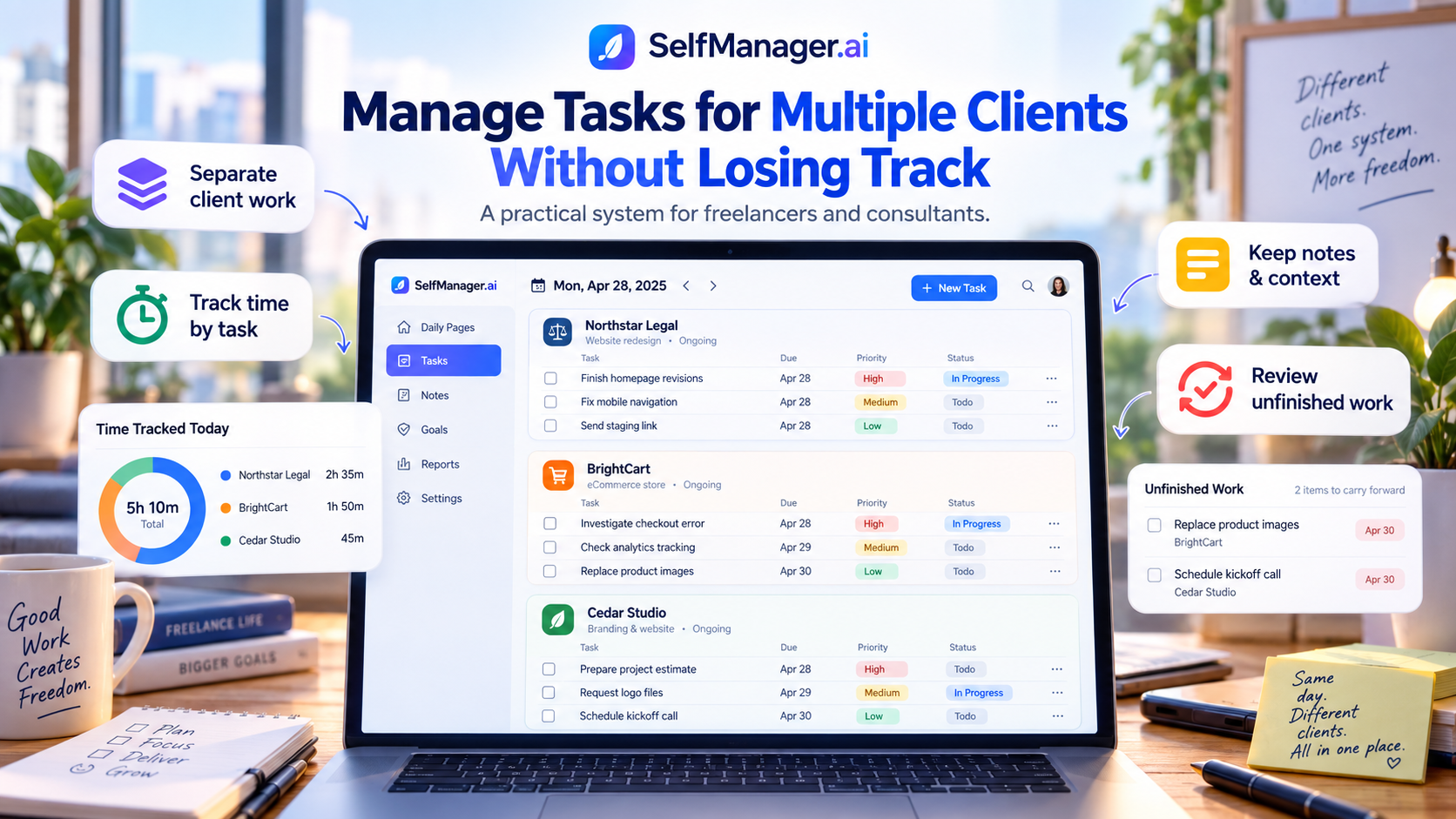
Managing one client is usually straightforward.
Managing three, five, or ten is different.
The problem is rarely that you cannot complete the work. The problem is remembering everything around the work:
- Client A needs revisions by Wednesday.
- Client B asked a small question during yesterday's call.
- Client C is waiting for an estimate.
- You spent two hours on something you expected to take 30 minutes.
- One task is blocked until the client replies.
- Another was supposed to happen Monday but quietly disappeared.
A good multi-client task system needs to answer four questions every day:
What does each client need?
What matters most today?
Where did my time actually go?
What is still unfinished?
The easiest way to do that is not to create one enormous freelancer to-do list.
Keep each client's work separate, bring only the relevant work into the current day, record context beside the tasks, and deliberately review what remains unfinished.
Here is a complete example.
The clients and work below are fictional. They are used only to demonstrate the workflow.
Meet the Freelancer: Three Clients, One Monday
Imagine Maya, an independent web designer and developer.
She currently manages three clients.
Client A: Northstar Legal
An ongoing website redesign.
Current work:
- Finish homepage revisions
- Fix mobile navigation
- Send revised staging link
- Get approval for the services page
Client B: BrightCart
An ecommerce support client.
Current work:
- Investigate checkout error
- Replace three product images
- Check analytics tracking
- Reply about a possible subscription feature
Client C: Cedar Studio
A smaller branding website project.
Current work:
- Prepare project estimate
- Review reference websites
- Schedule kickoff call
- Request missing logo files
That is already 12 pieces of work.
Now add email, calls, invoicing, personal obligations, and unexpected requests.
The system needs to stay understandable even when Monday stops going according to plan.
First Rule: Do Not Mix Every Client Into One Task List
A single list might initially look efficient:
- Fix navigation
- Send estimate
- Replace images
- Review homepage
- Email client
- Check analytics
- Ask for logo
- Prepare staging
- Schedule call
The problem is context.
Which client owns "email client"?
Which website needs the navigation fix?
Does "check analytics" belong to the ecommerce store or the legal website?
And when you look back two weeks later, what did those tasks actually mean?
Instead, keep client work clearly separated.
In SelfManager.ai, every date can contain multiple tables.
Maya's Monday could contain:
Northstar Legal
- Finish homepage revisions
- Fix mobile navigation
- Send staging link
BrightCart
- Investigate checkout error
- Check analytics tracking
Cedar Studio
- Prepare estimate
- Request logo files
Admin
- Send invoices
- Review tomorrow's calls
The clients remain separate, but the work still belongs to one real Monday.
That distinction matters.
You do not need three completely separate productivity systems just because you have three clients.
You need separate contexts inside the same working day.
Read more: how to use SelfManager.ai.
Keep Ongoing Client Work Visible With Pinned Tables
Daily work changes constantly, but some clients remain active for weeks or months.
For those, an ongoing client or project table can be pinned.
Maya might keep these tables pinned:
- Northstar Legal - Website Redesign
- BrightCart - Ecommerce Support
- Cedar Studio - Website Project
Pinned tables act as a persistent view of important ongoing work.
That gives Maya two useful perspectives.
The ongoing table answers:
What is happening with this client overall?
The current date answers:
What am I actually doing for this client today?
Those are different questions.
Mixing them together is how project lists become enormous and daily plans become unusable.
Monday Morning: Decide What Actually Matters
Maya starts Monday with seven client tasks available.
But they are not equally important.
The BrightCart checkout error may be preventing customers from completing purchases.
The Northstar homepage revisions need to be shown during Tuesday's client call.
The Cedar Studio estimate would be useful to send today, but nothing breaks if it goes out Tuesday morning.
So Maya sets priorities accordingly.
A simplified version might look like this:
| Task | Client | Priority | Status |
|---|---|---|---|
| Investigate checkout error | BrightCart | 5 | Not started |
| Finish homepage revisions | Northstar | 5 | In progress |
| Fix mobile navigation | Northstar | 4 | Not started |
| Check analytics tracking | BrightCart | 3 | Not started |
| Prepare project estimate | Cedar Studio | 3 | Not started |
| Send staging link | Northstar | 2 | Not started |
| Request logo files | Cedar Studio | 2 | Not started |
The exact priority numbers matter less than making the distinction.
Without priorities, Maya has seven tasks.
With priorities, she knows where Monday starts.
The checkout problem comes first.
Use Task Names That Still Make Sense Tomorrow
Multi-client work becomes dangerous when task titles depend on short-term memory.
Bad:
Fix issue
Better:
BrightCart - investigate checkout error on mobile Safari
Bad:
Send update
Better:
Northstar - send revised homepage staging link after navigation fix
Bad:
Ask client
Better:
Cedar Studio - request SVG logo and brand font files
You may know what "fix issue" means at 10:00 Monday morning.
By Thursday, you may not.
By next month, you almost certainly will not.
Clear tasks reduce the amount of context you need to reconstruct later.
Keep Client Context Beside the Work
Tasks are only part of client management.
Imagine Maya investigates BrightCart's checkout problem.
She discovers that:
- The error only occurs on mobile Safari.
- It began after a theme update.
- Disabling one script appears to solve it.
- She wants to test the fix before telling the client it is resolved.
If all Maya records is:
Fix checkout error - done
most of the useful information disappears.
Instead, she can leave context with the work.
A note might say:
Checkout issue appears related to the new theme script. Reproduced on Safari iOS. Disabling script fixed test checkout. Need final production test before confirming with client.
Now future Maya has something useful.
She does not need to remember what happened.
This becomes even more valuable when a client returns two months later and asks:
Didn't we already have a checkout problem like this?
The answer may already be sitting beside the original work.
Comments Are Useful for Decisions and Changes
Client projects change constantly.
A homepage task might begin as:
Update hero section.
Then the client asks to replace the image.
Later they decide to keep the original image but change the headline.
Then the mobile version needs a different layout.
Simply changing the task title each time removes history.
Comments can preserve the progression.
For example:
Monday: Client requested new hero image.
Tuesday: Client reversed image change. Keep current image and update headline instead.
Wednesday: Mobile version approved with text stacked above CTA.
This type of context is especially useful when you manage several clients because similar conversations happen simultaneously.
Without a record, details begin blending together.
Track Time at the Task Level
Now suppose Monday ends like this:
| Client | Work | Time |
|---|---|---|
| BrightCart | Checkout investigation | 2h 05m |
| Northstar | Homepage revisions | 1h 40m |
| Northstar | Mobile navigation | 55m |
| Cedar Studio | Project estimate | 35m |
| Admin | Email and invoicing | 45m |
Maya worked six hours.
But the distribution matters more than the total.
BrightCart consumed considerably more time than expected.
Northstar received almost three hours.
Cedar Studio received only 35 minutes.
If Maya tracks only her total working time, she misses that information.
If time is attached directly to individual tasks, the work record becomes much more useful.
Over several weeks, she can start answering questions such as:
- Which client actually consumes the most time?
- Which type of task consistently takes longer than expected?
- Am I spending too much unpaid time on support?
- Did Client A receive the amount of attention I expected this week?
- Why was this project less profitable than I thought?
- Which work should I estimate differently next time?
SelfManager.ai includes a timer on tasks as well as manual time entry, so the time remains connected to the actual work instead of existing as a separate list of timers.
Time Tracking Does Not Automatically Equal Invoicing
There is an important limitation here.
Tracking time inside a task manager and running a dedicated billing system are not the same thing.
If you need features such as:
- Automatic invoices
- Billable versus non-billable rates
- Expense tracking
- Tax calculations
- Payment collection
- Detailed client billing reports
you may still need dedicated invoicing or accounting software.
The value of task-level time tracking is context.
You can see that 1 hour and 40 minutes did not simply go to "Northstar."
It went to specific homepage revisions on a specific date.
That is useful even if another system ultimately creates the invoice.
What Happens When an Unexpected Client Request Arrives?
At 14:20 on Monday, Northstar sends Maya this message:
We just noticed that the attorney profile images look blurry on retina screens. Could you check that before tomorrow's meeting?
This is where multi-client plans usually start breaking.
The request did not exist when Maya planned the morning.
She now has to decide whether it should displace something else.
She adds:
Northstar - investigate retina profile image quality
Because tomorrow's meeting depends on it, she gives it a high priority.
But time did not magically appear.
Something else has to move.
Maya decides that Cedar Studio's logo-file request can wait until Tuesday.
That is the actual work of managing multiple clients.
Not building the perfect plan.
Reprioritizing without losing the work you removed from today.
Do Not Automatically Roll Everything Forward
By the end of Monday, Maya finishes most of the important work.
But two tasks remain incomplete:
- BrightCart - check analytics tracking
- Cedar Studio - request logo files
There are two common bad approaches.
The first is leaving unfinished work buried in Monday and hoping you remember it.
The second is having the task manager automatically move everything into Tuesday.
The first risks forgetting the work.
The second rewrites history.
If Monday originally contained seven tasks and two were not completed, looking back at Monday should show that.
That is useful information.
Maybe Maya overcommitted.
Maybe the checkout emergency changed the day.
Maybe Cedar Studio repeatedly gets pushed aside whenever larger clients need attention.
SelfManager.ai leaves unfinished work on the original date.
When Maya plans Tuesday, she deliberately decides what needs to continue.
That preserves both things:
Monday shows what really happened.
Tuesday contains the work she has consciously recommitted to.
Tuesday Morning: Review Unfinished Work First
Before adding new tasks, Maya checks what remained open.
BrightCart - check analytics tracking
Still relevant?
Yes.
Move it into Tuesday's work.
Cedar Studio - request logo files
Still relevant?
Yes.
This should take five minutes, so Maya carries it forward and handles it early.
Now imagine another task:
Research alternative animation libraries
It has been unfinished for three weeks.
Maya should not automatically keep moving it forever.
She should ask:
Does this actually need doing?
Repeatedly postponed work is information.
The task may need to be:
- Completed
- Simplified
- Delegated
- Scheduled properly
- Put on hold
- Or deleted
A task manager should help you notice that decision rather than allowing old work to reproduce forever.
A Simple Daily Routine for Multiple Clients
Maya does not need an hour of project management every morning.
Her routine can be simple.
1. Check deadlines
Is anything due today or soon?
Client deadlines should be visible before low-value administrative work takes over the morning.
2. Check unfinished work
What from yesterday still matters?
Do not carry everything forward automatically.
Choose deliberately.
3. Check each active client
Look at the current state of each important client.
Is anyone waiting for you?
Is anything blocked?
Is a project receiving no attention?
4. Pick today's actual client tasks
Create or organize the tables that belong to today's work.
Not everything in every client project needs to appear today.
5. Set priorities
Ask:
If the day goes badly and I complete only three things, which three should they be?
Those should be obvious in the system.
6. Work and record context
Track time where useful.
Add notes or comments when something happens that future-you may need to understand.
7. Close the day by checking what remains
Do not build tomorrow's entire plan while tired.
Just make sure nothing important has disappeared.
The System Becomes More Useful at the End of the Week
Friday is where a multi-client task system can reveal whether your week matched your intentions.
Maya remembers being busy.
That does not necessarily mean every client progressed.
Suppose her tracked week looks like this:
| Client | Tracked time | Key outcome |
|---|---|---|
| Northstar Legal | 12h 20m | Homepage revision ready for approval |
| BrightCart | 9h 10m | Checkout fixed, analytics investigation ongoing |
| Cedar Studio | 3h 45m | Estimate sent, kickoff scheduled |
| Admin | 4h 05m | Invoices, email, planning |
Immediately, something becomes visible.
Cedar Studio received much less attention.
That may be completely appropriate.
Or it may signal a problem.
Maybe the project keeps getting displaced by urgent support work from larger clients.
Without tracking and review, Maya may only notice when Cedar Studio asks why progress has slowed.
Review Unfinished Work by Client, Not Just Globally
A generic Friday question is:
What tasks are unfinished?
A better freelancer question is:
What is unfinished for each client?
Northstar
- Waiting for services-page approval
- Need final mobile test
BrightCart
- Analytics investigation remains open
- Subscription feature question needs estimate
Cedar Studio
- Kickoff scheduled
- Need homepage content from client
This makes Monday much easier.
Maya is no longer reconstructing three client relationships from memory.
She can see their current state.
AI Can Help Review the Week Once the Data Exists
This is where storing good task data becomes useful.
SelfManager.ai's AI Review can work across a selected week and analyze the work recorded during that period.
Instead of asking an AI chatbot:
How productive was my week?
with no context, Maya can ask questions about actual work.
For example:
Which clients consumed most of my tracked time this week?
What important client work remains unfinished?
Which high-priority tasks slipped?
Summarize progress separately for Northstar, BrightCart, and Cedar Studio.
Which client appears blocked by something outside my control?
What should I carry into next week?
The quality of those answers depends partly on the quality of the work record.
Clear task names, meaningful statuses, tracked time, and useful notes give the AI more to work with.
AI does not eliminate the system.
It becomes useful because the system exists.
Read more: AI task managers that write your weekly review.
Do Not Confuse Client Priority With Task Priority
This is an easy mistake for freelancers.
Your largest client does not automatically own every high-priority task.
Suppose Northstar represents your biggest contract.
BrightCart still has a broken checkout.
BrightCart's task may deserve the highest priority today even if Northstar is commercially more important overall.
Priority should describe the work that needs attention.
Client importance is a separate decision.
Keeping those concepts separate prevents your biggest client from automatically consuming your entire schedule.
Do Not Create a Different Productivity System for Every Client
Clients may already use:
- Slack
- Asana
- Jira
- Trello
- Notion
- ClickUp
- Microsoft Teams
You may have to use those systems to communicate with them.
That does not mean they should become your personal planning system.
A freelancer working with five clients can easily end up with five different places where tasks are supposed to be remembered.
Your own system should answer:
What do I need to do today across all of them?
Client software can remain the source of collaboration.
Your task manager becomes your personal operating layer.
When an important task arrives elsewhere, bring the action into the system you actually review every day.
Read more: task managers that fit a freelancer weekly flow.
Keep Personal Work Visible Too
Freelancers do not have a separate body for client work and personal life.
The same Tuesday may contain:
- Three hours of client work
- An invoice
- A dentist appointment
- Grocery shopping
- A sales call
- Gym
- Updating your own website
Ignoring personal commitments does not make them disappear.
It only makes the professional plan unrealistic.
A date-based system allows Maya to keep a Personal or Admin table alongside her client tables without mixing every task together.
She sees the whole day while preserving context.
That is much closer to how independent work actually operates.
Read more: how I run an agency and a SaaS using one system.
The Goal Is Not to Perfectly Organize Every Client
There is a temptation to build an elaborate project-management system before doing any actual work.
Every client gets:
- Fifteen statuses
- Ten categories
- Custom labels
- Complex folder hierarchies
- Several dashboards
- Automations for everything
Then maintaining the system becomes another project.
For a solo freelancer or consultant, the simpler questions are usually more useful:
What needs doing?
For whom?
How important is it?
What happened?
How much time did it take?
What remains unfinished?
If your system can reliably answer those six questions, you already have most of what you need for daily client management.
A Practical Three-Client Setup in SelfManager.ai
For a freelancer like Maya, a simple setup could look like this.
Pinned ongoing tables
- Northstar Legal
- BrightCart
- Cedar Studio
These provide quick access to important ongoing projects.
Daily tables
Only create or bring in client work that actually belongs to the current date.
Monday might contain Northstar and BrightCart.
Tuesday might contain all three.
Wednesday might contain only Cedar Studio because the other projects are waiting on client feedback.
Priorities and statuses
Use them to distinguish urgent work, ongoing work, blocked work, and finished work.
Notes and comments
Record decisions and context that will matter later.
Time tracking
Track work at the task level when knowing where your hours went is useful.
Deadlines
Use deadlines for commitments that genuinely have a due date rather than treating every task as equally urgent.
Friday review
Check what moved, what consumed time, and what each client is still waiting for.
That is enough structure to run a surprisingly complicated freelance workload.
When This Approach Is Not Enough
SelfManager.ai is not meant to replace every specialist business system.
If you need advanced:
- Client invoicing
- Accounting
- CRM pipelines
- Contract management
- Resource planning
- Detailed agency profitability reporting
- Enterprise approvals
you may need dedicated software alongside your task manager.
The purpose of the system described here is narrower:
Make sure your own client work does not disappear between inboxes, meetings, dates, and competing priorities.
For a freelancer managing several clients personally, that is often the most immediate problem.
Start With One Client This Week
You do not need to migrate your entire freelance business to test this workflow.
Choose one active client.
Create a clear place for their ongoing work.
Then organize only this week's actual tasks.
For each task:
- Give it a clear name
- Set a meaningful priority
- Add useful context when something changes
- Track time if the information matters
- Keep unfinished work visible
At the end of the week, review what happened.
If you can answer:
What did I do for this client?
How much time did it take?
What is still open?
What should happen next?
without reconstructing the week from email and memory, the system is working.
Then add the second client.
SelfManager.ai currently includes a 7-day free trial with every feature available and no credit card required, so you can test the workflow with real client work before deciding whether to keep using it.
Frequently Asked Questions
What is the best way to organize tasks for multiple clients?
Keep each client's context separate while maintaining one place where you can see the work that belongs to the current day.
Avoid one giant mixed task list. Use clear client-specific tables or projects, then decide which tasks genuinely need attention today.
Should I create a separate task manager for every client?
Usually not.
You may need to use a client's project-management software for collaboration, but your own planning system should give you one view of your responsibilities across all clients.
Otherwise you have to remember to check several different systems every day.
How do I stop small client requests from being forgotten?
Convert the request into a clear action as soon as you decide it requires work.
Avoid relying on an unread email, Slack message, or memory as your reminder.
Give the task enough context that you will understand it later.
Should unfinished tasks automatically move to tomorrow?
Not necessarily.
Automatic rollover can hide the fact that you repeatedly planned work without completing it.
Keeping the original date intact and consciously deciding what moves forward gives you a more accurate record of your workload.
Is built-in time tracking enough for freelancers?
It depends on why you track time.
Task-level tracking can be enough if you mainly want to understand where your working hours go or record how long specific client tasks take.
If you need invoicing, billing rates, expenses, tax features, or sophisticated client reports, a dedicated time-tracking or accounting system may still be necessary.
Can SelfManager.ai review work from several clients with AI?
Yes.
AI Review can analyze the work recorded across a selected period and use task data, statuses, priorities, time tracking, notes, logs, and optional comments as context.
You can then ask follow-up questions about particular clients, unfinished work, time distribution, or priorities for the next period.
Can clients collaborate directly in SelfManager.ai?
SelfManager.ai supports sharing tables and collaboration on the Team plan, including task editing, comments, and image uploads.
However, you do not need to invite clients to use the workflow described in this article. It also works as a private freelancer task-management system.
Date-based AI Task Manager
Plan smarter, execute faster, achieve more
Create tasks in seconds, generate AI-powered plans, and review progress with intelligent summaries. Perfect for individuals and teams who want to stay organized without complexity.
Get started with your preferred account