Walkthrough

Everything SelfManager can do, explained in one place.

The design choices, the commands, the AI features, the team flow. Watch the two walkthrough videos below for the visual tour, then expand any section to dive deeper.

11sections2videos11AI features
The core idea

How SelfManager Works

SelfManager.ai is built around a simple but powerful idea: dates and tables. Each date represents your workday, and each table organizes tasks, notes, and progress. From there, you can expand into weekly/monthly overviews, precise time tracking, collaboration, and AI-powered insights.

How it works

Latest updates

These videos were recorded before our v4 redesign - the look has evolved, but the core idea is unchanged: date-centric workflow + AI built into every day. New walkthroughs are on the way.

In detail

Eleven sections. Expand what you need.

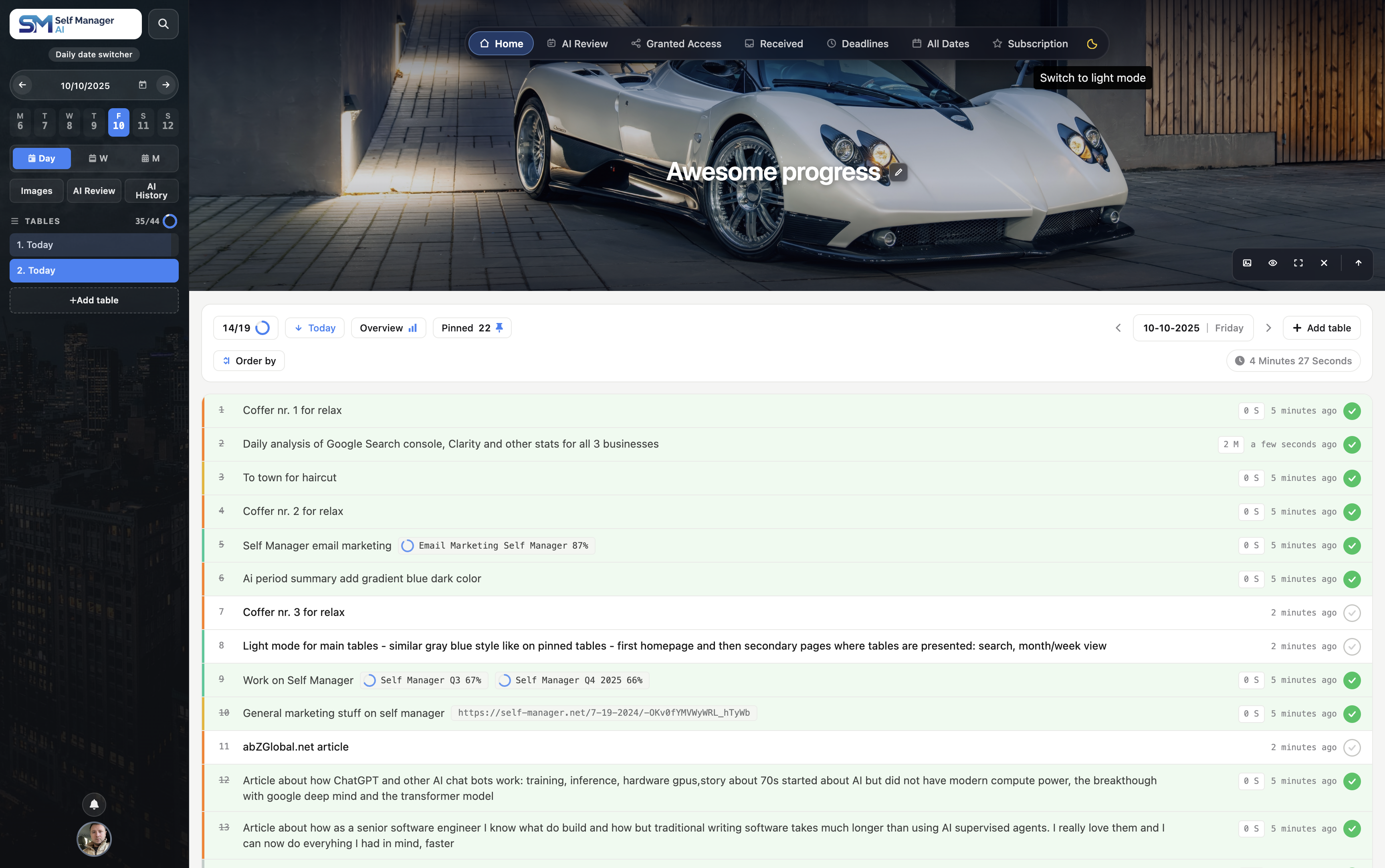
  • Move between dates using the arrow icons or the date picker.
  • Each date can contain unlimited tables, but only one table is active at a time.
  • On desktop, switch tables from the sidebar; on mobile, use the Tables button.
  • Add a "self-message" to any date — a personal note that appears at the top of the page.
SelfManager.ai dashboard view for logged in users on desktop