
How to Use SelfManager.ai: 10 Real Workflows for Work, Life, Planning, and AI Review
Most people don't need another list of features.
They need to know what the product will help them do on a real Monday - when a client is waiting, a project is slipping, three small obligations are competing for attention, and last week's plan has already met reality.
SelfManager.ai is a date-centric AI task manager. Instead of beginning with a board, folder, or endless backlog, it begins with the day. Every date has its own workspace, and every workspace can contain separate tables for the different parts of your work and life.
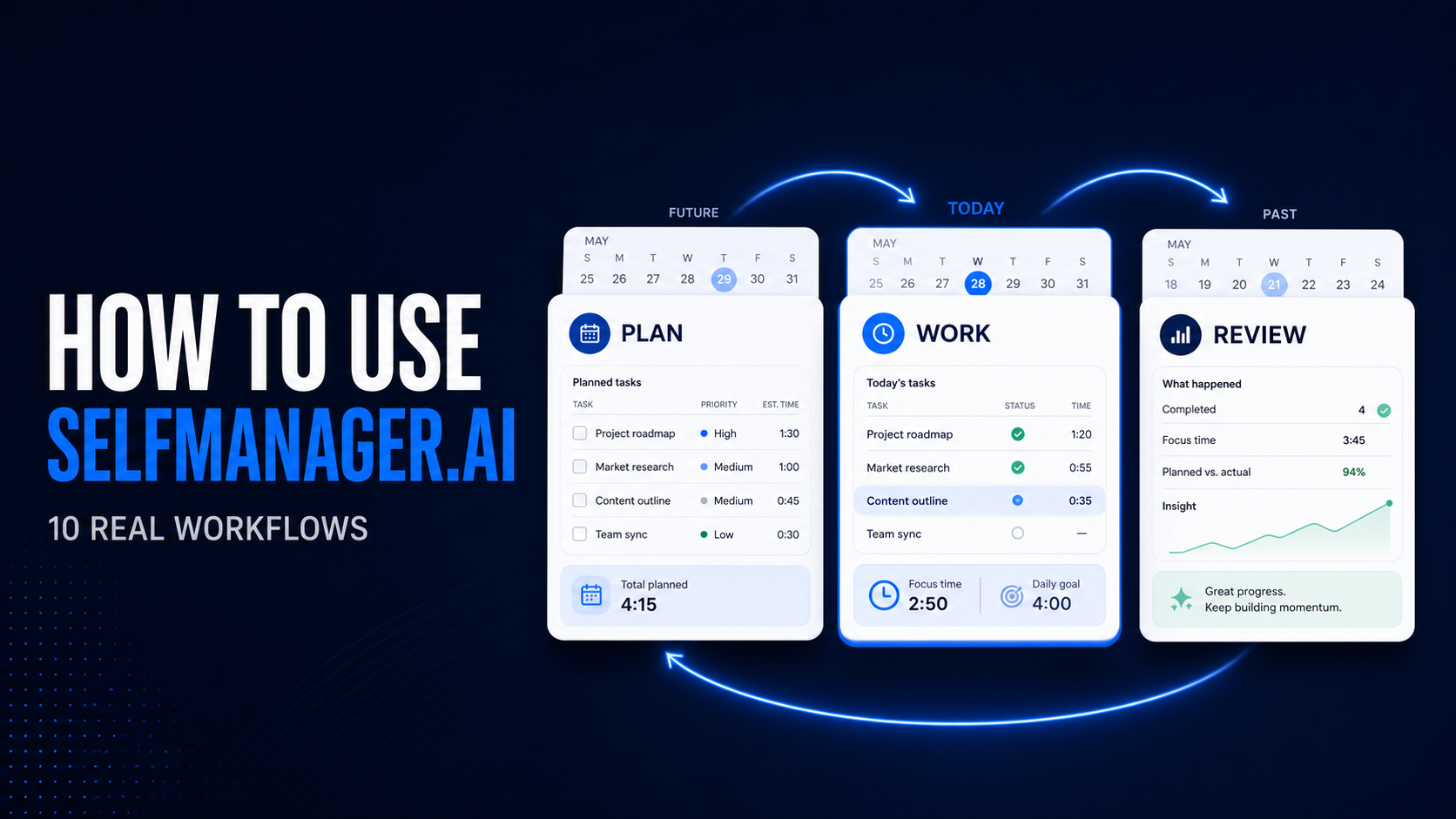
That dated structure connects a simple loop:
Plan what's next. Work one day at a time. Review what actually moved. Adjust the next plan.
You can use SelfManager as a straightforward daily task manager or build the complete loop over time.
This guide shows ten practical workflows - from organizing a complicated day to planning a launch, keeping long-running goals visible, reviewing a quarter, and collaborating without opening your whole system to other people.
SelfManager in 60 seconds: dates, tables, and a record you can review
The core structure is deliberately small.
A date is a workspace. Open today to work today. Open tomorrow to plan tomorrow. Return to an earlier date to see what happened.
A table is one area of that day. Client work, product development, administration, exercise, learning, shopping, and private notes don't have to become one mixed list.
A row is usually a task. Give it a priority and status, add context, track time, and mark it complete when the work is finished.
Pinned tables outlive one day. Keep an active project or long-term goal available from every date without moving all its work into today's list.
AI uses the record. It can help create a future plan, answer questions about one project or your pinned projects, and review the work recorded across a selected period.
The result isn't only a place to store tasks.
It's a time-ordered account of what you planned, what you did, what slipped, and what deserves attention next.
Your first three days are already set up
Blank productivity tools create an awkward first question:
What am I supposed to build here?
Every new SelfManager account begins with three prepared days that demonstrate the workflow.
Yesterday contains an example of a finished day. You can see what completed work looks like when tasks remain attached to the date where they happened.
Today contains a guided walkthrough. It introduces date navigation, the plan, work, and review rhythm, voice capture, table-based AI, common use cases, personalization, and the available AI capabilities.
Tomorrow contains a planning table. It gives you somewhere to turn your next real priority - or a complete brain dump - into work waiting on the right date.
You can edit or delete the starter content whenever you're ready. Its only job is to make the product understandable before you have created your own history.
1. Organize a complicated day without mixing everything together
A Tuesday isn't a project. It holds a bit of everything.
You might have a client deliverable, a product decision, forty minutes of administration, an appointment, exercise, and something you promised your family.
Those responsibilities may live in different categories, but they draw from the same hours.
Create a separate table for each area.
You might have one for client work, one for SelfManager development, one for administration, one for personal responsibilities, and another for learning.
Now you can see the whole day without forcing unrelated work into one list.
Each table can stay simple or grow with the work. Add priorities, statuses, descriptions, notes, comments, images, deadlines, and time tracking only where they help.
This is useful for solo founders, freelancers, consultants, and knowledge workers whose day doesn't fit neatly inside one project-management board.
The important distinction is that the date remains the entry point.
You aren't searching through five workspaces to discover what today requires. You open today, then move between the areas inside it.
2. Turn an email, meeting, or brain dump into an actionable table
Sometimes the work already exists, but not in a useful shape.
It may be buried inside a long client email, meeting notes, a product brief, a voice transcription, a rough launch idea, or an unordered list copied from somewhere else.
Open Add Table, then choose Use AI, and paste the material.
SelfManager can handle it in two ways.
First, it can preserve an existing list. If you already wrote the tasks, the AI keeps the wording and order while turning the items into rows and assigning sensible priorities.
Second, it can develop an idea into a plan. If you provide a goal or messy brief, the AI turns it into a short, actionable table with prioritized tasks.
Nothing is locked.
Rename the table, change a task, adjust its priority, remove anything that doesn't belong, and add the missing judgment that only you have.
For example, you might paste:
"We need to launch the new pricing page next week. Copy still needs review, the annual discount needs checking, mobile needs testing, analytics events need verification, and we need an announcement article."
The useful result isn't more prose.
It's a table you can act on: review the copy, verify the pricing calculation, test mobile, check tracking, and prepare the announcement.
3. Plan a project, week, or month with AI Plan
A task generator creates one table. AI Plan creates a dated proposal across several days.
Choose a single day, a week, a month, or a custom window of up to 31 days.
Then describe what you want to accomplish in normal language.
For example:
"Plan the next seven days for launching a redesigned pricing page. Include copy review, implementation, mobile testing, analytics verification, documentation, and an announcement. Keep the weekend light."
AI Plan can use three kinds of context.
The first is your brief: the outcome, constraints, priorities, and working preferences you describe.
The second is work already placed on the target dates in SelfManager. This helps it avoid treating a day with substantial planned work as empty capacity.
The third is optional previous work. You can include up to three months of past tables, and optionally their comments, when you want the plan to reflect recent projects, habits, unfinished work, and the reasoning behind previous tasks.
The proposal arrives as one editable table per day.
Swipe through the dates, rename tables, rewrite or reorder tasks, change priorities or statuses, add rows, delete rows, and approve or skip individual days.
Nothing enters your real workspace until you approve and commit it.
That last point matters.
The AI does the heavy lifting, but it doesn't take the final decision away from you.
AI Plan does not read an external calendar. It reads the work already placed on dates inside SelfManager.
If automatic Google Calendar or Outlook Calendar scheduling is essential to your workflow, SelfManager may not be the right fit for that particular need.
4. Run work and personal life on the same day
Many productivity systems quietly assume that work and life have separate time budgets.
They don't.
A client deadline and a dentist appointment are both coming out of Wednesday.
A product launch and the evening you promised your family are both competing for your attention this week.
SelfManager lets you keep those areas separate without making them invisible to one another.
Put professional work in its own tables.
Keep personal responsibilities in private tables on the same dates.
Use a Self Message for something that matters but isn't a task.
Pin long-term goals so they remain visible without being copied into every day.
Review the period as a whole when you want an honest account of where the time went.
You don't have to pretend that work and personal responsibilities draw from separate hours.
This doesn't mean every private thought belongs in your task manager.
It means the system can represent the real shape of a day instead of showing only the professional portion.
5. Keep long-running projects and goals visible across days
Some work belongs to Tuesday.
Other work explains why the Tuesdays matter.
A product launch, quarterly objective, client relationship, annual goal, content system, or personal finance table may need to remain accessible for weeks or months.
Recreating it on every date would produce clutter and destroy its history.
Pin the table instead.
A pinned table remains reachable from any day. You can open it directly, monitor its progress, and use AI across one pinned project or the complete pinned set.
You can ask questions such as:
Which pinned project hasn't moved recently?
What is blocking the launch?
Which project contains the most unfinished high-priority work?
Summarize the health of everything I have pinned.
What should receive attention next week?
You can also generate a summary of one table, continue the conversation, and turn the result into a status update, revised plan, or message for someone else.
Daily work stays on dates. Long-running context stays available.
You get both without turning every project into a permanent daily burden.
6. Keep the context behind the task
"Fix checkout" may be enough while the problem is fresh.
Three weeks later, it tells you almost nothing.
The context might be:
"Payment integration is blocked by account verification. Waiting for the provider before testing the complete checkout flow."
SelfManager gives that reasoning somewhere to live.
Add a description or notes to the table.
Leave comments under the relevant task.
Upload screenshots or other images.
Dictate a comment, table note, or AI prompt instead of typing it.
Add a private Self Message to the day when the thought is personal rather than actionable.
When voice is used for a comment or table note, the transcript remains editable and you choose whether to keep or delete the recording.
Audio used for an AI prompt isn't stored.
Later, the context becomes searchable and reviewable.
Dedicated views bring together dates, comments, notes, images, recordings, and Self Messages, with links back to the tables where they originated.
This is how a task manager becomes a useful record rather than a collection of titles whose meaning expires.
7. See where time and effort actually went
Most people aren't particularly good at remembering where their time went.
The busiest part of the week isn't always the part that moved the most important work.
SelfManager lets you build evidence while you work.
Start the timer when beginning a task.
Complete the task to capture its duration.
Correct the start and completion times if you forgot the timer.
See time totals for a task, table, day, week, or selected period.
Compare completion by priority and status in week and month overviews.
Use deadlines and reminders to see overdue, current, and upcoming work.
One isolated number won't change much.
A month of real durations can.
You may discover that supposedly small administrative work consumes an afternoon every week.
You may find that your deep work consistently takes longer than expected.
Or you may see that one project receives plenty of activity without meaningful completion.
The goal isn't to turn every minute into surveillance.
It's to replace an impression with enough evidence to make the next plan more realistic.
8. Review a week, month, or quarter with AI
Recording work is useful.
Learning from it is better.
Open AI Review and choose a week, month, quarter, or custom period of up to three months.
You can generate an instant structured review or open chat mode with a specific question.
Depending on what you included during the period, the AI can work with tables, tasks, statuses, priorities, recorded time, table notes, logs, and comments.
Start with questions that lead to a decision.
What actually moved this week?
What slipped, and what appears to have caused it?
Which project stalled quietly?
Where did most of my recorded time go?
Did urgent work displace important work?
What should receive attention next week?
Can you turn this into a concise update for my client or manager?
You don't have to accept the first response as a finished report.
Continue the conversation.
Ask for evidence.
Drill into one date or project.
Request a different framing.
Turn the findings into next steps.
Saved AI conversations remain available in AI History, so you can return to an earlier review without generating it again.
If you would rather listen, AI responses can be played aloud with speed controls, skipping, scrubbing, and optional download.
9. Use the review to improve the next plan
Planning and reviewing become more valuable when they are connected.
Consider a product-launch week.
On Sunday, AI Plan proposes work across the next five days.
On Tuesday, you record two hours on pricing copy and leave a comment that payment verification is blocking checkout.
On Thursday, the page is visually complete, but the launch task remains unfinished.
On Friday, you run AI Review. It can connect the unfinished launch with the blocker recorded earlier in the week.
When planning the following week, you include the recent work as context and ask AI Plan to prioritize the remaining launch dependencies.
The value isn't that the AI knows everything.
It only knows the SelfManager information included in the request.
The value is that the plan, daily work, comments, time, and review all share the same dated structure.
You don't have to move a report from one app into a chatbot, then copy the resulting plan into a third system.
Plan. Work. Review. Adjust.
The same record connects every step.
10. Collaborate without turning everything into a team workspace
Collaboration doesn't have to mean exposing your complete personal system.
With the Team plan, share only the tables that need another person's involvement.
Give a contractor access to the launch table.
Share one client table with that client.
Keep personal, administrative, and unrelated project tables private.
Let collaborators update tasks, notes, comments, and images inside the work you shared.
Access is granted table by table.
That makes SelfManager especially suitable for one owner coordinating work with contractors, collaborators, clients, or a small team while keeping the rest of their system separate.
Team AI Review can focus on the tables shared with your team for a selected week, month, quarter, or custom period.
Include comments when you want the review to consider the discussion behind the tasks.
Then continue with follow-up questions about progress, priorities, and possible blockers.
The Team plan uses flat pricing rather than charging for every invited collaborator.
A complete SelfManager week
The features make more sense when they are seen as one workflow rather than twenty separate switches.
On Sunday, describe the week's outcome in AI Plan. Review the proposed tables, change what doesn't fit, skip unnecessary days, and commit the plan.
On Monday, open today's workspace. Work from separate client, product, administration, and personal tables.
On Tuesday, track time on a launch task and record the payment-verification blocker in a comment.
On Wednesday, paste meeting notes into Add Table and Use AI. Turn them into a prioritized follow-up table.
On Thursday, a collaborator updates the shared launch table while the rest of your workspace stays private.
On Friday, run AI Review. Ask what moved, what slipped, where time went, and what should change next week.
The following Sunday, include the previous week as context in AI Plan and create a more realistic plan around the remaining work.
You don't need to use the complete loop immediately.
Begin with today's tasks.
Add time when estimates matter.
Pin a project when it needs to remain visible.
Run a review when enough history exists to reveal something useful.
The system can deepen without requiring you to build it all before doing any work.
Four mistakes that make a date-centric system harder than it needs to be
The first is planning too far ahead in too much detail.
A month of precisely scheduled tasks looks impressive on Sunday and becomes fiction by Wednesday. Plan the week in detail and the month in outline.
The second is creating a table for every thought.
Tables are areas, not tasks. Five or six meaningful areas will serve you better than fifteen near-empty ones.
The third is skipping the status and context while working.
The record is what makes the review worth running. Two seconds of status now saves a guess later.
The fourth is treating an AI proposal as a decision.
AI Plan and AI Review produce material for you to edit, challenge, and approve. The judgment about what actually matters this week stays with you.
SelfManager feature map: what to use for each problem
When you need to organize a real day, use dates, tables, rows, manual reordering, priorities, and statuses.
When you need to turn messy information into work, generate tasks from text. Choose whether AI should preserve your existing list or develop an idea into actionable tasks.
When you need to build a dated multi-day plan, use AI Plan with target-date context, optional past-work context, and editable daily proposals.
When you need to capture context, use descriptions, notes, comments, images, voice transcription, and Self Messages.
When you need to keep projects visible, use pinned tables, their progress information, and direct access from every date.
When you need to find previous information, use the dedicated Dates, Comments, Notes, Images, Recordings, and Self Messages views. Each entry can take you back to its original table.
When you need to track effort and deadlines, use the task timer, editable start and completion times, table totals, deadlines, and reminders.
When you need to see the bigger picture, use week and month views, completion rates, priority breakdowns, status breakdowns, and daily time totals.
When you need to understand one project, chat with that table, generate a table summary, and follow up on the result.
When you need to understand several important projects, chat with your pinned tables, summarize the pinned set, and continue the conversation.
When you need to review a period, use AI Review chat, instant reviews, optional comments, follow-up conversations, and AI History.
When you would rather listen than read, use the read-aloud controls available on AI responses.
When you need to coordinate shared work, use table-specific access, real-time collaboration, and Team AI Review.
When you want to make the workspace more comfortable, personalize the table and sidebar images, profile image, layout density, and light or dark mode.
Who is SelfManager best suited to?
SelfManager is a strong fit when your work and personal responsibilities no longer fit comfortably in one list.
It works well when you manage several projects, clients, or areas at once.
It makes sense when you want the day - not a board or document - to be the center of the system.
It is useful when you want AI to work with tasks and history you have actually recorded.
It is designed for people who value planning and reviewing as much as capturing tasks.
It can also work well when you want to share selected work without making everything collaborative.
It may not be the right fit when your primary requirement is automatic external-calendar scheduling.
It isn't intended to replace a large enterprise portfolio-management platform with complex organizational administration.
It isn't a free task manager that continues forever without a subscription after the trial.
And if you only need a minimal checklist, you may not benefit from its dated history, context, planning, and review capabilities.
Knowing what the product doesn't try to be is part of choosing the right system.
Frequently asked questions
Do I have to use every feature?
No.
Start with dates, tables, and tasks.
Add priorities, time, comments, pins, AI, or collaboration when a real need appears.
SelfManager doesn't require you to configure a complete workspace before creating your first task.
Does SelfManager sync with Google Calendar or another external calendar?
No.
AI Plan reads the tables already placed on the target dates inside SelfManager.
It doesn't read Google Calendar, Outlook Calendar, or another external calendar.
Can I import tasks from another app?
For unstructured or copied material, paste the text into Add Table, then Use AI.
Preserve-list mode can turn an existing list into rows without rewriting the tasks.
Plan-from-idea mode can develop a larger brief into an actionable table.
Does AI automatically change my real tables?
AI Plan creates a proposal first.
You can edit it, approve or skip individual days, and decide when to commit it.
Table summaries, chats, and AI Review produce responses rather than silently rewriting your work.
Can I use SelfManager for both work and personal planning?
Yes.
Put separate tables on the same date and share only the tables that require collaboration.
Private tables and Self Messages can remain part of your personal system.
What can the AI see?
That depends on the feature and the context you select.
Table AI works with the chosen table.
Pinned-table AI works with the pinned set.
AI Review works with the selected period and the optional data you include.
AI Plan uses your brief, the SelfManager tables already on the target dates, and optional previous-work context.
It doesn't automatically see an external calendar.
What happens to a task I don't finish?
It stays on the date where you planned it, with its status and any comments intact.
You can move the remaining work forward when you plan the next day or week, and the original date still shows what actually happened.
How long before a review becomes useful?
A single week is enough for a basic review of what moved and what slipped.
Patterns in time, completion, and recurring blockers usually need three or four weeks of recorded work before they say anything you didn't already suspect.
Is there a free trial?
Yes.
SelfManager includes a 7-day trial, and no credit card is required to begin.
Start with one real day
You don't need to migrate your entire life or design the perfect productivity system before SelfManager becomes useful.
Start with tomorrow.
Create one table for the most important outcome.
Add the tasks you already know.
Use AI to structure the messy parts if needed.
Work from that table when the date arrives.
Leave enough status, time, and context for your future self to understand what happened.
Then repeat.
After a week, review it.
After a month, look for patterns.
When the next plan begins, use what the previous one taught you.
That is the complete idea behind SelfManager:
Plan what's next. Work one day at a time. Review what actually moved.
Open your first three days free for seven days. No card required.
Date-based AI Task Manager
Plan smarter, execute faster, achieve more
Create tasks in seconds, generate AI-powered plans, and review progress with intelligent summaries. Perfect for individuals and teams who want to stay organized without complexity.
Get started with your preferred account