
Sunsama vs Akiflow: Which Daily Planner Is Better in 2026?
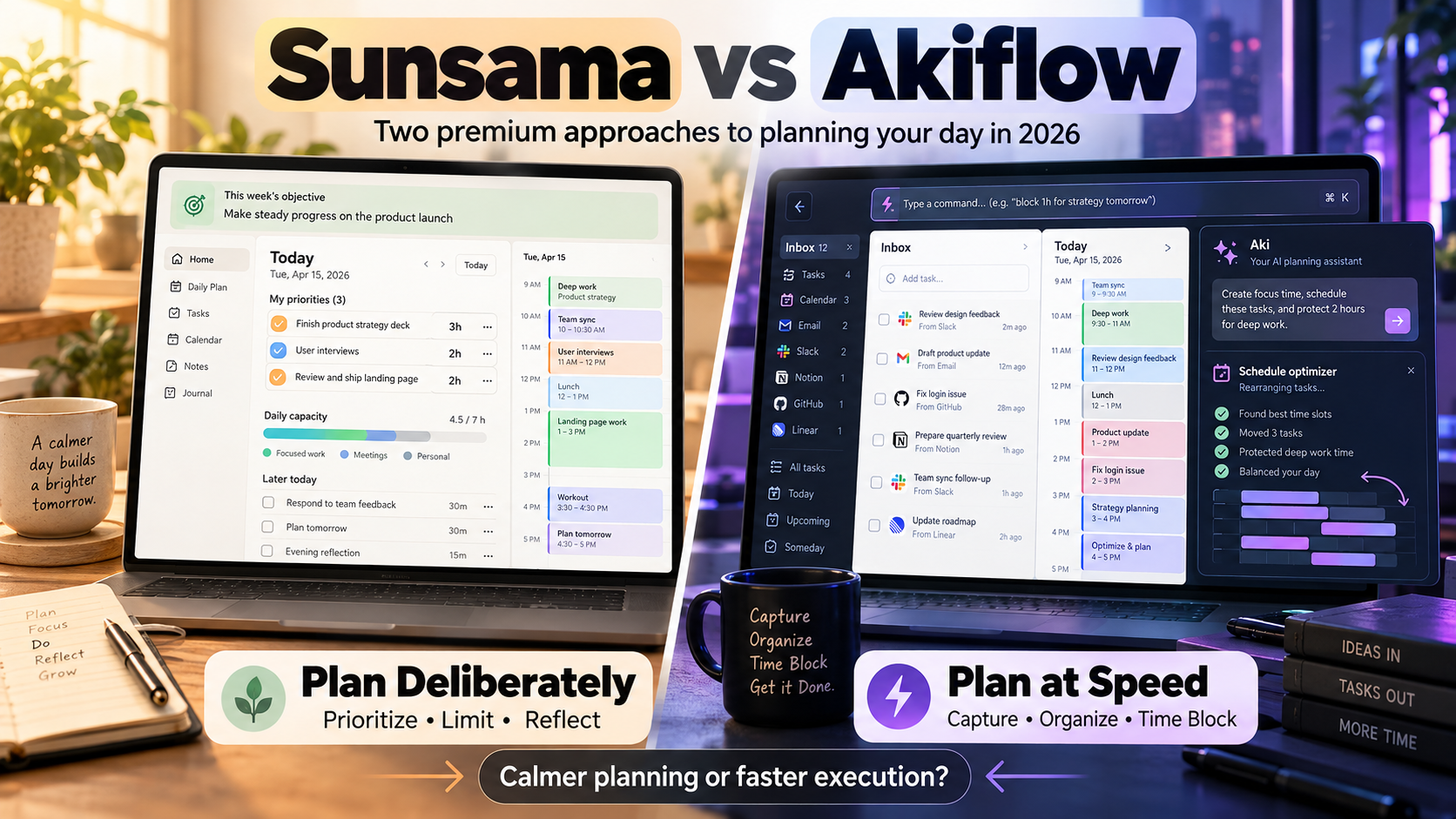
Sunsama and Akiflow are both premium daily planners built around the same basic idea: a task list becomes more useful when you connect it to the limited time available on your calendar.
The difference is how they help you get there.
Choose Sunsama if you want a guided, deliberate planning process that helps you limit your workload, define weekly objectives, and build realistic days.
Choose Akiflow if you want a faster command center for capturing tasks from many sources, organizing them quickly, time-blocking work, and increasingly using AI to help manage the schedule.
Both are now much more capable than that simple distinction suggests.
Sunsama vs Akiflow at a Glance
| Feature | Sunsama | Akiflow |
|---|---|---|
| Best for | Guided, realistic daily planning | Fast planning and task consolidation |
| Core philosophy | Plan deliberately and avoid overcommitment | Capture everything, organize fast, schedule it |
| Daily planning ritual | Yes | Yes |
| Daily shutdown | Yes | Yes |
| Weekly planning | Yes | Yes |
| Weekly review/shutdown | Yes | Yes |
| Calendar time blocking | Yes | Yes |
| Google Calendar | Yes | Yes |
| Outlook Calendar | Yes | Yes |
| iCloud Calendar | Yes | Not a primary direct integration |
| Task integrations | Strong | Strong, 20+ tools |
| Global task capture | Yes | Strong Command Bar |
| Subtasks | Yes | Yes |
| AI assistant | Yes | Aki |
| Schedule optimization | Auto-scheduling available | Schedule Optimizer + Aki |
| Desktop | Windows, macOS, Linux | Windows, macOS |
| Mobile | iOS/iPadOS, Android | iOS, Android |
| Web | Yes | Yes |
| Monthly price | $22/user | $34 |
| Annual equivalent | $17/month | $19/month |
| Free trial | 14 days | 7 days |
| Permanent free plan | No | No |
The price difference is smaller on annual billing than it first appears.
The bigger decision is how you want planning itself to feel.
Sunsama Is Built Around Deliberate Planning
Sunsama's core experience is guided planning.
Instead of opening the app and immediately confronting every task you have accumulated, Sunsama encourages you to intentionally decide what deserves your attention.
Its daily planning ritual takes you through a sequence.
You review the previous day.
You decide what belongs today.
You prioritize what matters.
You compare the workload with the time you actually have available.
Then you finalize the plan.
This is not merely interface design.
It is the product philosophy.
Sunsama is trying to stop you from creating an unrealistic day before you start working.
Sunsama explicitly warns you when you plan too much
This is one of its strongest features.
Tasks can have planned durations.
During daily planning, Sunsama adds up that expected work and compares it with your configured workload threshold.
Suppose you have:
- 2 hours of meetings
- 90 minutes of design work
- 2 hours of development
- 1 hour of email
- 90 minutes of documentation
- 1 hour of administrative work
A normal task manager can happily put all of that on Tuesday.
Sunsama forces you to confront whether Tuesday actually contains enough time.
If the workload is unrealistic, you can move lower-priority work to another day or back into the backlog.
That makes Sunsama particularly useful for people whose main productivity failure is planning more than they can realistically complete.
Akiflow Is Built Around Speed and Consolidation
Akiflow begins from a slightly different problem.
Your tasks may already be scattered across:
- Gmail
- Slack
- Notion
- Todoist
- Asana
- Jira
- ClickUp
- Linear
- GitHub
- Trello
- Monday
- Multiple calendars
Akiflow wants to bring those inputs into one command center.
Its Inbox becomes the place where incoming work gets processed.
Then you decide:
- Which project does this belong to?
- Is it important?
- Does it belong today?
- This week?
- Next month?
- Which Time Slot should contain it?
- When should it happen on the calendar?
That makes Akiflow feel particularly natural for founders, managers, operators, consultants, and other people whose work arrives from many different places.
Akiflow's Command Bar is a major advantage
On desktop, Akiflow's Command Bar can be opened globally.
You do not necessarily have to switch into the full application just to capture something.
You can quickly create:
- Tasks
- Events
- Scheduled work
- Recurring tasks
and use natural language to specify dates and times.
For someone who captures dozens of small obligations while working, that speed matters.
Sunsama also offers shortcuts and external capture options, but Akiflow puts unusually strong emphasis on rapid keyboard-driven processing.
Both Now Have Daily Planning Rituals
This is where older comparisons can become misleading.
Sunsama used to have a much clearer claim to ritual-driven planning.
Akiflow now has its own:
- Daily Planning
- Daily Shutdown
- Weekly Planning
- Weekly Shutdown
So the difference is no longer:
Sunsama has rituals. Akiflow does not.
It is more about what those rituals emphasize.
Sunsama's daily ritual emphasizes capacity
Sunsama guides you toward an achievable workload.
It asks you to select tasks, estimate time, look at your existing meetings, and decide what should be deferred.
Its workflow continually reinforces the idea:
Do less, but make the plan realistic.
Akiflow's daily ritual emphasizes organization and execution
Akiflow's Daily Planning flow includes reviewing yesterday, checking Inbox, This Week, and Month, selecting what should receive attention today, and deferring lower-priority work.
You then move naturally into the calendar and Time Slots.
Its Daily Shutdown lets you review completed work, analyze time use, rate the day, and prepare tomorrow.
The result feels somewhat more operational.
You are processing incoming commitments and turning them into an executable schedule.
Weekly Planning: Sunsama Focuses on Objectives
Sunsama's Weekly Planning ritual is intentionally centered around objectives rather than detailed task scheduling.
At the beginning of the week, you can:
- Review objectives from the previous week
- Continue unfinished objectives
- Define new objectives
- Reflect on the upcoming week
Weekly Objectives are larger outcomes.
For example:
Publish the new pricing page
might contain tasks spread across several days.
Tuesday:
- Finish copy
Wednesday:
- Implement layout
Thursday:
- Review mobile
Friday:
- Publish
Sunsama does not encourage you to completely fill every future day during the weekly ritual.
Instead, weekly planning defines direction.
Daily planning determines the detailed execution.
That separation is one of Sunsama's more deliberate design choices.
Akiflow Weekly Planning Goes Further Into Execution
Akiflow's Weekly Planning ritual is more operational.
It currently guides you through:
- Reviewing the previous week
- Reviewing previous goals
- Creating this week's goals
- Adding notes
- Pulling tasks from Inbox, Month, or Someday into the week
- Creating Time Slots and time-blocking tasks
That final step creates a meaningful distinction.
Akiflow's weekly ritual can move much closer to:
What exactly should my calendar look like?
Sunsama's philosophy is closer to:
What matters this week, and what should I realistically decide each day?
Akiflow is therefore better suited to someone who enjoys constructing the week ahead in more detail.
Sunsama is more cautious about planning too much too early.
Time Blocking: Both Are Strong
Both apps are built around the idea that tasks need to meet reality.
And reality is the calendar.
Sunsama timeboxing
You can drag Sunsama tasks onto the calendar.
That creates calendar events representing the work.
Sunsama can integrate with:
- Google Calendar
- Outlook Calendar
- Apple iCloud Calendar
Those external calendars can be displayed alongside your tasks.
You can also import meetings into your daily task list so they contribute to your understanding of the day's workload.
This is particularly useful because four hours of meetings should affect how much work you attempt to plan.
Akiflow time blocking
Time blocking is even more central to Akiflow's identity.
Tasks can be placed directly onto the calendar.
Akiflow also introduces Time Slots.
A Time Slot is essentially a container for a type of work.
For example:
9:00-11:00 - Deep Work
Then specific tasks can be placed inside that slot.
Or:
2:00-3:00 - Admin
might contain:
- Send invoices
- Reply to accountant
- Review subscriptions
This gives the calendar structure without requiring every task to define the entire block independently.
Akiflow Is Stronger for Building an Ideal Week With Time Slots
Time Slots are one of Akiflow's strongest differentiators.
You can design recurring blocks for areas such as:
- Deep work
- Marketing
- Client work
- Administration
- Fundraising
- Personal time
- Learning
Then tasks can be associated with the appropriate containers.
This helps separate two planning questions:
What type of work belongs here?
and:
Which exact task should I do during that block?
For professionals with recurring responsibilities, that can be extremely useful.
Instead of constructing the entire calendar from scratch every Monday, the structure of the week already exists.
Sunsama Is Stronger at Making Overcommitment Visible
Sunsama's workload forecasting deserves separate attention.
During planning, it compares the expected workload against your configured schedule.
It can show when the estimated work would push your day beyond the time you intend to stop.
That supports an important psychological shift.
Instead of asking:
Can I add this task?
you start asking:
What am I willing to remove if I add this task?
That is one reason Sunsama tends to appeal to people trying to build a calmer relationship with work rather than simply process work faster.
Integrations: Both Are Strong
Neither app requires every task to originate inside the planner itself.
That is important because many professionals already have an established work stack.
Sunsama integrations
Sunsama currently connects with tools including:
- Asana
- ClickUp
- GitHub
- Gmail
- Google Calendar
- Google Tasks
- Jira
- Linear
- Microsoft Planner
- Microsoft Teams
- Microsoft To Do
- Monday.com
- Notion
- Outlook
- Outlook Calendar
- Slack
- Todoist
- Toggl
- Trello
- Zapier
The workflow is often selective.
You do not necessarily migrate the entire project into Sunsama.
Instead, you pull the tasks that matter today into your daily plan.
That keeps the original work system intact.
Akiflow integrations
Akiflow connects with more than 20 external tools and services, including:
- Notion
- Todoist
- ClickUp
- Asana
- Jira
- Linear
- Monday.com
- GitHub Issues
- Trello
- Gmail
- Slack
- Google Calendar
- Outlook Calendar
- Zapier
- Make
- API-based workflows
Incoming work can feed the Akiflow Inbox and then be processed into your schedule.
Both products therefore work well as a planning layer above another task or project system.
Akiflow feels slightly more like a universal intake and scheduling command center.
Sunsama feels slightly more like a deliberate daily planning layer.
Calendar Integration: Sunsama Has the Edge for iCloud
Both products work well with Google and Microsoft calendars.
Sunsama directly supports:
- Google Calendar
- Outlook Calendar
- Apple iCloud Calendar
Akiflow's main direct calendar integrations are:
- Google Calendar
- Outlook Calendar
So someone heavily invested in Apple Calendar has a stronger reason to choose Sunsama.
For Google or Microsoft users, both are viable.
Read more: task manager calendar integrations.
AI in Sunsama vs Akiflow
AI is now part of both products, but neither should be understood primarily as an AI chatbot with a planner attached.
The planner remains the product.
AI reduces friction around it.
Sunsama AI
Sunsama's current plan includes AI functionality alongside its planning and integration system.
The product also offers features such as auto-scheduling to help place tasks onto the calendar.
But Sunsama continues to emphasize user judgment.
The system helps you create a realistic plan rather than completely replacing the planning process.
Akiflow Aki
Akiflow's Aki assistant has become more deeply integrated.
Aki can work with:
- Tasks
- Events
- Time Slots
- Dates
- Recurrence
- Deadlines
- Priorities
- Projects
- Tags
- Scheduling changes
You can ask questions such as:
What's left on my to-do list?
or ask Aki to create and reschedule work.
Akiflow has also expanded AI into daily briefs, meeting workflows, project assignment, and schedule assistance.
That gives Akiflow the stronger AI-assistant feel of the two.
Akiflow's Schedule Optimizer Narrows the Gap With Auto-Schedulers
Akiflow has also become more capable at rearranging a day.
Schedule Optimizer can help after your original plan stops matching reality.
Suppose a task scheduled from 9:00 to 10:00 runs until 10:30.
Instead of manually moving everything below it, Akiflow can offer to optimize the affected schedule.
It keeps the sequence of tasks and moves eligible work into available time.
There is also an ASAP option for placing a task into the next available slot.
This is useful automation.
But it is still more user-triggered and controlled than the continuous scheduling philosophy of products such as Motion or Reclaim.
Akiflow helps repair your plan.
It does not mean you have surrendered the entire calendar to an autonomous scheduler.
Read more: daily planner vs AI auto-scheduler.
Sunsama Also Supports Auto-Scheduling
Sunsama should not be described as purely manual either.
Its current product includes task auto-scheduling.
You can automatically schedule tasks ahead into available calendar time.
The difference is again philosophical.
Auto-scheduling exists inside a product whose central workflow remains guided planning, workload awareness, and intentional decision-making.
So neither comparison should be reduced to:
Sunsama = manual
Akiflow = automated
Both now mix manual and automated planning.
Task Management
Neither Sunsama nor Akiflow is trying to replace every enterprise project-management system.
But both can manage their own tasks.
Sunsama
Tasks can exist natively inside Sunsama.
They can also originate from external tools.
Sunsama supports things such as:
- Recurring tasks
- Planned durations
- Channels
- Weekly Objectives
- Backlog
- Subtasks through task merging
- Calendar timeboxing
The structure remains intentionally lightweight.
Akiflow
Akiflow currently supports:
- Tasks
- Subtasks
- Projects
- Tags
- Priorities
- Deadlines
- Recurring tasks
- Timeframes
- Time Slots
- Attachments
- Natural-language planning
Akiflow therefore feels closer to a fully featured standalone task manager.
Sunsama more openly embraces the possibility that your deeper project structure exists somewhere else.
Capturing Tasks
If rapid capture is one of your biggest concerns, Akiflow has the advantage.
Its desktop Command Bar can be summoned globally.
You can use natural language to create and schedule tasks quickly without repeatedly navigating through the main UI.
Akiflow's mobile applications also support quick capture and voice capture through Aki.
Sunsama gives you multiple capture methods, including global task creation and integrations, but capture speed is less central to its identity.
Sunsama wants you to think carefully about what makes it into the plan.
Akiflow wants to make sure no commitment gets lost before you process it.
Daily Review and Shutdown
Both applications now understand that planning should not end when the morning ritual finishes.
Sunsama
Daily Shutdown helps close the day and feeds reflection back into future planning.
Weekly Review can also be combined with Weekly Planning.
The system therefore reinforces a cycle of:
Plan → execute → reflect → plan
Akiflow
Daily Shutdown lets you:
- Review completed tasks
- Look at time use
- Rate the day
- Prepare tomorrow
Weekly Shutdown similarly asks you to review accomplishments, goals, notes, and the upcoming week.
Akiflow is now much stronger at reflection than many older comparisons imply.
The biggest difference from SelfManager.ai is that these reviews are guided rituals rather than AI analysis of a complete date-based historical record.
Read more: best apps for weekly reviews.
Apps and Platform Support
Sunsama is available across:
- Windows
- macOS
- Linux
- Web
- iPhone and iPad
- Android
Akiflow provides:
- Windows desktop app
- macOS desktop app
- Web app
- iPhone app
- Android app
Akiflow's desktop apps have additional advantages such as global Command Bar capture.
If you use Linux as your main computer, Sunsama has the clearer advantage.
For Windows or Mac users, both provide dedicated desktop experiences.
Sunsama vs Akiflow Pricing
Both are premium productivity products.
Neither is competing primarily on being the cheapest task manager.
Sunsama pricing
Sunsama currently costs:
- $22/user/month when paid monthly
- $17/user/month when billed annually
Annual billing is $204 per year.
New users receive a 14-day free trial with all features and no credit card required.
There is no permanent free plan.
Akiflow pricing
Akiflow Pro currently costs:
- $34/month when paid monthly
- $19/month when billed annually
There is a 7-day free trial.
Akiflow also does not offer a normal permanent free tier.
Which is cheaper?
On monthly billing, Sunsama is significantly cheaper:
$22 vs $34
On annual billing, the gap becomes small:
$17/month equivalent vs $19/month
So if you plan to subscribe yearly, price probably should not decide the comparison.
Workflow should.
Sunsama Is Better if You Want Planning to Slow You Down
That sounds like a criticism.
It is actually the point.
Many productivity failures happen because people move too quickly from:
I should do this
to:
This belongs today
without asking whether it fits.
Sunsama deliberately inserts friction.
It asks you to review.
Estimate.
Prioritize.
Check capacity.
Defer.
Then commit.
For someone constantly overloading the day, that friction can be valuable.
Akiflow Is Better if You Want Planning to Move Faster
Akiflow's philosophy is closer to processing.
Capture something.
Put it into the Inbox.
Assign it.
Schedule it.
Time-block it.
Move on.
The Command Bar, integrations, keyboard shortcuts, timeframes, Time Slots, natural-language input, and Aki all support that goal.
For someone receiving dozens of small obligations from clients, meetings, emails, Slack, and project systems, this can be extremely efficient.
Sunsama vs Akiflow for Weekly Planning
Choose Sunsama if weekly planning means:
What are the few outcomes that actually matter this week?
Then let daily planning determine how those objectives get executed.
Choose Akiflow if weekly planning means:
What are my goals, what tasks belong this week, and where should the work fit into the calendar?
Akiflow lets you move further into detailed scheduling during the weekly ritual itself.
Read more: best weekly planner apps.
Sunsama vs Akiflow for Busy Professionals
Both are designed for busy professionals, but the ideal user looks slightly different.
Sunsama fits:
- Individual contributors
- Managers
- Leaders
- People who chronically overcommit
- People who want stronger boundaries around work
- People who appreciate guided rituals
- People whose deeper projects already live in other apps
Akiflow fits:
- Founders
- Executives
- Consultants
- Operators
- Managers
- People receiving tasks from many applications
- Heavy keyboard users
- People who plan directly on their calendar
- People who want a more capable internal task system
There is significant overlap.
The distinction is mostly about how much structure versus speed you want.
What if Neither Sunsama nor Akiflow Fits?
Both Sunsama and Akiflow are deeply connected to calendar-based planning.
That is not what everyone wants.
Read more: compare Sunsama and Akiflow with other AI planners.
Some people want to decide:
This task belongs Tuesday
without also deciding:
This task belongs from 10:30 AM until 11:15 AM.
SelfManager.ai takes that approach.
Every date is its own workspace, and each day can contain several tables for different areas of work.
AI Plan can propose a dated plan covering one to 31 days.
AI Review can later examine the real work history from a week, month, quarter, or custom period.
SelfManager also includes actual task time tracking.
But it intentionally gives up several things both Sunsama and Akiflow do well.
SelfManager currently has:
- No Google Calendar integration
- No Outlook Calendar integration
- No iCloud or CalDAV integration
- No automatic time blocking
- No automatic rescheduling
- No subtasks
- No tags
- No public API
- No Zapier integration
So SelfManager is not the right alternative if the reason you are comparing Sunsama and Akiflow is that you want tasks tightly integrated with your calendar.
It is worth considering if you like deliberate planning but prefer organizing the week around days rather than calendar slots.
Individual pricing is $8/month or $72/year, with a 7-day full-feature trial requiring no credit card.
Sunsama vs Akiflow: Which Should You Choose?
There is no reason to turn this comparison into a universal winner.
The products increasingly overlap.
Both now have:
- Daily planning
- Daily shutdown
- Weekly planning
- Weekly review or shutdown
- Tasks
- Calendar time blocking
- Integrations
- AI
- Scheduling assistance
- Desktop and mobile apps
The difference is the center of gravity.
Choose Sunsama if:
- You want a calmer planning process.
- You regularly overload your days.
- Workload forecasting is valuable to you.
- Weekly objectives matter more than pre-planning every task.
- You want planning and reflection to feel guided.
- You use iCloud Calendar.
- You prefer bringing selected work into the day rather than processing a universal task inbox.
- You want a 14-day trial.
Choose Akiflow if:
- Tasks arrive from many different apps.
- You want very fast global capture.
- You like keyboard-driven workflows.
- Time blocking is central to how you work.
- You want reusable Time Slots for categories of work.
- You want a more detailed weekly planning process.
- You want a more complete internal task-management layer.
- You want Aki to create, edit, and reschedule tasks and events.
- Schedule optimization is important.
Consider SelfManager.ai if:
- You want AI-assisted planning without requiring calendar time blocks.
- You think in days more naturally than hourly calendar slots.
- You want several separate work areas inside the same date.
- You want actual task time tracking.
- You want AI to review your historical weeks and months.
- You do not need external calendar synchronization.
The simplest version is:
Sunsama helps you commit to a realistic day.
Akiflow helps you process and schedule a complicated workload quickly.
SelfManager.ai helps you organize, track, and review work around dates without turning every task into calendar time.
FAQ
Is Sunsama better than Akiflow?
Sunsama is a stronger fit if you value guided daily planning, workload limits, weekly objectives, and a more deliberate workflow. Akiflow is a stronger fit if you value fast task capture, integrations, Time Slots, detailed calendar planning, and more AI-assisted schedule management.
Is Akiflow cheaper than Sunsama?
Not currently. Sunsama costs $22/month or $17/month billed annually. Akiflow costs $34/month or $19/month billed annually. The annual price difference is relatively small, while the monthly difference is much larger.
Does Sunsama have a free plan?
No. Sunsama offers a 14-day free trial with no credit card required, but there is no permanent free plan.
Does Akiflow have a free plan?
No permanent free plan is currently listed. Akiflow offers a 7-day free trial of its Pro functionality.
Does Sunsama integrate with Google Calendar and Outlook?
Yes. Sunsama integrates with Google Calendar, Outlook Calendar, and Apple iCloud Calendar. Tasks can be timeboxed onto connected calendars and calendar events can be incorporated into the planning workflow.
Does Akiflow integrate with Google Calendar and Outlook?
Yes. Akiflow integrates with Google Calendar and Outlook Calendar and uses those calendars directly within its task and time-blocking workflow.
Does Akiflow automatically schedule tasks?
Akiflow includes scheduling assistance through Aki and Schedule Optimizer. Schedule Optimizer can reflow eligible tasks after a plan changes, while ASAP can place work into the next available slot. It remains more user-controlled than a fully autonomous continuous auto-scheduler.
Does Sunsama automatically schedule tasks?
Sunsama supports auto-scheduling tasks into calendar time, but its broader philosophy remains guided planning. It is designed to help users make realistic decisions rather than completely hand scheduling control over to an algorithm.
Date-based AI Task Manager
Plan smarter, execute faster, achieve more
Create tasks in seconds, generate AI-powered plans, and review progress with intelligent summaries. Perfect for individuals and teams who want to stay organized without complexity.
Get started with your preferred account