
SelfManager.ai vs Sunsama: Which Fits Your Daily Planning Workflow?
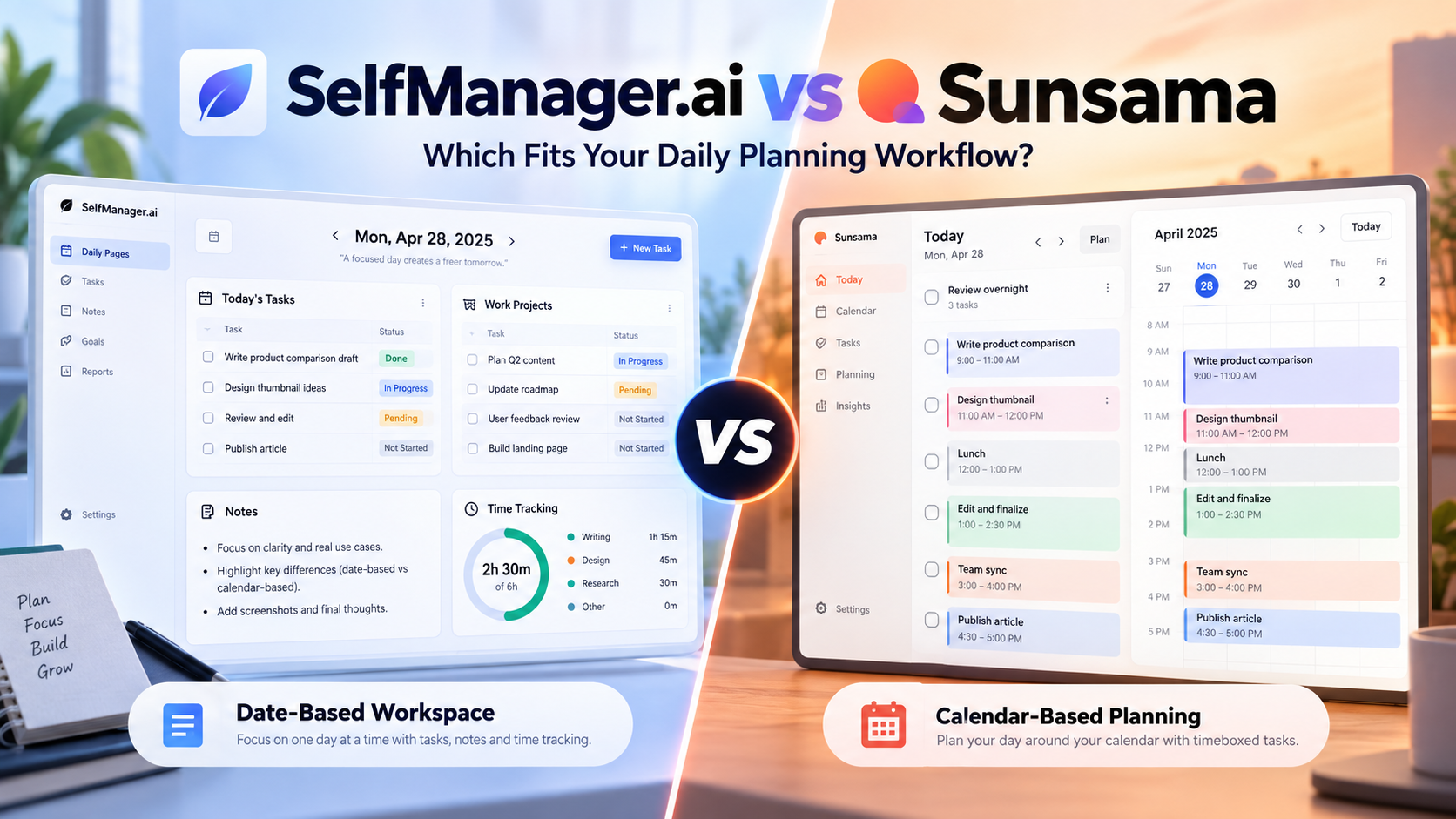
SelfManager.ai and Sunsama both help you plan what to work on today, but they are built around different ideas of what a daily planner should do.
Sunsama is strongest when you want a guided planning ritual that brings tasks, meetings, and work from other apps into one calendar-connected day.
SelfManager.ai is built around a different model: every date becomes its own workspace, where you can plan tasks, organize different areas of work, track what actually happened, keep notes and context, and later review that history with AI.
The short version:
Choose Sunsama if you want your task manager tightly connected to your calendar and existing work apps.
Choose SelfManager.ai if you want your daily plan to become a detailed record of your work that you can plan and review with AI over time.
Neither approach is automatically better. The right choice depends on what problem you are trying to solve.
Product features and pricing in this comparison were verified on September 27, 2026.
Disclosure: This article is published by SelfManager.ai. We have tried to make the comparison useful rather than automatically positioning our own product as the right choice.
SelfManager.ai vs Sunsama at a Glance
| Feature | SelfManager.ai | Sunsama |
|---|---|---|
| Core approach | Date-based workspaces | Guided daily planning |
| Main planning unit | A complete workspace for each date | Tasks organized around your day and calendar |
| Calendar timeboxing | Not the core workflow | Yes |
| External integrations | Limited compared with Sunsama | Extensive |
| AI planning | AI Plan for a day, week, month, or custom range | Sunny AI assistant + planning tools |
| AI review | AI Review across your real work history | Sunny + daily and weekly review workflows |
| Time tracking | Built into tasks | Planned time, actual time, and timers |
| Notes and work context | Stored with tables, tasks, comments, logs, and dates | Task notes and daily planning context |
| Weekly review | AI analysis of completed and unfinished work | Dedicated guided Weekly Review |
| Individual monthly price | $8/month | $22/user/month |
| Annual price | $72/year ($6/month equivalent) | $204/year ($17/month equivalent) |
| Free trial | 7 days, no credit card | 14 days, no credit card |
| Best fit | People who want planning, execution, history, and review in one dated system | People who want calendar-driven planning across multiple work apps |
The feature lists overlap more than the workflows do.
The easiest way to understand the difference is to put the same person through a realistic working day.
A Realistic Workday in SelfManager.ai and Sunsama
Imagine Alex, a freelance designer managing three active clients.
It is Tuesday morning.
Today he needs to:
- Finish homepage revisions for Client A
- Join a Client B call at 11:00
- Prepare three new concepts for Client C
- Send an invoice
- Investigate a website issue
- Reply to several client messages
- Go to a personal appointment at 17:00
There is more work available than will comfortably fit into the day.
That is where the two products start solving the problem differently.
Planning Tuesday With Sunsama
Sunsama is deliberately built around a daily planning ritual.
You can start Daily Planning and review what remains from yesterday before deciding what belongs today.
Tasks can come from Sunsama itself, your backlog, your calendar, and connected services.
This is one of Sunsama's strongest advantages.
If Alex already keeps Client A tasks in Asana, Client B work in Todoist, meetings in Google Calendar, and receives requests through Gmail, Sunsama can bring those different sources into the daily planning process rather than requiring him to rebuild his entire workflow inside one app.
He can then estimate how long today's work should take.
For example:
| Task | Planned time |
|---|---|
| Client A revisions | 90 minutes |
| Client B meeting + follow-up | 60 minutes |
| Client C concepts | 120 minutes |
| Website issue | 45 minutes |
| Invoice | 20 minutes |
| Email and messages | 30 minutes |
Now Alex is not only deciding what he wants to do.
He is confronting how much time those decisions require.
Sunsama is designed to make workload visible and encourage users to plan a realistic amount of work rather than filling the day with an endless task list.
Tasks can also be timeboxed onto the calendar.
Instead of merely saying:
Finish Client A revisions today.
Alex might create a working block between 9:00 and 10:30 before his first meeting.
The result is a daily plan closely tied to available time.
This makes Sunsama particularly useful for people whose schedules revolve around meetings, calendar availability, and blocks of focused work.
Planning the Same Tuesday With SelfManager.ai
SelfManager.ai starts from a different place.
Alex opens Tuesday.
Tuesday itself is a workspace.
Instead of putting everything into one flat list, he can create separate tables for the different areas competing for his attention.
For example:
Client A
- Finish homepage revisions
- Check responsive layout
- Send revised version
Client B
- Prepare for 11:00 call
- Join client meeting
- Record requested changes
Client C
- Produce three initial concepts
Admin
- Prepare invoice
- Answer important email
Personal
- 17:00 appointment
Each table can contain tasks, statuses, priorities, deadlines, tracked time, notes, comments and other information related to that work.
SelfManager is not primarily trying to answer:
At exactly what time will I perform each task?
Its core question is:
What belongs to this day, what happened to it, and what context will I want to remember later?
That is the key difference.
Using AI to Build the Day
SelfManager.ai can also help create the plan rather than requiring Alex to manually build every task.
With AI Plan, he can describe what he needs to accomplish and generate a plan for:
- One day
- One week
- A full month
- Or a custom range of up to 31 days
The generated result is shown before it is saved.
Alex can edit tasks, change priorities, remove unnecessary work, skip days, or change the plan before approving it.
AI can also use previous work as optional context.
That matters because AI planning should not be treated as an unquestionable scheduler.
It may not know that Client A suddenly became more important this morning, that Alex has less energy than usual today, or that a task requires information he has not received yet.
The AI proposes.
The user still decides.
Once approved, the plan becomes real dated tables inside SelfManager.
The Biggest Planning Difference: Date Versus Calendar
This is probably the most important distinction between the products.
Sunsama is heavily connected to the calendar.
SelfManager.ai is heavily connected to the date.
Those are not the same thing.
A calendar-first workflow asks:
When during Tuesday will I do this?
A date-first workflow asks:
What work belongs to Tuesday?
For some people, the first question is essential.
If you spend your day moving between calls and meetings and need focused work to occupy the remaining spaces, Sunsama's calendar workflow is extremely useful.
For others, assigning a precise hour to every task creates more maintenance than value.
They care more about knowing what needs to happen today, keeping different areas organized, and adjusting priorities throughout the day.
That is closer to the SelfManager approach.
What Happens When Work Actually Starts?
Planning is only half of the workflow.
The other question is what happens to the information generated while you are doing the work.
Suppose Alex starts the Client A revisions.
He estimated 90 minutes.
The work actually takes two hours because the mobile navigation has an unexpected problem.
That information can become useful later.
Time Tracking in Sunsama
Sunsama supports both planned time and actual time.
That lets Alex compare what he expected a task to require with what really happened.
He can also use a task timer.
This fits naturally with Sunsama's overall philosophy.
Before the work begins, time helps determine whether the planned workload is realistic.
After the work is completed, actual time provides another view of how the day went.
For people who frequently underestimate work, that comparison can be valuable.
Time Tracking in SelfManager.ai
SelfManager.ai also includes time tracking directly inside tasks.
Alex can start the timer when he begins the Client A work and stop it when he finishes.
But the timer exists inside a broader record.
During those two hours Alex could also:
- Update the task status
- Change the priority of another task
- Add a note explaining the mobile issue
- Leave a comment about what still needs checking
- Add supporting context to the table
- Record how long individual tasks took
At the end of the day, Tuesday does not disappear into a completed-task archive.
It remains Tuesday.
That distinction becomes more valuable over time.
Your Daily Planner Eventually Becomes Your Memory
Most planning tools are naturally focused on the future.
What should I do today?
What needs to happen tomorrow?
What is due next week?
But after months of work, another question becomes increasingly important:
What actually happened?
Imagine that two months later Client A asks why the homepage revision took longer than expected.
Alex may not remember.
But the work itself may contain the answer.
The task history could show that the job took two hours.
The comments could explain that the mobile navigation required additional work.
The table could show what else was completed that day.
Instead of relying entirely on memory, Alex has a historical work record.
This is one of the main ideas behind SelfManager.ai: the same system used to plan work should also help preserve what happened while doing it.
Where Sunsama Has a Major Advantage: Integrations
Sunsama is much stronger if your work already lives in several other applications.
Its current integrations include services across task management, email, calendars, communication, and development workflows.
Examples include:
- Asana
- ClickUp
- GitHub
- Gmail
- Google Calendar
- Google Tasks
- Jira
- Linear
- Microsoft Planner
- Microsoft Teams
- Microsoft To Do
- Monday.com
- Notion
- Outlook
- Slack
- Todoist
- Toggl
- Trello
- Zapier
This changes what Sunsama can be used for.
It does not necessarily need to replace the systems where your work originates.
Instead, it can become the layer where you decide what deserves attention today.
For someone managing work across several professional tools, that is a powerful model.
SelfManager.ai is not currently trying to compete with Sunsama as an integration hub.
If your ideal workflow is:
Pull my tasks from five different apps, combine them with my calendar, and decide what fits today.
Sunsama is the better fit.
What if a Client Sends New Work During the Day?
Consider another realistic situation.
At 13:30, Client B emails Alex:
The meeting was great. Could you also update the pricing screenshots, change the mobile heading, check whether the analytics event is still working, and maybe look at the footer if you have time?
That message contains several potential tasks and one vague request.
In Sunsama
The strength is proximity to the source.
Sunsama's Gmail integration can help bring email-related work into the planning environment, alongside tasks from other connected tools.
If Alex already manages his professional life through several apps, this reduces the amount of context switching required to build today's plan.
In SelfManager.ai
Alex can copy the client's message into SelfManager's AI task-generation workflow.
The AI can turn the text into proposed actions such as:
- Update pricing screenshots
- Change mobile heading
- Verify analytics event
- Review footer changes
Alex still needs to check the result.
For example, "look at the footer if you have time" may not deserve the same priority as verifying broken analytics.
AI can structure messy information.
It should not silently make every business decision for you.
The important limitation is that this is not a native Gmail integration.
Alex is bringing the text into SelfManager himself.
If automatic integration with the source application matters more than AI structuring after capture, Sunsama has the advantage.
What Happens When Tuesday Ends?
Sunsama treats the end of the workday as an intentional part of planning.
Its workflow includes Daily Shutdown and Daily Highlights, helping users review what they accomplished and mentally close the day.
This fits the wider Sunsama philosophy well.
The goal is not simply completing more tasks.
It is also creating a deliberate boundary around work.
People who frequently keep working because there is always another task available may find this useful.
SelfManager takes a less ritual-driven approach.
The day's record is already sitting on Tuesday.
Some tasks are complete.
Some remain unfinished.
Tracked time shows where parts of the day went.
Notes and comments preserve additional context.
Instead of requiring the day to be summarized immediately, SelfManager keeps the underlying information available for later review.
This becomes particularly relevant on Friday.
The Friday Test: Reviewing the Week
A daily planner can feel useful after one day.
Its real value often becomes clearer after several weeks.
Suppose Friday afternoon arrives.
Alex wants to know:
- What did I actually finish?
- Which client received most of my time?
- What remained unfinished?
- What repeatedly got postponed?
- What should carry into next week?
Both Sunsama and SelfManager.ai can help, but again the approach differs.
Weekly Review in Sunsama
Sunsama has a dedicated Weekly Review workflow.
Rather than leaving reflection entirely to the user, the product encourages a recurring review ritual around the previous week.
The review can include your completed work, progress toward weekly objectives, and how your time was distributed.
This is valuable because weekly reviews often fail for a simple reason:
People forget to do them.
Sunsama makes review part of the product's operating rhythm.
It also now has Sunny, its AI assistant.
Sunny can work with tasks and planning context and can summarize completed work across periods such as the previous week.
That is an important change in how Sunsama should be compared with AI-focused productivity tools.
Sunsama is no longer accurately described as a purely manual planning and reflection system.
Its AI capabilities now sit alongside its existing guided rituals.
Weekly Review in SelfManager.ai
SelfManager.ai approaches the same problem from the work history accumulated across your dates.
Alex can open AI Review and select a period such as:
- This week
- Last week
- A month
- A quarter
- A custom date range
The AI can then read the work inside that period, including information such as tasks, statuses, priorities, tracked time, logs, and optionally comments.
Alex does not have to remember every important thing that happened.
He can ask questions about the underlying work.
For example:
What did I accomplish this week?
Which client took most of my tracked time?
What high-priority work is still unfinished?
Which tasks kept getting postponed?
Summarize only my work for Client A.
What should I prioritize next week based on what is still open?
SelfManager can also generate an Instant AI Review when Alex does not have a specific question.
That review can surface completed work, unfinished work, where time went, and possible focus areas for the next period.
AI Review Is Now a Difference of Approach, Not AI Versus No AI
It would be misleading to compare the products by saying:
SelfManager has AI reviews. Sunsama has manual reviews.
That is no longer accurate.
Both products now use AI.
The more useful distinction is what surrounds the AI.
Sunsama combines AI with a strong planning and reflection ritual.
SelfManager combines AI with a detailed date-based history of the work itself.
Sunsama's approach is closer to:
Help me deliberately plan and reflect on my work.
SelfManager's approach is closer to:
Here is what actually happened across my work. Help me understand it and decide what to do next.
Those approaches overlap, but they are not identical.
Going From Review Back to Planning
A good productivity system should form a loop.
You plan.
You work.
You review what happened.
Then what you learned should influence the next plan.
SelfManager.ai was designed around this cycle.
After reviewing a period, you can continue asking follow-up questions about the same context.
For example:
What should I carry into next week?
Or:
Build next week's priorities from everything that remains unfinished.
AI Plan can then be used to create the next dated plan.
The goal is not to produce an AI-generated schedule and blindly follow it.
The goal is to make previous work available as context when deciding what comes next.
Over time the workflow becomes:
Plan → Work → Record → Review → Plan again
That loop is one of SelfManager's clearest differences from a conventional to-do list.
Collaboration and Team Use
Both products can extend beyond completely solo use, but neither should automatically be treated as a replacement for a heavyweight enterprise project-management platform.
Sunsama supports workspaces and collaborative workflows, and its integrations make it particularly useful when a company already uses other systems for project management and communication.
SelfManager.ai lets Team users share selected tables with collaborators.
People can work on shared tasks, leave comments and keep project context together.
The pricing model is also different.
Sunsama bills by user.
SelfManager's Team plan uses flat pricing with unlimited collaborators.
That can matter to a small business that wants several people inside the same system without increasing the subscription for every additional collaborator.
However, price should not override workflow.
If your team relies heavily on integrated calendars, Asana, Jira, Gmail, Slack or other external systems, paying more for Sunsama may still produce the more useful setup.
SelfManager.ai vs Sunsama Pricing
Pricing makes the difference between the products particularly noticeable for individual users.
SelfManager.ai Individual
- $8 per month with monthly billing
- $72 per year
- Equivalent to $6 per month when billed annually
- 7-day free trial
- No credit card required
- 35 AI credits every week
- All 14 current AI features included
Sunsama Pro
- $22 per user per month with monthly billing
- $204 per user per year
- Equivalent to $17 per month when billed annually
- 14-day free trial
- No credit card required
- Unlimited usage and integrations under its current Pro plan
SelfManager is considerably less expensive for an individual.
But comparing the prices without comparing the workflows would be misleading.
Sunsama includes a much deeper integration and calendar-planning layer.
If that removes daily friction from your workflow, the difference may be worth paying.
If you do not need it, you may be paying for a planning approach you are not actually going to use.
When Sunsama Is the Better Choice
Choose Sunsama if your workday is strongly calendar-driven.
It is particularly well suited if:
- You have several meetings most days
- You like timeboxing work into specific calendar slots
- Tasks already live across several other applications
- You want to pull those tasks into one daily planning layer
- You want a structured morning planning routine
- You like explicit shutdown and weekly review rituals
- You want to estimate workload before committing to the day
- Deep integrations are more important than keeping everything natively inside one task manager
A typical Sunsama user may already have a mature work stack.
Sunsama becomes the place where those different systems meet each morning.
That is a legitimate reason to choose it even though it costs more.
When SelfManager.ai Is the Better Fit
SelfManager.ai makes more sense if your problem is not primarily calendar scheduling.
It is suited to people who want:
- Every date to become its own workspace
- Several different areas of life or work organized within the same day
- Tasks, notes, comments, time and work context kept together
- A history of what happened after the date passes
- AI planning across days, weeks and months
- AI reviews based on their real work
- Follow-up conversations about previous work
- Built-in time tracking without another time-tracking app
- Lower individual pricing
- Flat team pricing rather than adding another charge for every collaborator
It is particularly useful when yesterday's work is almost as important as tomorrow's plan.
Who Should Choose Something Else?
There are also situations where neither is the best option.
If you want software to automatically rebuild your entire calendar whenever priorities change, a more aggressive automatic scheduler such as Motion may match that expectation better.
Read more: SelfManager.ai vs Motion.
If you need enterprise resource planning, complex dependencies, portfolios, detailed permissions, or sophisticated project reporting, a larger project-management system may be more appropriate.
And if you only need a simple checklist with reminders, both products may be more complicated than necessary.
More features do not automatically create a better productivity system.
The best system is one whose workflow solves a problem you actually have.
Read more: Sunsama alternatives.
SelfManager.ai vs Sunsama: Which Should You Choose?
The decision comes down to where you want the center of your productivity system to live.
Choose Sunsama if you want your day built around your calendar.
It is particularly strong when work comes from several other tools and your main challenge is deciding what realistically fits between meetings and existing commitments.
Choose SelfManager.ai if you want your work built around dates.
It is designed for people who want to plan what belongs to a day, execute the work inside that structure, preserve what happened, and use AI to understand that history when planning what comes next.
Sunsama's strongest question is:
How should I use the time available today?
SelfManager's strongest question is:
What should I accomplish today, what actually happened, and what can I learn from it later?
For many people, that distinction will matter more than the number of features in either product.
Try the Workflow Before Moving Everything
If you are genuinely choosing between the two, do not start by migrating hundreds of old tasks.
Run a smaller experiment.
Use the product for one normal working week.
Add the work you genuinely need to complete.
Plan each day.
Track what actually happens.
Allow some tasks to slip, because real weeks are messy.
Then perform a Friday review.
Ask:
- Did planning the day feel natural?
- Did I spend too much time maintaining the system?
- Could I see what was realistic?
- Did I know what remained unfinished?
- Could I understand where the week went?
- Did the review help me make a better plan for Monday?
That tells you much more than a feature checklist.
If the date-based workflow described in this article sounds closer to how you naturally think about work, you can try SelfManager.ai free for seven days without entering a credit card.
Use your real work rather than creating a perfect demo setup.
By the end of the week, you should have a much clearer answer about whether the workflow fits.
Frequently Asked Questions
Is SelfManager.ai cheaper than Sunsama?
Yes.
As of September 27, 2026, SelfManager.ai costs $8 per month or $72 per year for the Individual plan.
Sunsama's current Pro plan costs $22 per user per month or $204 per user per year.
The products offer different workflows, so price should be considered alongside calendar integration, external integrations, AI features and how you prefer to plan.
Does Sunsama use AI?
Yes.
Sunsama now includes Sunny, an AI assistant that can work with tasks, planning and calendar information.
It can help manage tasks and summarize work across periods, among other supported actions.
This means the current comparison is not simply SelfManager AI versus Sunsama manual planning.
Does SelfManager.ai replace Google Calendar?
No.
SelfManager organizes work around dates, but it is not primarily an external calendar timeboxing application.
If planning individual tasks around meetings on Google Calendar or Outlook is central to your workflow, Sunsama has the stronger approach.
Can SelfManager.ai track time?
Yes.
Time tracking can be enabled on tables, allowing users to record time against individual tasks and keep that information with the rest of their dated work history.
Does Sunsama track time?
Yes.
Sunsama supports planned time and actual time for tasks, including task timers.
This is particularly useful for comparing how long you expected work to take with how long it actually required.
Which is better for weekly reviews?
They use different review styles.
Sunsama has a structured Weekly Review ritual built into its planning process.
SelfManager AI Review analyzes the work recorded across a selected week, month, quarter or custom period and lets you continue asking questions about that work.
Choose based on whether you prefer a guided reflection ritual or deeper querying of your stored work history.
Which is better for integrations?
Sunsama.
It currently provides substantially more native integrations with calendars, task managers, email, communication tools and other work applications.
SelfManager is better suited to people who want more of their planning and work context to live directly inside SelfManager itself.
Can I use SelfManager.ai for both personal and professional tasks?
Yes.
Because every date can contain multiple separate tables, you can organize different areas of the same day independently.
For example, Monday might contain tables for client work, your own business, administrative tasks, fitness and personal plans.
They still belong to the same real day without needing to become one large mixed task list.
Date-based AI Task Manager
Plan smarter, execute faster, achieve more
Create tasks in seconds, generate AI-powered plans, and review progress with intelligent summaries. Perfect for individuals and teams who want to stay organized without complexity.
Get started with your preferred account