
How to Review Your 2026 With AI
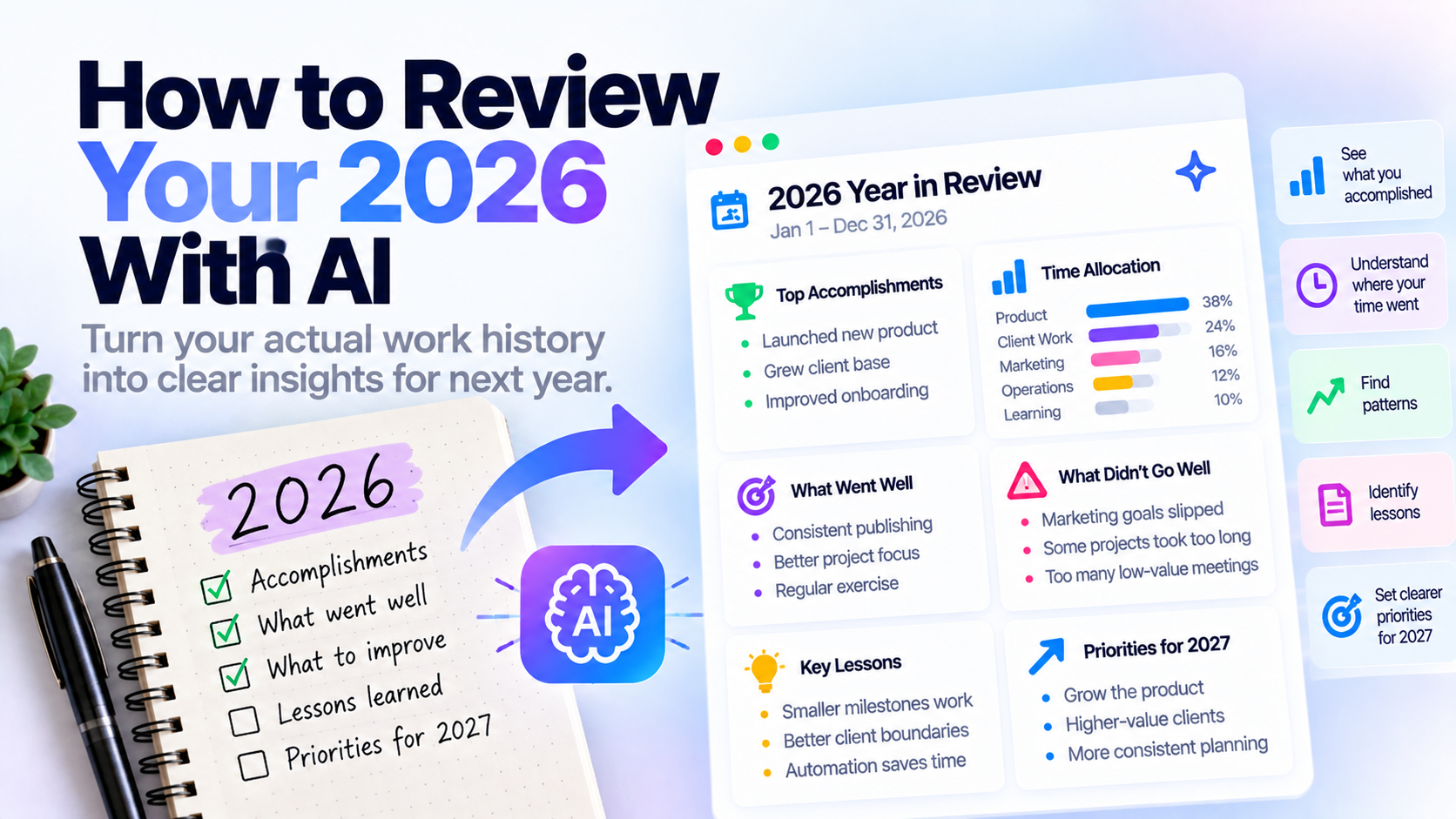
A useful year review should answer more than “Was this a good year?”
It should show what you actually did, what moved forward, what repeatedly slipped, where your time went, what changed, and what deserves your attention next.
AI can help with that - but only if it has evidence.
The best starting point is your actual 2026 work history.
A Simple 2026 Year-In-Review Template
Use this structure:
2026 Year in Review

1. Biggest accomplishments
- [Major win]
- [Project completed]
- [Important progress]

2. What I spent the most time on
- [Area]
- [Project]
- [Responsibility]

3. What went well
- [Habit, system, decision, or pattern]

4. What did not go well
- [Goal that slipped]
- [Repeated problem]
- [Something I would change]

5. What I learned
- [Lesson]
- [Skill]
- [Change in perspective]

6. What changed during the year
- [New responsibility]
- [New project]
- [Lifestyle or work change]

7. What I should stop doing
- [Low-value activity]
- [Repeated distraction]

8. What I should continue doing
- [Useful system]
- [Habit]
- [Approach that worked]

9. What deserves more attention in 2027
- [Priority]
- [Goal]
- [Area of life or work]
You can fill this manually.
Or you can use AI to help extract the answers from the work you recorded throughout the year.
Why Year-End Reviews Are Hard
Twelve months is a long time.
By December, January often feels like a different life.
You may remember:
- Your biggest launch
- A difficult month
- A major personal event
- Something that happened recently
But you probably do not remember every:
- Small project you finished
- Problem you solved
- Week that went unusually well
- Idea you followed through on
- Goal you quietly abandoned
- Responsibility you gradually took over
- Period where your priorities changed
That creates recency bias.
The last few months feel more important simply because they are easier to remember.
A year review based only on memory can therefore tell an incomplete story.
Start With What Actually Happened
Before asking AI for conclusions, gather the evidence.
Useful sources include:
- Completed tasks
- Daily plans
- Weekly reviews
- Monthly reviews
- Notes
- Comments
- Time tracking
- Project history
- Calendar history
- Photos or files connected to work
- Personal records
You do not need all of them.
The goal is simply to replace:
“What do I remember?”
with:
“What actually happened?”
Do Not Ask AI to Review an Empty Year
A generic prompt such as:
“Help me review my 2026”
can still generate useful reflection questions.
But AI does not know your year.
It may know nothing about:
- What you worked on
- What you finished
- What repeatedly slipped
- How your priorities changed
- What consumed your time
- Which months were most productive
- What you stopped caring about
The useful version is:
Your history + AI analysis.
Review the Year in Four Quarters
SelfManager.ai Instant AI Review can cover a custom range of up to 90 days in one review.
That means a full-year review should not be attempted as one giant run.
Instead, split 2026 into four parts:
Q1
January through March
Q2
April through June
Q3
July through September
Q4
October through December
Review each period separately.
Then compare the four summaries.
This also makes the year easier to understand because you can see how priorities changed over time.
Step 1: Review January Through March
Ask:
- What did I accomplish?
- What received most of my attention?
- What did I repeatedly postpone?
- What problems appeared?
- What was I trying to improve?
- What unfinished work carried into Q2?
You are looking for the shape of the quarter.
Do not worry yet about the whole year.
Step 2: Repeat for Q2, Q3, and Q4
Use the same questions.
Consistency matters because it makes the quarters easier to compare.
You may discover patterns such as:
Q1:
Mostly building.
Q2:
Mostly client work.
Q3:
More sales and marketing.
Q4:
More optimization and review.
Those shifts are part of the story of the year.
Step 3: Pull Out the Biggest Accomplishments
Once you have four quarterly summaries, identify the work that mattered most.
Do not simply choose the largest tasks.
Ask:
- What created the most progress?
- What was difficult?
- What would not have happened without my effort?
- What did I finally finish?
- What changed something meaningfully?
- What am I genuinely glad I completed?
A year review should distinguish meaningful progress from simple activity.
Example
Suppose the year included:
- Redesigned a major product
- Fixed dozens of small bugs
- Started publishing weekly
- Improved onboarding
- Worked with several clients
- Built automation for repetitive admin
- Exercised regularly for three months
- Tried several marketing channels
- Stopped one project that was not working
The most important insights may be:
- Product development dominated the year
- Consistent publishing became a new system
- Automation reduced repetitive work
- Several marketing experiments failed
- Exercise became consistent only later in the year
- One abandoned project freed time for higher-priority work
That is more useful than simply listing 200 completed tasks.
Step 4: Look at What Slipped
A good year review should not only celebrate completed work.
Look for things that repeatedly appeared but did not move.
Ask:
- Which tasks were postponed again and again?
- Which goals disappeared?
- What stayed unfinished for months?
- What did I say was important but rarely work on?
- What did I keep avoiding?
Repeated delay can mean several things.
Maybe the task was genuinely difficult.
Maybe the goal was poorly defined.
Maybe other priorities kept winning.
Or maybe you did not actually care enough about it.
All four are useful discoveries.
Step 5: Look at Where Your Time Went
Your task history tells you what happened.
Time tracking can add another layer:
What consumed your year?
You may believe one project was your main focus.
Then discover another category consumed much more time.
For example:
- Client work
- Administration
- Development
- Marketing
- Support
- Meetings
- Personal projects
This is one of the most valuable year-end questions:
Did my time match what I said mattered?
Step 6: Find Repeating Patterns
One month can be unusual.
A year reveals patterns.
Look for repeated behavior.
For example:
- Mondays consistently started slowly
- Client work repeatedly interrupted product work
- Writing happened only when scheduled in advance
- Larger projects stalled without smaller milestones
- Exercise was easier when done early
- Certain tasks were repeatedly underestimated
- Planning the week improved follow-through
AI can be particularly useful here because patterns are difficult to notice while living through them.
Step 7: Review What Changed
A year is not static.
Compare the beginning of 2026 with the end.
Ask:
- What responsibilities do I have now that I did not have in January?
- What did I stop doing?
- What became easier?
- What became harder?
- What new skill did I develop?
- What did I care about less?
- What became more important?
This gives the year a direction.
You are not only asking what happened.
You are asking how you changed.
Step 8: Identify Decisions That Worked
Not every positive result comes from working harder.
Some come from making better decisions.
Think about:
- A tool you started using
- A project you stopped
- A routine you changed
- A client you decided not to take
- A feature you simplified
- A habit you started
- Something you delegated
- A process you automated
Ask:
“What decisions made the rest of the year easier?”
Those are often worth repeating.
Step 9: Identify Decisions That Did Not Work
The same applies to failed experiments.
Maybe you:
- Spent too long on something with little return
- Chased a goal you no longer wanted
- Added unnecessary complexity
- Overcommitted
- Used a system you did not maintain
- Repeatedly underestimated a category of work
Do not frame the year review as a judgment.
Treat it as evidence.
The point is to improve future decisions.
Step 10: Turn the Review Into 2027 Priorities
A year review becomes useful when it changes what happens next.
Do not finish with:
“Interesting.”
Finish with decisions.
For example:
Continue
- Weekly planning
- Regular exercise
- Publishing consistently
- Tracking important work
Stop
- Low-value meetings
- Maintaining unnecessary tools
- Starting too many parallel projects
Improve
- Estimation
- Client boundaries
- Consistency
- Delegation
Prioritize in 2027
- Product growth
- Health
- Higher-value clients
- More focused marketing
The year review should reduce uncertainty about what comes next.
A 2026 Review Prompt You Can Copy
After generating your quarterly summaries, use something like:
Help me review my 2026 based only on the quarterly summaries below.

Identify:

1. My biggest accomplishments
2. The areas that received most of my attention
3. Goals or tasks that repeatedly slipped
4. Important patterns across the year
5. Things that improved
6. Things that became worse or harder
7. Decisions that worked well
8. Decisions or habits that did not work
9. Skills or responsibilities I developed
10. What I should continue, stop, and change in 2027

Do not invent results or conclusions that are not supported by the summaries.

Finish with a concise 2026 year review and a short list of priorities for 2027.
You can then edit the result.
The AI finds patterns.
You decide whether those patterns actually matter.
How to Review 2026 in SelfManager.ai
SelfManager.ai stores work around dates.
Every date can contain its own tasks, tables, notes, comments, images, and tracked work.
That means the daily system gradually becomes a historical record.
For a year review, use Instant AI Review four times:
- Q1
- Q2
- Q3
- Q4
A single review should not exceed the 90-day limit.
For each quarter, ask similar questions so the outputs are easy to compare.
Questions to Ask Each Quarter
Use a consistent set such as:
- What did I accomplish?
- What unfinished work mattered?
- What received most of my attention?
- What repeatedly slipped?
- What patterns appeared?
- What did I improve?
- What should I follow up on?
- What would be useful to remember at the end of the year?
Then save the useful parts.
Example Quarterly Review
Imagine Q1 contains:
- Product redesign
- Client work
- Several unfinished marketing experiments
AI might summarize:
Q1
Main progress:
- Major product redesign advanced significantly
- Several client projects completed
Recurring issue:
- Marketing work was repeatedly postponed
Pattern:
- Client deadlines consistently displaced internal work
Lesson:
- Internal projects needed protected time
Now compare Q2.
Maybe the pattern changes.
Q2
Main progress:
- Product launch completed
- Weekly publishing started
Recurring issue:
- Administrative tasks consumed more time
Pattern:
- Content happened consistently only after getting a fixed schedule
Lesson:
- Recurring blocks worked better than relying on spare time
By Q4, you can see how the year evolved.
Why Quarterly Reviews Work Better Than One Giant Prompt
There is a practical product limit of 90 days per Instant AI Review.
But there is also a reasoning advantage.
A year contains too much context.
Breaking it into quarters helps preserve:
- Different priorities
- Different projects
- Different problems
- Changes in habits
- Seasonal shifts
If you compress the year too early, some of those differences disappear.
Analyze first.
Combine later.
Review Accomplishments Without Turning It Into a Brag List
A year review should acknowledge wins.
But it should not become only:
“Look at everything I accomplished.”
You also want to understand:
- What mattered
- What did not
- What changed
- What cost too much time
- What you avoided
- What you learned
That is the difference between an accomplishment list and reflection.
Both are useful.
They solve different problems.
Include Personal Life if It Matters
A year is not only work.
If your task system contains personal plans too, consider reviewing areas such as:
- Health
- Relationships
- Travel
- Learning
- Finances
- Fitness
- Home
- Recreation
Work and personal life compete for the same time.
Looking at them separately can hide tradeoffs.
For example:
You may have had an excellent business quarter but neglected exercise.
Or you may have deliberately reduced work for a month because personal life needed more attention.
That context changes how you interpret the data.
Do Not Turn Your Year Review Into a Productivity Score
The purpose is not to maximize completed tasks.
A year with 2,000 completed tasks is not automatically better than one with 1,000.
Some tasks matter more.
Some periods should be slower.
Some time is supposed to be spent resting.
The useful questions are:
Did I spend enough time on what mattered?
Did I move in the direction I wanted?
What should change?
Use AI to Surface, Not Judge
AI can help surface:
- Patterns
- Accomplishments
- Repeated delays
- Categories of work
- Changes across time
It should not decide whether your year was a success or failure.
That judgment depends on goals and context the system may not fully understand.
Treat AI as an analyst of your history.
You remain the person interpreting it.
What if You Did Not Track Your Entire Year?
You can still do a useful review.
Use whatever records exist.
For example:
- Task manager
- Calendar
- Photos
- Messages
- Notes
- Bank statements
- Fitness history
Do not abandon the review just because the data is incomplete.
Start with evidence.
Fill gaps from memory afterward.
What if Your Goals Changed During 2026?
That is useful information.
You should not judge December entirely against what January expected.
Maybe circumstances changed.
Maybe you discovered that a goal was not worth pursuing.
Maybe a better opportunity appeared.
A year review should capture those changes.
Ask:
“Which goals changed, and why?”
Sometimes abandoning the wrong goal is progress.
A More Useful Way to Measure the Year
Instead of rating the whole year from 1 to 10, consider several areas:
Work
What moved?
Health
What improved or declined?
Relationships
Did I invest enough?
Learning
What did I learn?
Money
Did my financial behavior improve?
Time
Where did my time actually go?
Personal growth
What changed in how I think or behave?
This creates a more balanced picture.
Your Task History Becomes More Valuable With Time
A task manager is usually treated as a tool for future work.
What do I need to do today?
But after a year, the same system can answer another question:
What did I actually do?
That historical value compounds.
One day gives you a plan.
One week gives you context.
One month gives you patterns.
One year gives you a record.
That is one of the strongest reasons to keep your work in a consistent system.
Review 2026 Before Planning 2027
Do not jump straight into next year's goals.
First understand this year.
Review:
- What happened
- What worked
- What failed
- What repeatedly mattered
- What repeatedly did not
- What changed
- What deserves to continue
Then build 2027 from evidence instead of optimism alone.
Your next plan should be informed by the person you actually were in 2026, not only the person you hope to become next year.
Review Your 2026 With Your Actual Work History
If your year is already recorded inside SelfManager.ai, use four quarterly Instant AI Reviews rather than trying to analyze all twelve months in one run.
Review Q1.
Then Q2.
Then Q3.
Then Q4.
Compare the results.
Find the patterns.
Decide what should continue, stop, or change.
The value of a year review is not remembering everything.
It is noticing what a year of individual days adds up to.
Frequently Asked Questions
How do I review my year?
Start with evidence from the year, identify major accomplishments, unfinished goals, time allocation, recurring patterns, lessons, and changes, then use those findings to decide what should continue or change next year.
Can AI review my year for me?
AI can help analyze your recorded history and identify patterns, accomplishments, repeated delays, and themes. You should still interpret the results yourself because AI may not understand the full importance or context of every event.
What should I include in a year-end reflection?
Useful areas include accomplishments, challenges, time spent, unfinished goals, lessons, skills developed, decisions that worked, things that did not work, and priorities for the following year.
How can I use AI to review 2026?
Give AI evidence from your year rather than asking for a generic reflection. Review your work history in manageable periods, identify patterns in each period, and then compare those summaries across the year.
Can SelfManager.ai review all of 2026 at once?
No. A single Instant AI Review can cover a custom range of up to 90 days. For a full year, use four quarterly reviews and combine the most important findings.
Why review the year in quarters?
Quarterly reviews reduce recency bias and preserve the different priorities and patterns that appeared throughout the year. They also fit SelfManager.ai's 90-day review limit.
When should I review 2026?
Late November through December is a useful period for beginning year-end reflection, with the final review completed once enough of December has passed to represent the year properly.
Should I review 2026 before setting goals for 2027?
Yes. Looking at what actually happened in 2026 gives you better evidence for deciding what to continue, change, stop, or prioritize in 2027.
Date-based AI Task Manager
Plan smarter, execute faster, achieve more
Create tasks in seconds, generate AI-powered plans, and review progress with intelligent summaries. Perfect for individuals and teams who want to stay organized without complexity.
Get started with your preferred account