
End-of-Day Report: Template + How to Write It in 2 Minutes
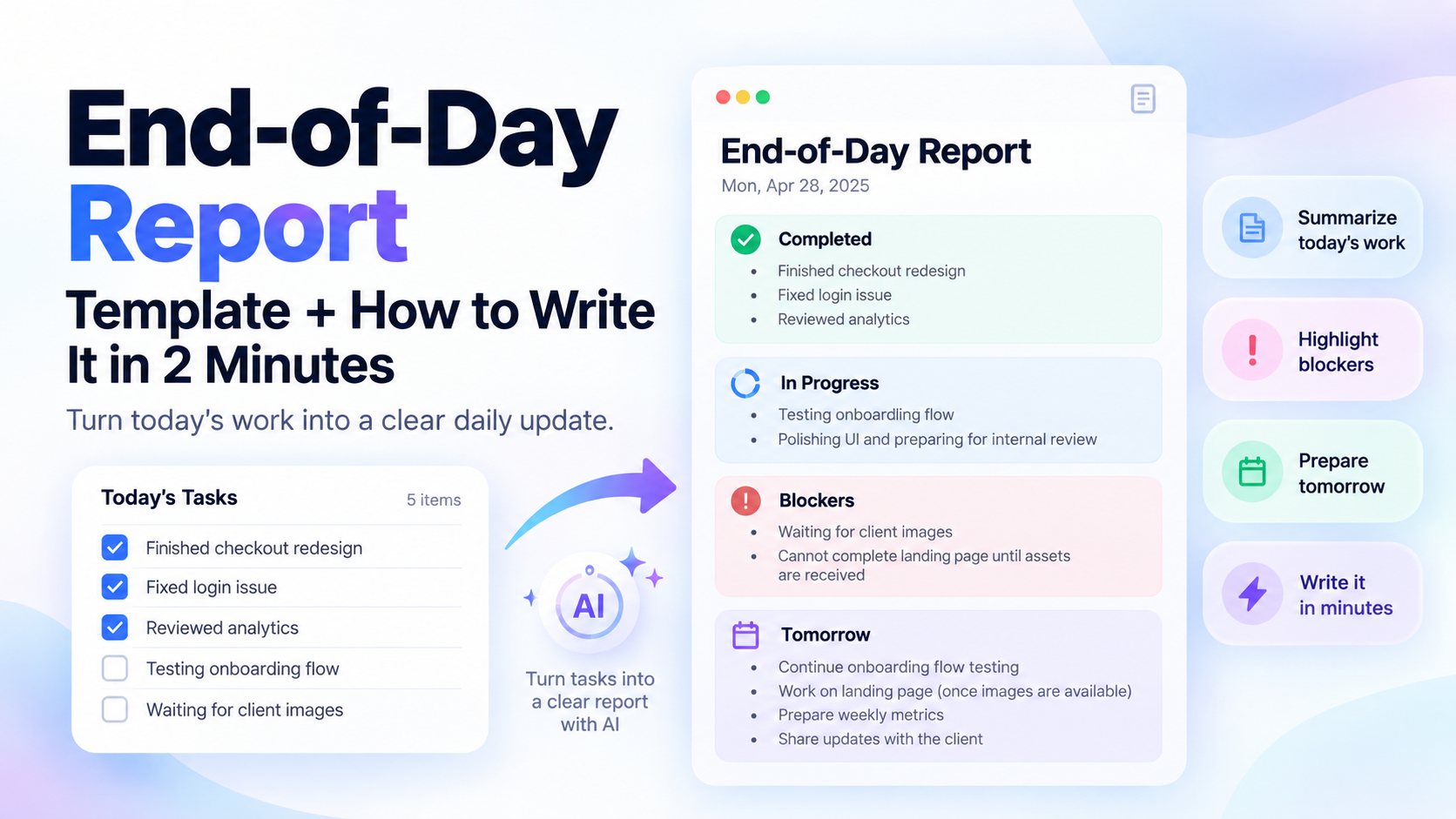
An end-of-day report is a short summary of what you completed, what is still in progress, what is blocked, and what you plan to do next.
The fastest way to write one is to start from the work you already recorded during the day instead of trying to reconstruct everything from memory at 5 PM.
End-Of-Day Report Template
Copy this template:
End-of-Day Report - [Date]

Completed:
- [Task or result]
- [Task or result]
- [Task or result]

In Progress:
- [Task currently being worked on]
- [Task currently being worked on]

Blockers:
- [Anything preventing progress]
- [Anything you are waiting for]

Tomorrow:
- [Top priority]
- [Next task]
- [Follow-up]
For many jobs, that is all you need.
An EOD report should usually be easy to scan in less than a minute.
It is not a diary.
It is not a detailed timesheet.
It is a quick answer to four questions:
- What got done?
- What is still moving?
- What is blocked?
- What happens next?
End-Of-Day Report Example
Here is a simple example for someone working on a website project.
End-of-Day Report - October 2

Completed:
- Finished the checkout page redesign
- Fixed the login issue reported this morning
- Sent the updated homepage to the client for review

In Progress:
- Testing the new onboarding flow

Blockers:
- Waiting for final product images from the client

Tomorrow:
- Finish onboarding testing
- Implement client feedback on the homepage
- Start the pricing page update
That gives a manager enough information to understand the day without reading a long explanation.
What Should an EOD Report Include?
A useful end-of-day report normally needs four sections.
Completed
List the meaningful work you finished.
Avoid turning this into every tiny action you performed.
Instead of:
- Opened analytics
- Checked email
- Changed button
- Tested button
- Sent message
Write:
- Reviewed analytics and updated the landing-page CTA based on the results
The report should communicate progress, not keystrokes.
In Progress
Include work that started but is not finished.
This is particularly important when a manager might otherwise assume the task was forgotten.
For example:
- Checkout testing is in progress
- Drafted the article, final editing tomorrow
- Completed the backend work, frontend integration still pending
Blockers
Mention anything preventing progress.
A blocker could be:
- Waiting for client approval
- Missing access
- Waiting for another team member
- Technical issue
- Unclear requirement
- External dependency
A useful blocker statement explains what is needed.
Instead of:
"Blocked on API."
Write:
"Blocked on the API integration until we receive production credentials."
Tomorrow
Finish with the work you expect to prioritize next.
This tells the reader that today's unfinished work has not disappeared.
It also forces you to think briefly about the next day before signing off.
How Long Should an End-Of-Day Report Be?
Usually short.
For most individual contributors, contractors, remote employees, and virtual assistants, five to ten bullet points are enough.
A good EOD report should communicate the state of the day without becoming another major task.
If writing the report takes 20 minutes every afternoon, the reporting process is probably too complicated.
The ideal workflow is closer to two minutes.
How to Write an End-Of-Day Report in 2 Minutes
The easiest method is to avoid starting from a blank page.
At the end of the day, review the tasks you worked on and classify them into four groups:
Step 1: Find what you completed
Look at today's completed tasks.
Pull out the ones that communicate meaningful progress.
Step 2: Find unfinished work
Anything you started but did not finish goes into In Progress.
You do not need to explain every unfinished task.
Include the ones your manager or team needs to know about.
Step 3: Identify blockers
Ask:
"Why did anything not move today?"
If the answer involves another person, missing information, access, approval, or a technical problem, that may belong under Blockers.
Step 4: Look at tomorrow
Choose the most important work that should happen next.
Then convert the whole thing into a clean update.
Why Writing EOD Reports From Memory Is Hard
At the end of a busy day, your memory is not a perfect timeline.
You may have:
- Switched between several projects
- Fixed small unexpected issues
- Answered client questions
- Attended meetings
- Changed priorities
- Started tasks you did not finish
- Completed work that was not on your original plan
By the time you write the report, some of the day already feels blurry.
This is why the best source for an EOD report is not memory.
It is the record of the work itself.
Turn Today’s Tasks Into an EOD Report
If your work is already recorded inside a task manager, much of the report already exists.
For example, imagine today's task table contains:
- Finish checkout redesign - completed
- Fix login bug - completed
- Reply to client - completed
- Test onboarding flow - in progress
- Review analytics - completed
- Product images from client - waiting
- Tomorrow: finish onboarding
- Tomorrow: update homepage
That can quickly become:
Completed:
- Finished the checkout redesign
- Fixed the login issue
- Responded to the client
- Reviewed analytics

In Progress:
- Testing the new onboarding flow

Blockers:
- Waiting for product images from the client

Tomorrow:
- Finish onboarding testing
- Update the homepage
The important difference is that you are summarizing recorded work rather than trying to remember the whole day.
Write Today’s Report From Today’s Tasks
SelfManager.ai organizes work around dates, so today's work already lives inside today's workspace.
If you use a table to track your day, Table AI can summarize that table or answer questions about it.
A simple prompt could be:
"Write an end-of-day report from this table. Use four sections: Completed, In Progress, Blockers, and Tomorrow. Keep it concise and do not invent anything that is not present in the table."
The result is copy-ready text that you can review before sending.
What the AI Should and Should Not Do
AI is useful for turning raw task data into a cleaner report.
It can:
- Group completed work
- Condense similar tasks
- Rewrite fragmented task titles
- Identify unfinished work
- Structure the update
- Improve readability
It should not invent impact.
For example, if your task says:
"Updated checkout page"
the AI should not write:
"Successfully increased checkout conversions."
Unless you actually measured that result, it is not supported by the task history.
The report should stay factual.
Use Voice Notes During the Day
Not everything that belongs in an EOD report starts as a formal task.
You may discover something while working:
"Checkout is finished but deployment is waiting for client approval."
Or:
"The bug appears to be caused by the authentication service. Need to investigate tomorrow."
Instead of interrupting your work to write a polished note, you can capture the information quickly by voice.
In SelfManager.ai, voice-to-text works in comments, notes, and AI prompt fields.
The transcript can then become part of the context you use when reviewing the day.
This is especially useful for blockers and observations that would otherwise be forgotten by the afternoon.
EOD Report for Remote Employees
Remote work makes short written updates particularly useful because coworkers do not automatically see what happened during the day.
A remote EOD report might look like:
Completed:
- Shipped the updated onboarding flow
- Resolved two customer-reported bugs
- Reviewed the new analytics dashboard

In Progress:
- Updating internal onboarding documentation

Blockers:
- None

Tomorrow:
- Finish documentation
- Begin work on the billing settings update
The point is visibility.
Your manager should not need to ask individually what happened.
EOD Report for a Developer
Developers often need to communicate progress without writing a technical essay.
Example:
Completed:
- Fixed authentication timeout bug
- Added validation to the checkout form
- Reviewed and merged two pull requests

In Progress:
- Refactoring payment error handling

Blockers:
- Waiting for staging API credentials

Tomorrow:
- Complete payment error handling
- Deploy checkout changes to staging
Notice that it communicates outcomes instead of listing every code change.
EOD Report for a Freelancer
A freelancer may use the report internally or send it to a client.
Example:
Completed:
- Finished homepage responsive adjustments
- Added the new testimonial section
- Updated mobile navigation

In Progress:
- Product page layout

Blockers:
- Waiting for final product copy

Tomorrow:
- Complete product page
- Add provided product content
- Begin checkout styling
For client-facing reports, avoid including unrelated personal or administrative work.
Only summarize the work relevant to that client.
EOD Report for a Virtual Assistant
Example:
Completed:
- Organized inbox and responded to priority emails
- Scheduled three meetings
- Updated the lead spreadsheet
- Prepared tomorrow's social posts

In Progress:
- Researching vendors for next month's event

Blockers:
- Waiting for pricing from two vendors

Tomorrow:
- Finish vendor comparison
- Follow up on unanswered leads
- Prepare weekly meeting notes
Again, the structure stays the same.
Only the work changes.
EOD Report vs Daily Standup
These two updates are related but not identical.
An end-of-day report is normally written after the workday.
It summarizes what happened.
A daily standup is usually delivered the next morning and commonly follows:
- What I did yesterday
- What I am doing today
- What is blocking me
They may use the same task history.
But the audience and timing are different.
An EOD report closes the day.
A standup starts the next one.
Should You Send an EOD Report Every Day?
Only if it is useful.
Some managers require one.
Some remote teams rely on asynchronous updates.
Some freelancers use them for client transparency.
Other teams already have enough visibility through project-management tools and do not need another report.
The report should solve a communication problem.
It should not exist only because reporting feels productive.
If nobody reads it or uses it, reconsider the process.
How to Make EOD Reports Less Repetitive
Daily reports become annoying when you rewrite the same structure every afternoon.
There are three ways to reduce that friction.
Keep the format fixed
Do not redesign the report every day.
Use the same four sections.
Record work during the day
Update task statuses while you work.
Do not wait until the end of the day to reconstruct everything.
Generate the first draft
Let your task manager or AI assistant convert today's recorded work into the report.
Then review it.
The goal is not to automate communication completely.
The goal is to remove the unnecessary rewriting.
A Better Daily Loop
A useful workflow looks like this:
Morning:
Review today's tasks.
During the day:
Complete tasks, update statuses, and capture important notes or blockers.
End of day:
Generate the report from today's work.
Before finishing:
Review tomorrow's tasks.
This creates a simple loop:
Plan today.
Track today.
Report today.
Prepare tomorrow.
The reporting step becomes a byproduct of doing the work instead of another separate system you need to maintain.
Why Task History Matters Beyond Reporting
An end-of-day report is useful immediately.
But storing daily work also creates a longer-term record.
After several weeks, you can look back and ask:
- What did I accomplish this month?
- What kept getting delayed?
- What consumed most of my time?
- Which projects moved forward?
- What problems appeared repeatedly?
- What should I change next month?
This is one reason date-based task history becomes more valuable over time.
Today's work helps write today's report.
A month of daily work helps write a monthly review.
A quarter of history can help prepare a self-review.
The same record keeps becoming useful.
End-Of-Day Report Checklist
Before sending your report, check five things:
- Did I include the important completed work?
- Did I mention meaningful unfinished work?
- Did I explain any blockers clearly?
- Did I say what happens next?
- Did I remove unnecessary detail?
If yes, send it.
Do not spend another ten minutes polishing a five-bullet update.
Write Today’s Report From Today’s Tasks
If you already use SelfManager.ai to plan your day, today's tasks are already organized under today's date.
Use Table AI to summarize the work into an end-of-day report, review the output, and copy the final version wherever you need it.
The goal is simple:
Do the work once.
Record it once.
Then let the record help you communicate what happened.
Frequently Asked Questions
What is an end-of-day report?
An end-of-day report is a short summary of the work completed during the day, tasks still in progress, blockers, and the priorities for the next workday.
What should I include in an EOD report?
A simple EOD report can contain four sections: Completed, In Progress, Blockers, and Tomorrow. This gives a manager or team enough context without creating a long daily document.
How long should an end-of-day report be?
For most roles, five to ten concise bullet points are enough. The report should be quick to read and should focus on meaningful progress rather than every small action taken during the day.
How do I write an end-of-day report quickly?
Use the work you already recorded during the day. Review completed tasks, unfinished work, blockers, and tomorrow's priorities, then place them into a consistent template.
Can AI write my EOD report?
Yes. AI can turn today's task history into a structured first draft. You should review the result before sending it and make sure the AI has not invented results or context that were not present in your work history.
Can SelfManager.ai generate an EOD report?
SelfManager.ai can use Table AI to summarize the table containing today's work. You can ask it to structure the summary as an end-of-day report and then copy or edit the generated text.
What is the difference between an EOD report and a standup update?
An EOD report is normally written at the end of the workday and summarizes what happened. A standup update is usually shared the following morning and focuses on yesterday's work, today's plan, and blockers.
Should I send an end-of-day report every day?
Only when it provides useful visibility. EOD reports are particularly helpful for remote teams, managers, contractors, freelancers, and asynchronous workflows, but they are unnecessary if the same information is already visible elsewhere and nobody needs the extra update.
Date-based AI Task Manager
Plan smarter, execute faster, achieve more
Create tasks in seconds, generate AI-powered plans, and review progress with intelligent summaries. Perfect for individuals and teams who want to stay organized without complexity.
Get started with your preferred account