
Digital Bullet Journal Without the Handwriting
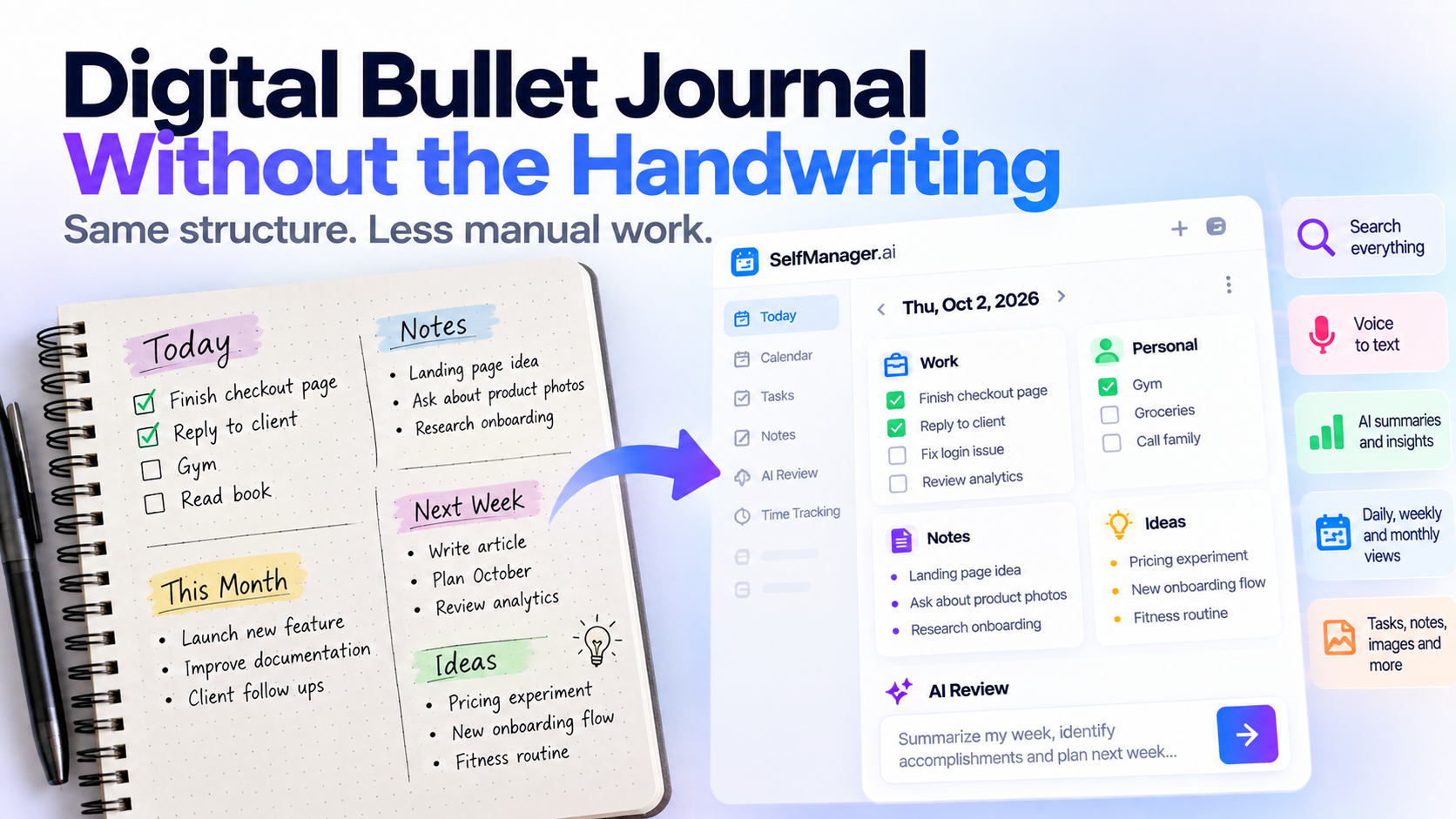
A digital bullet journal keeps the core idea of the Bullet Journal method - organizing life around daily logs, future plans, notes, tasks, and reflection - but moves the system into software.
For people who like the logic of bullet journaling but do not want to draw layouts, rewrite unfinished tasks, maintain an index, or carry a notebook everywhere, a date-based digital planner can provide much of the same structure with less manual upkeep.
What Is a Digital Bullet Journal?
A traditional bullet journal is more than a notebook full of attractive spreads.
At its core, it is a system for organizing:
- What you need to do
- What happened today
- What you want to remember
- What is coming later
- What deserves attention this month
- What should be carried forward
The paper itself is only the medium.
That means you can reproduce much of the underlying logic digitally.
A good digital bullet journal usually needs some version of:
- Daily logs
- Monthly planning
- Future planning
- Tasks
- Notes
- Collections or grouped information
- Reflection
- A way to move or revisit unfinished work
The digital version can then add things paper cannot easily provide:
- Search
- AI review
- Voice capture
- Time tracking
- Automatic organization
- Quick duplication
- File and image storage
The question is not whether digital bullet journaling is "real" bullet journaling.
The better question is:
Which parts of the method are useful to you, and which parts only exist because paper has limitations?
Why People Like Bullet Journaling
Bullet journaling works because it creates one place for many small pieces of life.
Instead of separating everything into:
- To-do app
- Notes app
- Calendar
- Habit tracker
- Journal
- Project planner
you can keep one running system.
That is especially useful if your life contains many small obligations.
You may need to remember:
- Work tasks
- Personal errands
- Ideas
- Appointments
- Things to research
- Follow-ups
- Bills
- Notes from conversations
- Plans for next week
A bullet journal gives all of these things somewhere to go.
The downside is the work required to maintain the notebook itself.
The Problem With Paper Bullet Journaling
For some people, the manual process is the appeal.
Writing slows them down.
Drawing the layout is relaxing.
Migrating unfinished tasks creates a deliberate moment of reflection.
That is valuable.
But for other people, those same things create friction.
You may like the system but dislike:
- Drawing weekly layouts
- Rewriting dates
- Copying unfinished tasks
- Searching old notebooks
- Maintaining an index
- Carrying the notebook
- Rewriting information that already exists digitally
- Spending time making the journal look organized
If that sounds familiar, the useful parts of Bullet Journal may be the structure rather than the handwriting.
Bullet Journal Concepts Mapped to a Digital System
The easiest way to understand digital bullet journaling is to separate the method into its basic components.
| Bullet Journal concept | Digital equivalent | SelfManager.ai approach |
|---|---|---|
| Daily Log | Workspace for today's tasks and notes | Every date has its own workspace with tables |
| Monthly Log | Monthly overview | Monthly view and date-based planning |
| Future Log | Work stored on future dates | Tasks and information can be planned directly on future dates |
| Rapid Logging | Fast task/note capture | Tasks, notes, comments, and voice-to-text |
| Collections | Grouped information around a subject | Tables can separate different types of work |
| Reflection | Weekly/monthly review | AI Review and period summaries |
| Migration | Moving unfinished work forward | No automatic carry-forward should be assumed |
| Index | Navigation across notebook content | Digital navigation replaces much of the need for a handwritten index |
That last pair matters.
Moving a paper system into software does not mean reproducing every paper mechanism literally.
Some mechanisms exist because paper needs them.
1. the Daily Log
The Daily Log is probably the Bullet Journal concept that translates most naturally into software.
A day contains whatever belongs to that day.
For example:
October 2
Work:
- Finish landing page
- Reply to client
- Review analytics
Personal:
- Gym
- Buy groceries
- Call landlord
Notes:
- New homepage idea
- Ask client about product photos
On paper, you write these items underneath today's date.
In SelfManager.ai, every date is already its own workspace.
You can create multiple tables inside that date, which means your day does not have to become one giant task list.
For example:
Work
- Finish checkout page
- Send invoice
- Test login fix
Personal
- Gym
- Groceries
- Book dentist
Ideas
- New article concept
- Product onboarding improvement
This is very close to the spirit of a Daily Log without requiring you to redraw the page tomorrow.
2. the Monthly Log
A Bullet Journal monthly spread gives you a broader view.
You stop looking only at today and start asking:
What matters this month?
A digital system can make this easier because the month already exists.
You do not need to manually write:
1 2 3 4 5 6...
or redraw your calendar.
SelfManager.ai includes weekly and monthly overviews, so the same daily work can be viewed at a broader level.
This is useful because daily planning and monthly planning stay connected.
You are not maintaining a separate monthly page and then copying information into daily pages.
3. the Future Log
A traditional Future Log exists because a paper notebook may not yet have a page for December when you are writing something in March.
Digital systems do not have this limitation.
Future dates already exist.
If something belongs on November 14, you can put it on November 14.
That removes some of the bookkeeping the Future Log was designed to solve.
You can still think in the same way:
"Not now, but I need to remember this later."
The difference is that software can store the item directly where it belongs.
4. Rapid Logging
Bullet journaling works best when capturing information is fast.
You should not have to stop working for five minutes just to record something.
Digitally, rapid logging can be:
- A short task
- A quick note
- A comment
- A voice recording
- A voice-to-text transcription
Voice capture is especially useful if you think faster than you type.
You may be walking away from your desk and suddenly realize:
"The pricing page should explain annual savings differently."
Instead of trying to remember it later, you can record it immediately.
SelfManager.ai's voice-to-text feature works in comments, notes, and AI prompt fields, with recordings up to 30 minutes according to the current product brief.
That gives rapid logging a meaning that paper could never really offer.
5. Collections
Bullet Journal Collections are pages dedicated to a topic.
For example:
- Books to read
- Project ideas
- Client notes
- Fitness goals
- Travel plans
- Business ideas
Digitally, you do not necessarily need to reproduce the concept as a dedicated notebook page.
Tables can serve the same organizational purpose.
For example, today's workspace might contain:
- Client Work
- SelfManager.ai
- Personal
- Notes
Another date may contain completely different tables.
The important idea is that related information remains grouped instead of everything becoming one endless list.
6. Migration
Migration is one of the most distinctive parts of traditional Bullet Journaling.
An unfinished task does not simply remain sitting there forever.
You consciously decide:
Should I still do this?
Should I move it?
Should I schedule it for later?
Should I delete it?
That reflection is useful.
But this is one place where a digital app should not pretend to behave like the paper method if it does not.
The current SelfManager.ai product brief does not confirm automatic carry-forward of unfinished tasks.
So the honest mapping is:
You can review unfinished work and decide where it belongs next, but automatic Bullet Journal-style migration should not be assumed.
There is an argument that this is not necessarily a disadvantage.
Automatic carry-forward can allow an irrelevant task to survive for weeks without being questioned.
Manual review forces the same useful question as paper migration:
Do I still care about this?
7. the Index
A paper Bullet Journal needs an index because information is spread across physical pages.
Page 27 might contain February goals.
Page 58 might contain project ideas.
Page 94 might contain a client plan.
The index tells you where everything lives.
Digital systems have navigation, dates, views, and search-like behaviors that reduce the need for a manually maintained page-number index.
So there is usually little reason to reproduce the paper index exactly.
This is a good example of why digital bullet journaling should preserve the useful principle without blindly copying the physical mechanism.
Digital Bullet Journal vs Digital Planner
These categories overlap.
A digital planner usually focuses heavily on:
- What you need to do
- When you need to do it
- Calendar planning
- Daily schedules
A digital bullet journal can include those things but often goes further into:
- Notes
- Reflection
- Ideas
- Records
- Daily observations
- Personal logging
That means someone looking for a digital Bullet Journal often wants more flexibility than a basic checklist app provides.
The system should be able to contain today's life, not just today's tasks.
Digital Bullet Journal vs Task Manager
A traditional task manager is often project-first.
You create:
Project A
Project B
Project C
Then place tasks inside them.
A Bullet Journal is naturally more date-centric.
You open today's page.
What is happening today?
That difference is one reason a date-based task manager can feel surprisingly close to a digital Bullet Journal.
SelfManager.ai is organized around dates rather than requiring every item to begin inside a project.
Each day can contain its own tables, notes, comments, images, and tasks.
That makes the day itself the main container.
Which Digital Bullet Journal Approach Is Best?
There is no universal answer.
Different tools reproduce different parts of the paper experience.
Goodnotes
Best if you want the notebook experience itself.
You can write, draw, annotate, use digital paper, and create layouts that resemble a physical journal.
This is closest to traditional Bullet Journaling visually.
But much of the manual work remains intentional.
Notion
Best if you want to build a highly customized system.
You can create databases, templates, journal pages, dashboards, and collections.
The advantage is flexibility.
The disadvantage is that the system itself can become a project to maintain.
Traditional task managers
Best if your main concern is tasks.
They are usually faster and more structured than maintaining a journal, but they often lose some of the open-ended daily logging that makes Bullet Journal attractive.
SelfManager.ai
Best suited to people who want a typed, date-based daily system with AI review rather than a digital imitation of paper.
You get the daily-date structure, but not the requirement to manually draw or rebuild the journal.
Where SelfManager.ai Fits
SelfManager.ai originally makes the most sense here if the parts you like about Bullet Journal are:
- Starting from the day
- Keeping work and personal tasks together
- Having several categories inside one date
- Recording notes alongside tasks
- Looking back at previous days
- Reviewing weeks and months
- Capturing ideas quickly
- Using previous work as context for future planning
The system is less appropriate if what you love most is:
- Handwriting
- Drawing layouts
- Decorative spreads
- Stickers
- Custom page design
- The physical ritual of journaling
For that experience, a handwriting-first app or actual notebook is the better tool.
That distinction should be obvious.
Where AI Changes Digital Bullet Journaling
A paper notebook stores your history.
It cannot analyze it.
That is one of the biggest differences AI introduces.
Imagine you have used a digital daily system for three months.
Instead of manually flipping through 90 days and asking:
"What did I actually accomplish?"
you can ask AI.
For example:
- What did I complete this month?
- What kept getting delayed?
- What projects received the most attention?
- What patterns appeared in my work?
- What should I follow up on?
- What did I spend most of my time doing?
- What should change next month?
SelfManager.ai's AI Review can analyze a week, month, quarter, or custom period, while Instant AI Review can generate structured reports over periods up to 90 days.
This effectively turns reflection from a fully manual process into a conversation with your own recorded history.
The Monthly Reflection Becomes Much Easier
Reflection has always been one of the most valuable parts of journaling.
But it is also one of the easiest parts to skip.
At the end of a month, you may want to ask:
- What went well?
- What did I finish?
- What slipped?
- What consumed my time?
- What should I stop doing?
- What deserves more attention next month?
A paper journal requires you to review the pages yourself.
A digital system with AI can generate a first analysis.
You still decide what it means.
AI simply reduces the amount of history you need to manually process.
Example Digital Bullet Journal Day
A date-based digital journal might look like this:
Work
- Finish checkout page
- Review analytics
- Reply to client
- Fix login issue
Personal
- Gym
- Groceries
- Call family
Notes
- Landing page headline idea
- Research voice onboarding
- Client wants launch next Thursday
Things to Revisit
- New pricing experiment
- Article idea
- Product feedback
At the end of the day, that page is no longer only a plan.
It is a record.
A month later, those records become your history.
That is where the journal part of a task manager becomes valuable.
You Do Not Need to Digitize Every Bullet Journal Rule
This is probably the most important point.
A digital Bullet Journal should not be judged by how perfectly it imitates a notebook.
Some paper mechanisms become unnecessary in software.
You may not need:
- Page numbers
- A handwritten index
- Repeated calendar layouts
- Manual copying between spreads
Keep the parts that improve your thinking.
Remove the parts that only exist because paper cannot automate them.
Who Should Try a Digital Bullet Journal?
It may suit you if:
- You like the Bullet Journal concept but dislike handwriting
- You want your day to be the main organizational unit
- You mix personal and professional tasks
- You capture many small notes and ideas
- You want to retain a history of completed work
- You want reflection without rereading dozens of pages manually
- You want AI to help review your history
- Traditional project-management software feels too rigid
It may not suit you if the physical notebook ritual itself is the part you value most.
That experience is difficult to replace with software because it is not only about productivity.
A Digital Journal Can Become More Valuable Over Time
The first day of a digital Bullet Journal gives you a plan.
After a month, it gives you history.
After a quarter, it gives you patterns.
After a year, it gives you a record of what your life and work actually looked like.
That is the part people sometimes underestimate.
Daily planning is useful today.
Historical context becomes useful later.
The same system can help answer:
What should I do today?
and months later:
What have I actually been doing?
Try a Date-Based Digital Bullet Journal
If you like the logic of Bullet Journal but do not want to maintain handwritten spreads, SelfManager.ai offers a different interpretation.
Every date is already a workspace.
Create tables for tasks, personal plans, notes, ideas, or anything else that belongs to the day.
Use voice-to-text when typing interrupts your thinking.
Then use weekly, monthly, or AI reviews to look back at what actually happened.
You keep the daily-log mentality.
The software handles much of the structure.
Frequently Asked Questions
What is a digital bullet journal?
A digital bullet journal applies ideas from the Bullet Journal method - such as daily logs, monthly planning, future planning, task capture, collections, and reflection - inside software instead of a paper notebook.
Can I bullet journal without handwriting?
Yes. The organizational method does not require handwriting. You can use a typed digital system if you value daily logging and reflection more than the physical notebook experience.
What is the best app for a digital bullet journal?
It depends on which part of Bullet Journaling you value. Goodnotes fits handwriting and visual layouts, Notion fits highly customized systems, while SelfManager.ai fits typed, date-based planning with AI-assisted review.
Is a digital bullet journal the same as a task manager?
Not necessarily. A task manager mainly focuses on work that needs to be done. A digital bullet journal can also include notes, ideas, personal logs, reflection, and records of what happened.
Can SelfManager.ai automatically migrate unfinished tasks?
Automatic carry-forward of unfinished tasks is not a feature that should currently be assumed. Unfinished work can instead be reviewed and deliberately placed where it belongs next.
How does AI help with digital bullet journaling?
AI can analyze your recorded work and help summarize accomplishments, unfinished tasks, recurring patterns, and priorities. This makes weekly, monthly, or quarterly reflection easier.
Can I use voice instead of typing?
Yes. SelfManager.ai includes voice-to-text in comments, notes, and AI prompt areas, so ideas or observations can be captured without stopping to type them manually.
Is SelfManager.ai a traditional Bullet Journal app?
No. It does not try to recreate a paper notebook visually. It uses similar date-based ideas - daily workspaces, notes, tasks, historical records, and review - in a structured digital system with AI.
Date-based AI Task Manager
Plan smarter, execute faster, achieve more
Create tasks in seconds, generate AI-powered plans, and review progress with intelligent summaries. Perfect for individuals and teams who want to stay organized without complexity.
Get started with your preferred account