
AI Task Prioritization: How It Works and Which Tools Do It
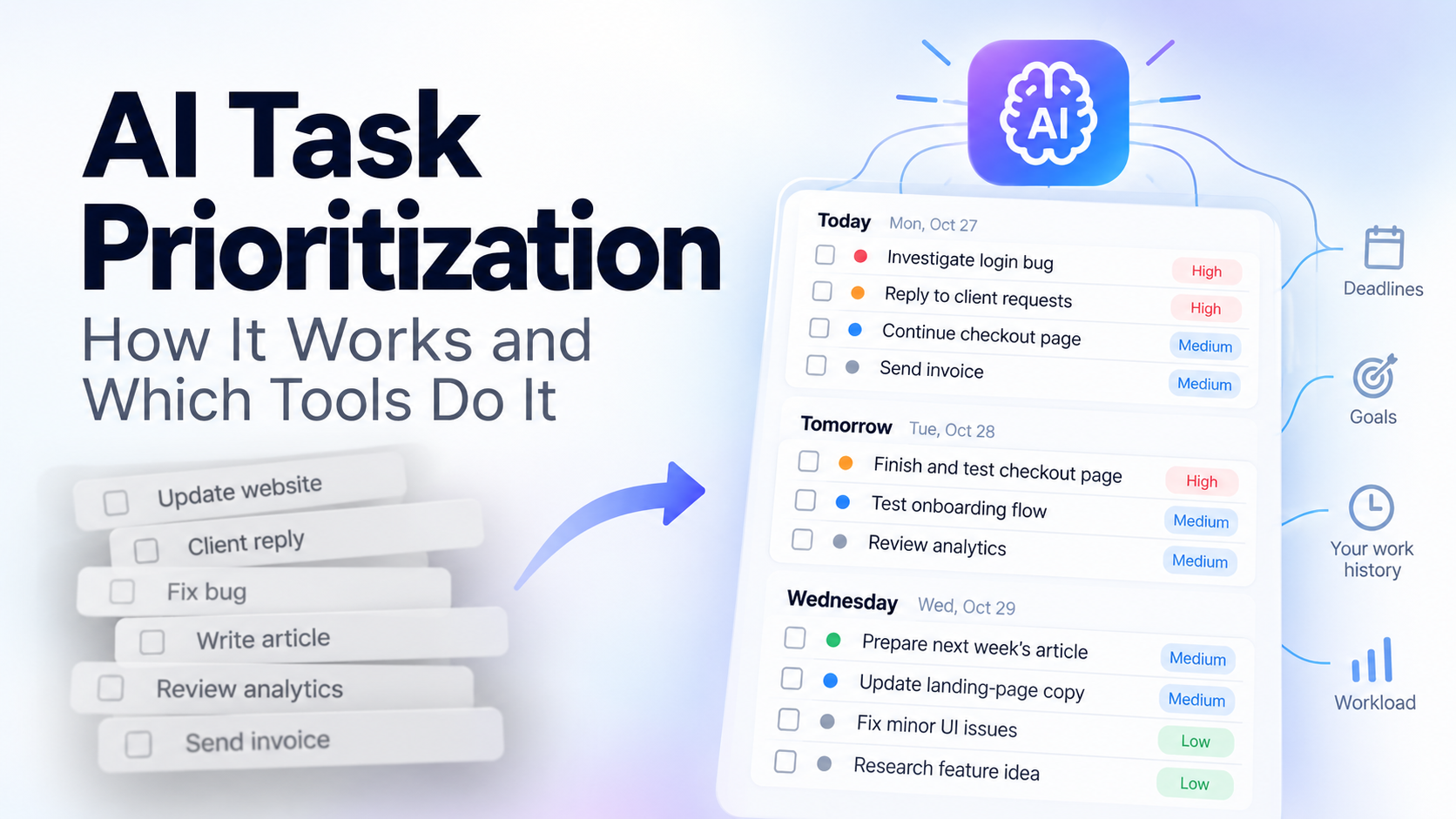
AI task prioritization uses software to help decide which tasks deserve your attention first instead of making you manually rank a long to-do list. Different tools approach this differently - some follow rules and deadlines, some automatically rearrange your calendar, and others use AI plus your previous work to build a prioritized plan.
The important distinction is that AI prioritization is not one feature.
A tool that sorts tasks by deadline is doing something very different from a tool that automatically schedules your entire day. And both are different from an AI task manager that can look at what you have actually been working on before suggesting what should come next.
What Is AI Task Prioritization?
Traditional task prioritization usually requires you to decide the importance of every task yourself.
You might mark something as:
- Urgent
- High priority
- Medium priority
- Low priority
Or you might use a framework such as the Eisenhower Matrix, deadlines, project importance or estimated effort.
AI task prioritization moves some of that decision-making into the software.
Instead of only storing the priority you give a task, the system can consider additional context and help answer a more useful question:
What should I actually work on next?
That can include factors such as deadlines, existing priorities, available time, current projects, recent work and the goals you give the AI.
But there are several fundamentally different ways software can do this.
The Three Main Approaches to Task Prioritization
1. Rules-Based Prioritization
The simplest approach is based on explicit rules.
You assign priority levels, deadlines, labels or other attributes, and the task manager sorts the list accordingly.
For example:
- Finish client revision - P1
- Send invoice - P1
- Update portfolio - P2
- Research new software - P3
This works well because it is predictable.
The downside is that the software is mostly organizing decisions you already made. If you have 30 tasks and everything feels important, you still need to decide which tasks deserve P1.
Todoist is a good example of this more traditional model. It supports four task-priority levels and can sort or filter tasks according to the priority the user assigns.
That is useful task prioritization, but the system is primarily following your instructions rather than independently reasoning through your workload.
2. Automatic Calendar Scheduling
The second approach goes further.
Instead of simply saying which task matters most, the software decides where work should fit into your calendar.
Motion is one of the clearest examples.
Its task manager uses factors including deadlines and priorities to automatically build a daily schedule. When circumstances change, Motion can rearrange the plan and move tasks to different available times.
This solves a different problem:
Not just "what should I do?"
But:
"When exactly should I do it?"
That can be extremely useful for people who want their task manager and calendar to become one automated schedule.
The tradeoff is that not everyone wants a productivity system continuously rearranging their calendar. Some people want help deciding what deserves attention without handing over the structure of every hour.
3. AI Prioritization Based on Context
The third approach is to give AI more context and let it reason about what belongs in the plan.
That context can include your goals, deadlines, current workload and, in some systems, what you have previously worked on.
This is the direction SelfManager.ai takes with AI Plan.
Instead of starting with an empty calendar and trying to fill time slots, you tell AI Plan what period you want to plan - a day, week, month or custom period up to 31 days - and describe what you are trying to accomplish.
You can also optionally give it up to three months of your actual previous work inside SelfManager as context.
It then generates a dated plan containing prioritized tasks, which you can review and edit before approving it.
The difference is subtle but important.
The AI is not only asking:
Which deadline comes first?
It can also see the recent work that led you to where you are now.
What Using Your Task History Changes
Imagine two people both ask an AI:
"Plan my work for next week."
Without additional context, the AI knows almost nothing about either person.
It can generate sensible productivity advice, but it does not know:
- What they completed last week
- Which projects have been receiving attention
- What keeps being postponed
- How they normally structure their days
- What work is already in progress
- What their normal workload looks like
Task history gives the AI evidence.
That is particularly useful for people whose work consists of many small tasks rather than one large project at a time.
A developer might have bug fixes, client requests, deployment work and research.
A freelancer might have three clients plus administration and personal tasks.
A founder might be switching between product development, support, content, sales and operations.
The priority of each task depends partly on what has already happened.
Example: Turning a Messy Workload Into a Prioritized Plan
Suppose your current situation looks like this:
- Finish checkout page
- Reply to two client requests
- Investigate a login bug
- Prepare next week's article
- Review analytics
- Update landing-page copy
- Send an invoice
- Test a new onboarding flow
- Research a feature idea
- Fix three minor UI issues
You could manually rank every task.
Or you could give an AI planner additional instructions:
"Plan these across the next three workdays. The login problem is affecting users, the checkout page needs to ship this week, client requests should not wait more than one day, and research is not urgent."
A reasonable prioritized result might become:
Day 1
- Investigate login bug
- Reply to client requests
- Continue checkout page
- Send invoice
Day 2
- Finish and test checkout page
- Test onboarding flow
- Review analytics
Day 3
- Prepare next week's article
- Update landing-page copy
- Fix minor UI issues
- Research feature idea
The value is not that AI invented the tasks.
The value is that it turned competing obligations into an actionable order.
With SelfManager.ai, AI Plan can create this as actual dated tables rather than returning only a block of text. You can edit the proposed tasks, priorities and days before approving the plan.
Generate a prioritized plan from your actual work
If your tasks already live inside SelfManager.ai, AI Plan can optionally use up to three months of previous work as context when building your next plan.
Review the result, change anything you disagree with, and approve only the days you want to create.
Which Tools Use AI for Task Prioritization?
The answer depends on what you mean by prioritization.
| Tool | Main approach | What it helps decide | Calendar placement |
|---|---|---|---|
| SelfManager.ai | AI planning with optional historical context | What should be worked on and which day it belongs to | No automatic time-slot scheduling |
| Motion | AI scheduling based on tasks, deadlines, priorities and calendar availability | What to work on and when | Yes |
| Reclaim | AI-assisted task relevance and prioritization | Which tasks are most relevant to work on | Depends on Reclaim workflow/version |
| Todoist | User-defined priorities, sorting and filtering | Which manually prioritized tasks appear first | No AI auto-scheduling required |
Motion is strongest when you want scheduling and prioritization tightly connected. Its system can automatically build and continuously adjust your calendar around the work it considers important.
Reclaim has also been moving toward AI-assisted task prioritization. Its current Reclaim 2.0 documentation describes evaluating tasks using information such as due dates, priorities and current calendar context to recommend what is most relevant to work on.
Todoist takes a more traditional approach to priority. You explicitly assign P1 through P4, then use those priorities to organize or filter your tasks.
SelfManager.ai sits somewhere different from automatic calendar schedulers. AI Plan can generate prioritized tasks across dates and can use recent work as context, but it does not automatically reserve specific hours on your calendar.
Does AI Actually Know Which Task Is Most Important?
Not automatically.
AI prioritization is only as useful as the information available to it.
A system might know that a task is due tomorrow, but not that the client verbally told you it can wait.
It might consider something urgent because of its deadline even though another task has much greater business impact.
And if your task manager contains almost no information about your work, there is little context for AI to reason from.
This is why human review still matters.
The best workflow is not:
AI decides everything.
It is:
AI produces a first prioritized plan, and you review the decisions before committing to them.
That removes much of the repetitive planning work without pretending that software understands every consequence of your decisions.
AI Prioritization vs AI Scheduling
These terms are often treated as if they mean the same thing, but they solve different problems.
AI prioritization answers:
"What deserves my attention first?"
AI scheduling answers:
"When should I work on it?"
Sometimes you want both.
If you want software to automatically restructure your calendar when tasks or meetings change, a scheduler such as Motion is designed around that workflow.
If you prefer to control your own hours but want help deciding how work should be distributed across your days, a date-based planning system can make more sense.
SelfManager.ai deliberately operates at the day level rather than automatically assigning every task a calendar time.
AI Plan may decide that a task belongs on Wednesday and give it a higher priority than another task.
It does not decide that you must work on it from 2:15 PM until 3:05 PM.
For some users, that is a limitation.
For others, it is exactly the amount of automation they want.
When AI Task Prioritization Is Most Useful
AI prioritization becomes particularly useful when the difficulty is not remembering your tasks but deciding between them.
It tends to help when:
- You regularly have 20 or more small tasks competing for attention
- Several projects are active at the same time
- Work and personal responsibilities share the same week
- Priorities change frequently
- You repeatedly postpone lower-urgency work
- You spend too much time planning what to do
- You want your previous work to influence your next plan
If you only have three tasks today, manually ordering them is probably faster.
The value increases as the number of obligations and competing contexts increases.
The Limitation of AI Task Prioritization
No AI task manager has perfect context.
There will always be information that exists in your head, in a conversation, in another application or simply in your judgment.
That means AI prioritization should be treated as decision support rather than unquestionable automation.
SelfManager.ai has another clear limitation compared with automatic scheduling tools: it does not automatically place tasks into open calendar slots.
AI Plan works with dates and daily plans instead.
If calendar automation is your main requirement, that difference matters.
If the harder problem is deciding what deserves attention across today, this week or this month, contextual AI planning addresses a different part of the workflow.
The Bigger Shift: From Storing Tasks to Helping Decide
For years, task managers mostly answered one question:
"What do I need to remember?"
Modern AI task managers are increasingly trying to answer another:
"What should I do next?"
That is a much harder problem.
Deadlines and manual priority levels are useful, but real workloads contain context that does not fit neatly into a P1-P4 field.
What did you already finish?
What have you ignored?
What are you trying to accomplish this week?
What has dominated your previous month?
Which tasks are connected to work already in progress?
As task managers gain more context, prioritization can become less about sorting a list and more about understanding the work behind the list.
That is where AI task prioritization becomes genuinely useful.
Try AI prioritization with your own task history
SelfManager.ai's AI Plan can create a prioritized plan for a day, week, month or custom period up to 31 days, with optional context from up to three months of previous work.
The generated plan remains editable before anything is added to your dates, so the AI can do the first pass while you keep the final decision.
Frequently Asked Questions
What is AI task prioritization?
AI task prioritization uses artificial intelligence or automated decision-making to help determine which tasks should receive attention first. Depending on the tool, it may consider deadlines, priorities, calendar availability, goals, workload or previous work.
Can AI automatically prioritize my to-do list?
Yes, some tools can generate or recommend a prioritized list. The quality depends on how much useful context the system has about your tasks, deadlines and goals. Human review is still important because AI may not know information that exists outside the task manager.
What is the difference between AI task prioritization and AI scheduling?
AI prioritization decides what should receive attention first. AI scheduling also decides when the work should happen, usually by placing tasks into calendar time slots.
Which AI tools prioritize tasks?
Different tools approach the problem differently. Motion combines prioritization with automatic scheduling. Reclaim uses priorities and contextual information to recommend or schedule important work depending on the workflow. SelfManager.ai uses AI Plan to generate prioritized, date-based plans and can optionally include up to three months of previous work as context.
Can SelfManager.ai automatically schedule tasks on my calendar?
No. SelfManager.ai is date-based rather than an automatic calendar scheduler. AI Plan can decide which tasks belong on particular days and assign priorities, but it does not automatically place those tasks into specific calendar time slots.
Can AI use my previous tasks to plan what I should do next?
Yes, if the task manager supports historical context. SelfManager.ai AI Plan can optionally use up to three months of previous work stored in the app while generating a new plan.
Date-based AI Task Manager
Plan smarter, execute faster, achieve more
Create tasks in seconds, generate AI-powered plans, and review progress with intelligent summaries. Perfect for individuals and teams who want to stay organized without complexity.
Get started with your preferred account