
To-Do List vs Task Manager vs Project Manager vs Productivity Home Base: What's the Difference?
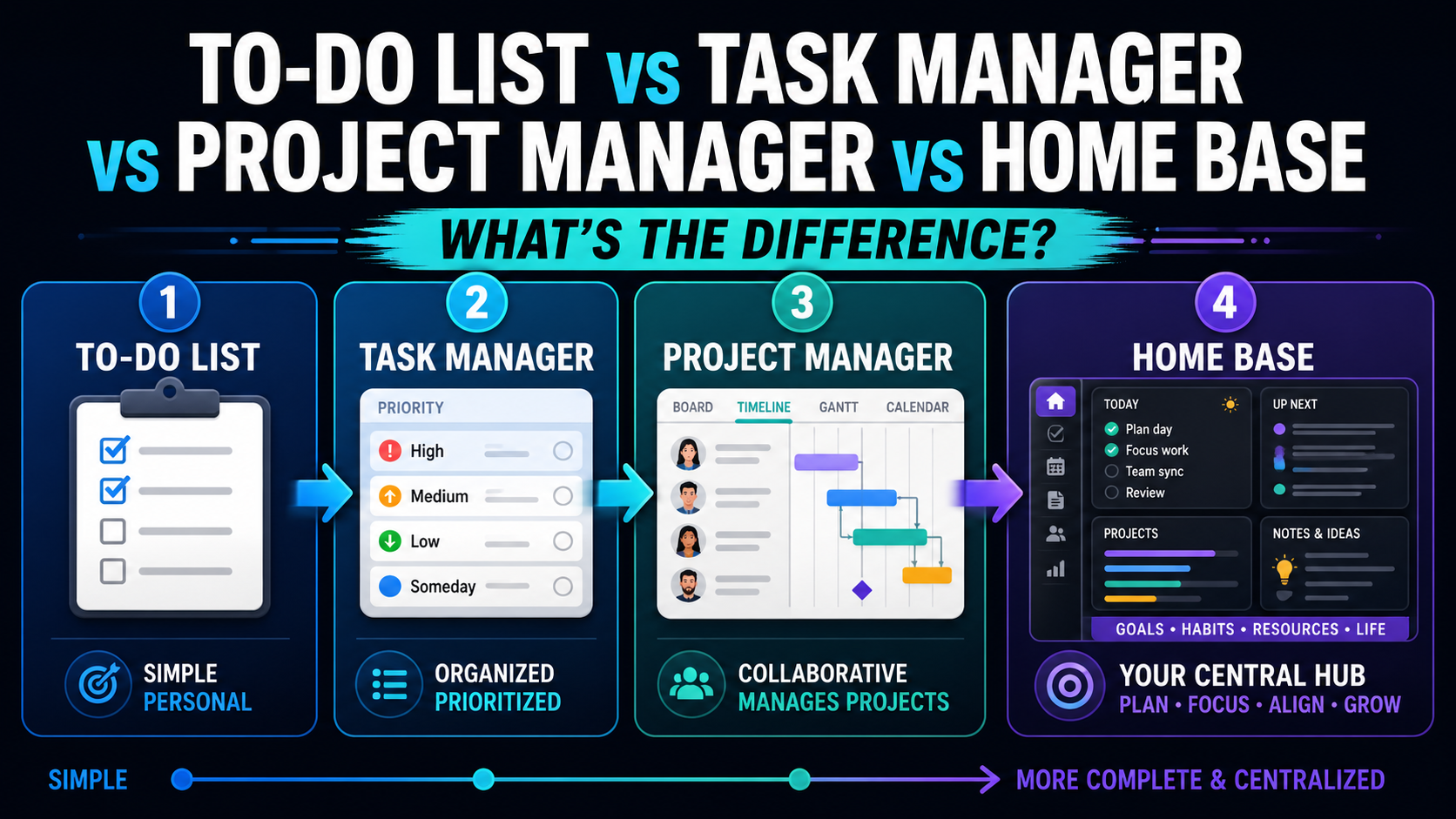
Most people do not know whether they need a to-do list, a task manager, a project manager, a daily planner, a notes app, or a productivity home base.
They just know one thing:
Their work feels scattered.
Tasks are in one app.
Notes are somewhere else.
Projects live in another tool.
Calendar events sit on a calendar.
Personal reminders are mixed with work reminders.
Ideas get saved in random documents.
And by the time they sit down to work, they are not really planning anymore. They are just trying to remember where everything is.
That is why understanding the difference between these tools matters.
A to-do list, task manager, project manager, and productivity home base are not the same thing.
They solve different levels of the productivity problem.
The simple difference
Here is the simplest way to understand it:
A to-do list helps you remember tasks.
A task manager helps you organize tasks.
A project manager helps you coordinate bigger work.
A productivity home base helps you run your day, week, projects, and personal work from one place.
That last category is where tools like SelfManager.ai fit.
SelfManager.ai is not trying to be only a checklist app. It is built around the day, so tasks, notes, projects, time tracking, comments, AI planning, and AI reviews can connect back to real dates.
That difference matters because most people do not only need a place to store tasks.
They need a system for understanding their work.
What is a to-do list?
A to-do list is the simplest productivity tool.
It is a place where you write down things you need to do.
Examples:
- Buy groceries.
- Call accountant.
- Reply to client.
- Pay invoice.
- Book appointment.
- Publish article.
- Fix bug.
- Follow up with customer.
A to-do list can be digital or physical. It can be an app, a note, a sticky note, a paper notebook, or a simple checklist.
Common tools people use as to-do lists include Apple Reminders, Google Keep, Microsoft To Do, Apple Notes, Google Docs, or even pen and paper.
The strength of a to-do list is speed.
You think of something. You write it down. You do not need a complex system.
That is why to-do lists are still useful.
If your needs are simple, a to-do list may be enough.
You need to buy food.
You need to call someone.
You need to remember a small errand.
You need to write down a few tasks for today.
For that kind of work, a simple to-do list is perfect.
The weakness appears when your life or work becomes more complex.
A to-do list usually does not handle context very well.
It does not always show which project a task belongs to.
It does not show why the task matters.
It does not track time.
It does not review your week.
It does not connect tasks to notes, files, comments, or long-term progress.
It may help you remember what to do, but it does not necessarily help you understand your work.
That is the limit.
A to-do list is good for capture.
It is not always enough for planning.
What is a task manager?
A task manager is a more structured version of a to-do list.
It does not only store tasks. It helps you organize them.
A task manager usually includes features like:
- Due dates.
- Priorities.
- Labels.
- Projects.
- Recurring tasks.
- Subtasks.
- Filters.
- Reminders.
- Notifications.
- Different views.
Examples include Todoist, TickTick, Things, Microsoft To Do, Any.do, and similar apps.
A task manager is useful when you have more than a few simple reminders.
For example, you might use a task manager to organize:
- Personal errands.
- Work tasks.
- Recurring bills.
- Client follow-ups.
- Content ideas.
- Household tasks.
- Fitness habits.
- Small business admin.
A task manager gives you more structure than a plain checklist.
You can group tasks by project.
You can set deadlines.
You can mark priority levels.
You can create recurring tasks.
You can filter by today, upcoming, overdue, or category.
This is helpful.
But the task is usually still the center of the system.
That means a task manager often answers this question:
"What tasks do I have?"
That is useful, but it is not always enough.
Many people do not struggle because they lack a list of tasks.
They struggle because they do not know what today should look like.
They struggle because tasks are disconnected from time, notes, projects, and review.
They struggle because they finish a week and have no idea what actually happened.
That is where task managers can start to feel limited.
A task manager can organize your tasks, but it may not become your full daily operating system.
What is a project manager?
A project management tool helps coordinate larger work.
It is less about remembering individual tasks and more about managing a body of work across people, deadlines, stages, and responsibilities.
Project management tools usually include features like:
- Boards.
- Timelines.
- Assignees.
- Comments.
- File attachments.
- Statuses.
- Deadlines.
- Dependencies.
- Dashboards.
- Reporting.
- Workflows.
Examples include Asana, ClickUp, Monday.com, Trello, Jira, Basecamp, and similar tools.
A project manager is useful when work involves multiple steps or multiple people.
For example:
- A website redesign.
- A product launch.
- A software development sprint.
- A marketing campaign.
- A client project.
- A hiring process.
- A content production workflow.
- A customer onboarding process.
A project management tool helps answer questions like:
- Who owns this?
- What is the deadline?
- What stage is this in?
- What is blocked?
- What needs approval?
- What tasks belong to this project?
- What files or comments are connected to this work?
That is extremely useful for teams.
But project management tools can also become heavy.
Sometimes they are great for seeing the project, but not great for running your actual day.
A project board may show 200 tasks across five projects.
That does not automatically tell you what to do today.
A timeline may show deadlines.
That does not automatically help you decide what deserves your attention this morning.
A dashboard may show progress.
That does not always help you understand your personal work rhythm.
This is why many people use a project management tool for the team, but still need another system for their daily planning.
Project management answers:
"What is happening with the project?"
Daily productivity also needs to answer:
"What should I do today?"
What is a productivity home base?
A productivity home base is different.
It is the central place where your daily work lives.
It is not only a to-do list.
It is not only a task manager.
It is not only a project board.
It is the place where you plan, work, track, and review.
A productivity home base can include:
- Daily planning.
- Tasks.
- Projects.
- Notes.
- Time tracking.
- Comments.
- Files and images.
- Calendar context.
- Personal tasks.
- Work tasks.
- Weekly reviews.
- Monthly reviews.
- AI summaries.
- Work history.
The key difference is that a productivity home base connects the pieces.
A to-do list might remember the task.
A task manager might organize the task.
A project manager might connect the task to a project.
A productivity home base connects the task to the day.
That is a big difference.
Because real life does not happen inside one perfect project board.
Real life happens on Monday.
Then Tuesday.
Then Wednesday.
You have client work, product work, meetings, errands, personal responsibilities, ideas, notes, distractions, and unfinished tasks.
A productivity home base helps you see the day as the center of the system.
This is how SelfManager.ai is designed.
SelfManager.ai is a date-centric productivity home base. The day is the center of the homepage. You can plan tasks, organize them into tables, track time, add notes, attach images, manage project work, use comments, and review your week or month with AI.
That makes it different from a basic to-do list.
It is not just asking:
"What tasks do you have?"
It is asking:
"What does today contain?"
And later:
"What actually happened?"
That is the real value of a productivity home base.
Where does a daily planner fit?
A daily planner is focused on today.
It helps you decide what the day should look like.
A daily planner might include:
- Top priorities.
- Tasks for today.
- Time blocks.
- Meetings.
- Habits.
- Notes.
- End-of-day review.
Examples include paper planners, Sunsama, Akiflow, Motion, and other daily planning tools.
A daily planner is useful when your biggest problem is deciding what to do today.
But a daily planner is not always a full productivity home base.
Some daily planners are mostly focused on scheduling or selecting tasks for the day.
A productivity home base goes further.
It connects the day to:
- Projects.
- Notes.
- Time tracking.
- Work history.
- Weekly reviews.
- Monthly reviews.
- Personal tasks.
- Team collaboration.
- AI planning and review.
SelfManager.ai includes daily planning, but it is broader than a daily planner.
It is better described as a date-centric productivity home base because the day connects to everything else.
Where does a notes app fit?
A notes app helps you store information.
That information might be:
- Ideas.
- Meeting notes.
- Research.
- Drafts.
- Personal notes.
- Client notes.
- Book notes.
- Plans.
- Checklists.
Examples include Apple Notes, Google Keep, Notion, Evernote, Obsidian, and similar tools.
Notes apps are useful because not everything starts as a task.
Sometimes you need to think.
Sometimes you need to write.
Sometimes you need to collect information before you know what to do with it.
The problem is that notes can easily become a graveyard.
You write something down.
You save it.
Then you forget about it.
A note can contain tasks, but that does not mean those tasks are planned.
A note can contain a strategy, but that does not mean anything will happen.
A note can contain a good idea, but that does not mean it will become part of your week.
That is why notes need to connect to action.
A note can capture an idea.
A task manager can turn it into an action.
A productivity home base can connect it to a real day.
That final step is what many systems miss.
Quick comparison
| Tool type | Best for | Main weakness |
|---|---|---|
| To-do list | Quick capture and simple reminders | Too simple for complex work |
| Task manager | Organizing tasks, deadlines, and priorities | Can become a long task database |
| Project manager | Coordinating projects, teams, and workflows | Can feel heavy for daily execution |
| Daily planner | Deciding what today should look like | May not handle long-term review |
| Notes app | Capturing ideas, notes, and information | Tasks and decisions can get buried |
| Productivity home base | Planning, doing, tracking, and reviewing work | Requires building a real habit |
Which one do you actually need?
The answer depends on what problem you are trying to solve.
Use a to-do list if you only need simple reminders.
If you mostly need to remember errands, small tasks, and one-off actions, a to-do list is enough.
Use a task manager if you have many tasks, recurring responsibilities, deadlines, and categories.
If your main problem is keeping track of what needs to be done, a task manager is better than a plain checklist.
Use a project manager if you coordinate bigger work with multiple steps, deadlines, people, or clients.
If your main problem is managing projects, ownership, statuses, and collaboration, a project management tool makes sense.
Use a daily planner if your biggest problem is deciding what to do today.
If your task list is full but your day still feels unclear, a daily planner can help.
Use a notes app if your biggest problem is capturing ideas, research, and information.
If you think through writing, notes are important.
Use a productivity home base if your work is scattered across tasks, notes, projects, time, personal life, and reviews.
If you want one place to plan the day, manage tasks, track work, and understand your week or month, you probably need a home base.
Where SelfManager.ai fits
SelfManager.ai fits the productivity home base category.
It is for people who do not want their productivity system to be only a list.
It is for people who think in days.
It is for people who want tasks, projects, notes, comments, images, time tracking, daily planning, and AI reviews connected to actual dates.
That matters because productivity is not only about checking boxes.
A checked box tells you what is done.
It does not always tell you what happened.
It does not tell you why a week felt heavy.
It does not tell you which project kept taking over.
It does not tell you what slipped again and again.
It does not tell you what to change next week.
SelfManager.ai is built for that bigger loop:
- Plan the day.
- Do the work.
- Track what happened.
- Review the week.
- Understand the month.
- Improve the next plan.
That is the difference between a simple productivity tool and a productivity home base.
Final takeaway
A to-do list helps you remember.
A task manager helps you organize.
A project manager helps you coordinate.
A daily planner helps you choose today's work.
A notes app helps you capture information.
A productivity home base helps you connect everything into one working system.
That is the category more people are starting to need.
Because modern work is not simple.
It is not just one list.
It is not just one project.
It is not just one calendar.
It is tasks, notes, projects, meetings, personal responsibilities, deadlines, unfinished work, ideas, and review.
SelfManager.ai exists for that reality.
It is a date-centric productivity home base for people who want to plan their days, manage tasks and projects, track what happened, and use AI to understand their work over time.
Date-based AI Task Manager
Plan smarter, execute faster, achieve more
Create tasks in seconds, generate AI-powered plans, and review progress with intelligent summaries. Perfect for individuals and teams who want to stay organized without complexity.
Get started with your preferred account