
Notion vs ClickUp: What's the Difference and Which One Should You Use?
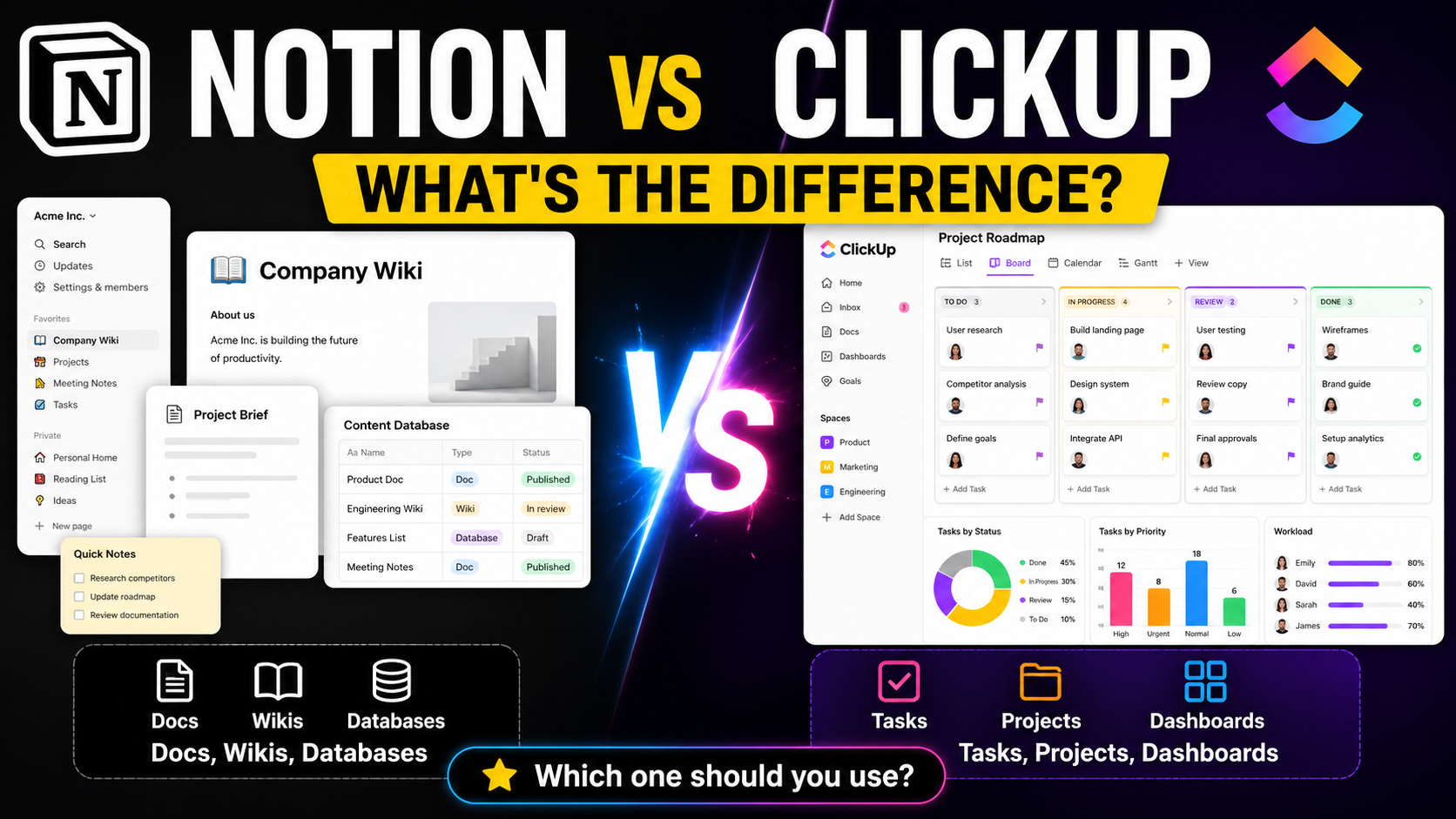
Notion and ClickUp are often compared because both can manage tasks, projects, docs, and team information.
But they feel very different because they come from different philosophies.
Notion started as a flexible workspace for notes, docs, wikis, databases, and custom systems.
ClickUp started more clearly as a work and project management platform for tasks, projects, teams, workflows, goals, and reporting.
Notion is best when your main problem is organizing knowledge, notes, docs, databases, and custom systems.
ClickUp is best when your main problem is managing tasks, projects, deadlines, teams, workflows, and reporting.
SelfManager.ai fits a different category: date-centric daily planning and review, where the day is the center of the system.
Notion and ClickUp are not the same type of tool
Notion and ClickUp are often compared because both can manage tasks, projects, docs, and team information.
But they feel very different because they come from different philosophies.
Notion feels like a flexible workspace you build.
ClickUp feels like a project management system you configure.
That is the key difference.
Notion is closer to:
- Docs.
- Wiki.
- Knowledge base.
- Database builder.
- Custom workspace.
- Light project management.
ClickUp is closer to:
- Task management.
- Project management.
- Team workflows.
- Dashboards.
- Goals.
- Reporting.
- Operations management.
What is Notion best for?
Notion is best for people and teams who want a flexible workspace for information.
Notion's own product positioning describes it as an AI workspace with docs, wikis, projects, enterprise search, meeting notes, integrations, and agents.
Notion is good for:
- Company wikis.
- Team documentation.
- Personal knowledge management.
- Content calendars.
- Meeting notes.
- Product specs.
- Client portals.
- Light CRM systems.
- Research databases.
- Startup operating systems.
- Custom internal tools.
What is a Notion wiki?
A Notion wiki is a structured knowledge base.
It is where a team stores important information like:
- Company policies.
- SOPs.
- Brand guidelines.
- Product documentation.
- Engineering docs.
- Onboarding material.
- Meeting notes.
- Process documents.
- Team knowledge.
Notion's wiki product is designed to keep docs organized and current, with features like verification so users can trust that information is accurate and up to date.
A Notion wiki is like a company brain.
Instead of important knowledge being buried in Slack, Google Docs, email, or random files, it lives in one organized workspace.
What is a Notion database?
A Notion database is not a developer database like MySQL or Firebase.
It is more like a smart table where each row can also be opened as its own page.
Notion describes databases as one of its fundamental features, used to manage and organize multiple pages in one place.
A Notion database can be used for:
- Content calendars.
- Task trackers.
- CRM pipelines.
- Project roadmaps.
- Reading lists.
- Habit trackers.
- Product feedback.
- Bug trackers.
- Job applications.
- Client lists.
Example:
A content calendar in Notion might have columns for:
- Title.
- Status.
- Author.
- Publish date.
- Category.
- URL.
- Notes.
Each article is a row, but each row can open into a full page with the draft, research, checklist, and comments.
That is why people like Notion.
It lets non-technical users build flexible systems.
What is ClickUp best for?
ClickUp is best for people and teams who need structured work management.
ClickUp describes itself as an all-in-one productivity platform that combines task management, docs, goals, and more in a single workspace. It also emphasizes 15+ view types so teams can visualize work in different ways.
ClickUp is good for:
- Project management.
- Client work.
- Software development.
- Marketing campaigns.
- Team operations.
- Agency workflows.
- Task assignment.
- Deadlines.
- Status tracking.
- Dashboards.
- Goals and OKRs.
- Reporting.
- Recurring workflows.
ClickUp is more task and project-driven than Notion.
The center of ClickUp is usually work execution:
- Tasks.
- Assignees.
- Statuses.
- Priorities.
- Deadlines.
- Dependencies.
- Comments.
- Workload.
- Dashboards.
ClickUp's core features explained
ClickUp tasks:
The main unit of work. A task can have an owner, due date, status, priority, description, comments, subtasks, attachments, and custom fields.
ClickUp views:
Different ways to see the same work. For example, list view, board view, calendar view, timeline, workload, table, and more. ClickUp says it offers more than 15 view types.
ClickUp dashboards:
A way to see progress, workload, deadlines, reporting, and project metrics in one place.
ClickUp goals:
A way to connect goals to tasks or projects and track progress toward outcomes. ClickUp describes Goals as a way to assign goals to projects or tasks and automatically track progress.
ClickUp docs:
Documentation inside ClickUp, often connected to tasks or projects.
ClickUp Brain:
ClickUp's AI layer. It can summarize Docs, task threads, updates, and Inbox comments, which is useful for project managers trying to understand blockers, risks, and priorities.
Job types and people who usually prefer Notion
Notion is often a better fit for:
- Founders building an operating system.
- Creators managing content calendars.
- Writers organizing research and drafts.
- Students organizing notes and assignments.
- Product managers writing specs and roadmaps.
- Designers storing briefs, guidelines, and references.
- HR teams building onboarding docs.
- Startups building internal wikis.
- Consultants creating client portals.
- People who like building custom systems.
Best example:
A startup founder might use Notion for:
- Company wiki.
- Product roadmap.
- Meeting notes.
- Investor notes.
- Hiring pipeline.
- Content calendar.
- Strategy docs.
- Light task tracking.
Notion works well when the work is knowledge-heavy.
Job types and people who usually prefer ClickUp
ClickUp is often a better fit for:
- Project managers.
- Operations managers.
- Marketing teams.
- Agencies.
- Software teams.
- Customer success teams.
- Remote teams.
- Team leads.
- Client service businesses.
- Businesses with recurring workflows.
- Teams that need reporting.
Best example:
A marketing agency might use ClickUp for:
- Client projects.
- Campaign timelines.
- Assigned tasks.
- Content production workflows.
- Approval stages.
- Deadlines.
- Team workload.
- Recurring monthly deliverables.
- Dashboards and reporting.
ClickUp works well when the work is execution-heavy.
Notion vs ClickUp in simple terms
| Category | Notion | ClickUp |
|---|---|---|
| Main strength | Flexible workspace and knowledge management | Structured project and task management |
| Best for | Docs, wikis, databases, custom systems | Projects, tasks, workflows, teams, dashboards |
| Feels like | A workspace you build | A project system you configure |
| Knowledge base | Very strong | Available, but not the main identity |
| Task management | Good for lighter workflows | Stronger for complex workflows |
| Project management | Flexible but can require setup | More structured out of the box |
| Dashboards and reporting | More limited or custom | Stronger |
| Best users | Creators, founders, product teams, knowledge workers | Project managers, agencies, operations teams, execution-heavy teams |
| Risk | Can become messy if overbuilt | Can feel heavy if you only need simple planning |
Where SelfManager.ai fits compared with Notion and ClickUp
Notion is strong when your main problem is organizing information.
ClickUp is strong when your main problem is managing projects and team execution.
SelfManager.ai is strong when your main problem is planning and understanding your work by day, week, and month.
SelfManager.ai is date-centric. The day is the center of the system.
That means it is built around questions like:
- What should I do today?
- What did I work on this week?
- What slipped?
- Where did my time go?
- What should I plan for next week?
- How do my tasks, notes, projects, and reviews connect to real dates?
This is different from Notion and ClickUp.
Notion starts with pages and databases.
ClickUp starts with tasks and projects.
SelfManager.ai starts with the day.
That is the cleanest positioning.
Final takeaway
Notion is best if you want to build a flexible workspace for knowledge, docs, databases, and custom systems.
ClickUp is best if you need a structured project management platform for tasks, teams, workflows, dashboards, and reporting.
SelfManager.ai is best if you want a date-centric productivity home base for daily planning, task management, time tracking, and AI weekly or monthly reviews.
The right tool depends on where your work breaks down.
If information is scattered, Notion may help.
If team execution is messy, ClickUp may help.
If your days, weeks, and priorities feel unclear, SelfManager.ai may be the better fit.
Date-based AI Task Manager
Plan smarter, execute faster, achieve more
Create tasks in seconds, generate AI-powered plans, and review progress with intelligent summaries. Perfect for individuals and teams who want to stay organized without complexity.
Get started with your preferred account