
Smartsheet Use Cases: What Power Users Actually Build With It
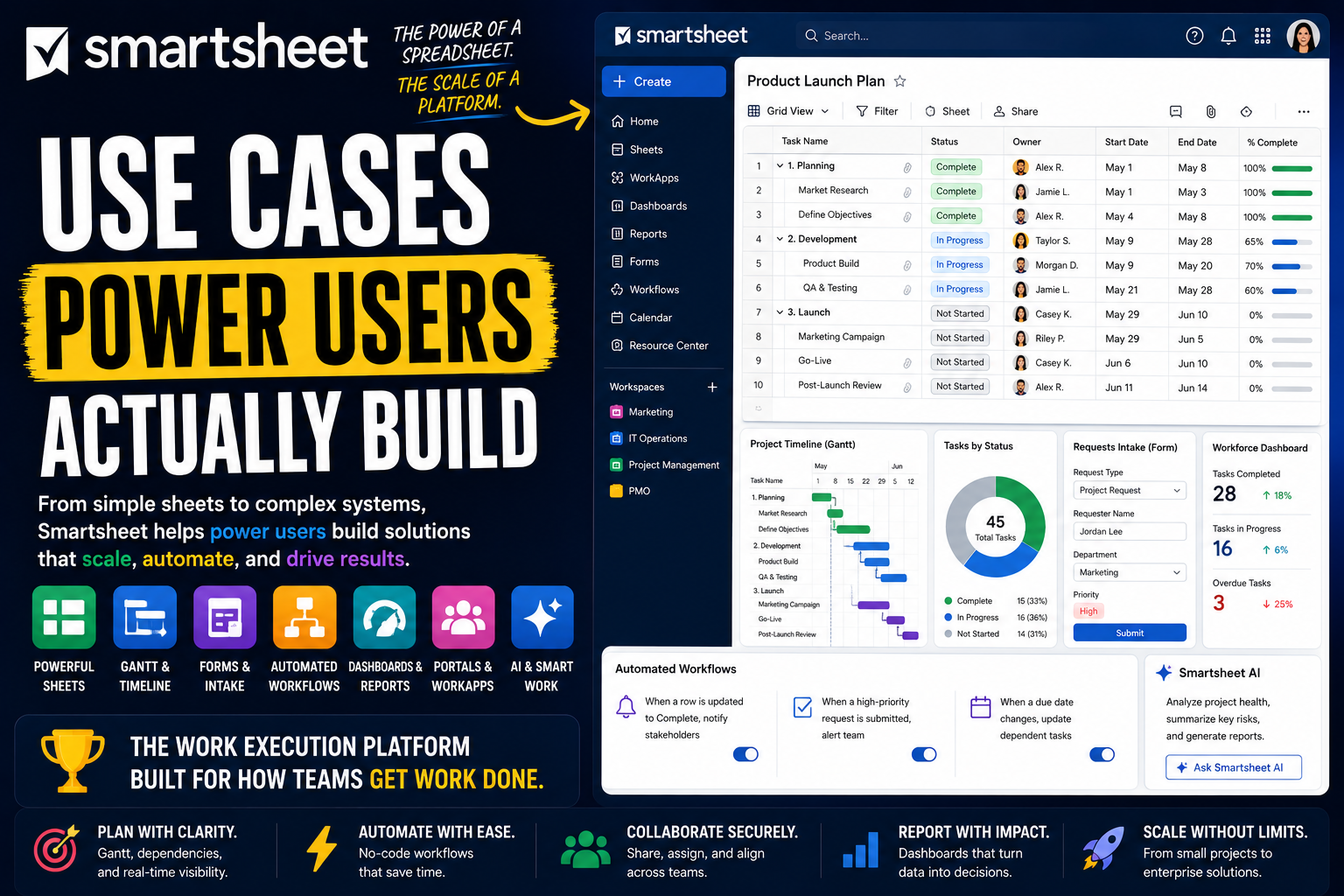
Smartsheet looks like a spreadsheet. That is the point - it is designed to feel familiar the moment you open it, so anyone comfortable with Excel can start using it without training. Most people stop there and treat it as a shared spreadsheet with a few nice extras.
Power users see something very different. To them, Smartsheet is a work execution platform that happens to wear a spreadsheet's clothes. They do not just track work in a grid. They build connected systems - linked sheets, automated workflows, live dashboards, controlled portals - the kind of thing large organizations run entire programs on.
That is the gap this article is about. Two people can open the same Smartsheet and have completely different experiences: one has a tidy task sheet, the other has built an operational system that a whole department depends on.
Here is a full look at what Smartsheet power users actually build, and how.
What separates a Smartsheet power user from everyone else
The difference is not effort. It is treating Smartsheet as a platform, not a spreadsheet.
The foundation looks simple. A Sheet holds rows and columns, and rows can be indented into a parent-child hierarchy. But columns have specific types - dates, contacts, dropdowns, checkboxes, symbols - which is what turns a grid into structured, usable data. Casual users stop at the grid. Power users build on top of it with a deeper toolkit:
- Multiple views. The same sheet can be seen as a Grid, a Gantt timeline, a Card board, or a Calendar, with no data duplicated.
- Cross-sheet references and reports. Links and rollups that connect many sheets into one system, with reports that pull rows from across all of them.
- Forms. Branded intake forms that drop clean, structured data straight into a sheet.
- Automated workflows. No-code rules that send alerts, request approvals, and update rows on their own.
- Dashboards. Widget-based command centers that turn raw sheet data into a live picture.
At the high end sit the premium capabilities - Dynamic View, Control Center, WorkApps - and a growing layer of AI. The mindset behind all of it: power users do not build a spreadsheet in Smartsheet. They build a system, with the grid as the starting point rather than the destination.
With that in mind, here is what people build.
Personal productivity systems power users build
Smartsheet is built for organizations, but power users often learn it by running their own work first - and the spreadsheet-style interface makes that an easy on-ramp.
A personal project plan
The natural starting point. Power users build a personal project sheet with a row per task, indented into phases, and dates that drive a Gantt timeline.
The advantage over a plain spreadsheet is dependencies. Link tasks in sequence, and when one date moves, the rest of the schedule shifts with it. A personal project stops being a static list and becomes a real plan that reacts to change.
Personal trackers and logs
Smartsheet suits structured tracking - habits, goals, finances, reading, anything with a date and a status. A sheet holds the records, column types keep the data clean, and conditional formatting flags what needs attention.
It is less playful than a dedicated tracking app, but more flexible. You decide exactly what to capture and how to see it, and the grid handles a few hundred entries without complaint.
A personal task list across projects
Power users keep a master task sheet that pulls together work from everywhere - or use a report that gathers their assigned rows from across multiple sheets into one place.
Sorting and filtering surface what matters now, and the Card view turns the list into a simple board. It becomes a single, reliable answer to "what should I work on" without hunting through separate sheets.
A personal dashboard
Power users build a dashboard for themselves, with widgets reading their own sheets - open tasks, upcoming deadlines, progress on goals, anything overdue.
Because the dashboard pulls live data, it never goes stale. Open Smartsheet in the morning and your own situation is laid out at a glance, separate from any team or project view.
Solo operator and freelance workflows
Smartsheet works well for independents too. Freelancers and consultants use it to run client work, often as a familiar replacement for older project tools.
Running client projects
Power users give each client their own project sheet, built from a consistent template - phases, tasks, owners, dates, and a Gantt timeline. Duplicating the template starts a new client engagement in seconds.
The familiar grid is part of the appeal: clients comfortable with spreadsheets can read a Smartsheet plan instantly, and shared views let them follow progress without learning a new tool.
A lightweight CRM and pipeline
You do not need a dedicated CRM. Power users build one in Smartsheet - a sheet as the pipeline, rows as deals, columns for stage, value, contact, and source, and the Card view turning it into a visual board by stage.
Automated workflows send follow-up reminders so leads do not go cold. It is a simple, visual sales pipeline built from a sheet, shaped exactly to how you sell.
Intake and request forms
Smartsheet Forms turn a request into a structured row automatically. Power users use them for client intake, project briefs, and feedback - branded, customizable, and usable on a phone in the field, even offline.
Someone submits a form and a clean, complete row lands in the sheet. No copy-paste, no missing details, and every request enters the same organized place.
Tracking deliverables, time, and finances
Power users run the back office in Smartsheet too. A deliverables sheet tracks what is due and what is approved, linked to a separate sheet for invoices moving through draft, sent, and paid.
Cross-sheet references tie it together, so a client's projects, deliverables, and payments connect. The admin side of freelancing becomes visible instead of scattered.
How teams run on Smartsheet
Personal use is one thing. Smartsheet's real strength is teams and large organizations - it is used across most of the Fortune 500 to run serious operational work.
Project and program management
The core use case. Teams run projects in Smartsheet with task sheets, dependencies, milestones, and a Gantt view that shows the critical path. It is widely adopted as a modern replacement for older desktop project tools.
Power users connect related project sheets with cross-sheet references, so a program made of many projects rolls up into one coordinated picture without manual consolidation.
Operations and recurring business processes
Operations teams run repeatable processes in Smartsheet - approvals, procurement, compliance checks, vendor onboarding. Each process is a sheet with a defined flow.
Forms handle intake, and automated workflows route each item, request approvals, and send reminders. A process that used to depend on email and memory becomes a tracked, auditable system.
Marketing campaigns and creative work
Marketing teams run campaigns, content calendars, and creative production in Smartsheet. A campaign sheet tracks every deliverable, with a Calendar view for the schedule and a Card view for the production pipeline.
Smartsheet's proofing tools let reviewers mark up creative assets directly, keeping feedback attached to the work. The whole campaign runs in one place instead of across documents and threads.
IT and request management
IT and internal teams use Smartsheet to manage requests, intake queues, and tracked work. A form captures each request, columns hold priority and type, and the sheet moves it from new to resolved.
Automated workflows assign and escalate, and dashboards give leadership a live view of volume and status. For teams that do not need a full service desk, a well-built request system handles it.
Construction and field operations
Construction is one of Smartsheet's signature industries. Teams manage project schedules, punch lists, RFIs, submittals, and site inspections - much of it captured on phones and tablets in the field.
Forms work offline, so data entered on a job site syncs when a connection returns. For an industry that runs on schedules and paper, Smartsheet replaces both with one connected system.
Project portfolio management
For large organizations, Smartsheet is a full project portfolio management platform. Reports and dashboards roll up dozens or hundreds of projects into portfolio-level visibility, so leadership can see health, progress, and risk across everything at once.
At enterprise scale, power users use Control Center to standardize this - rolling out consistent project templates, structures, and reporting automatically across an entire portfolio. It is what turns Smartsheet from a project tool into an operational backbone.
The advanced layer: automation, dashboards, and AI
This is where power users stop maintaining sheets by hand and start building systems that run themselves.
Cross-sheet references, reports, and rollups
This is the skill that separates a Smartsheet power user. Instead of one giant sheet, they build many focused sheets and connect them - cross-sheet references pull values between sheets, and reports gather rows from across all of them into one view.
Done well, this turns a pile of separate spreadsheets into a single connected system, where a portfolio-level report reflects every project sheet underneath it automatically.
Automated workflows
Smartsheet's no-code automation goes far beyond simple alerts. Power users build multi-step workflows with conditions - request approvals, update rows when a status changes, send recurring reminders, escalate stale items, and post to Slack or Teams.
These workflows replace a great deal of manual follow-up. The chasing, the status updates, the routing - it all happens on its own, with fewer errors and faster cycle times.
Dashboards as command centers
Dashboards are one of Smartsheet's strongest features. Power users build them as live command centers, with widgets pulling from sheets and reports - metrics, charts, key project sheets, shortcuts.
Different dashboards serve different audiences: a team view for daily work, an executive view for portfolio health. Status reporting that used to take hours becomes a link that is always current.
Dynamic View, WorkApps, and controlled sharing
At the advanced level, power users stop sharing raw sheets. Dynamic View gives each stakeholder access to exactly the rows and columns they should see, and nothing more - crucial when many people touch the same data.
WorkApps go further, packaging sheets, reports, and dashboards into a no-code app with a clean interface and role-based access. The underlying sheets stay complex, while each person gets a focused, app-like experience.
Smartsheet AI and Smart Agents
This is Smartsheet's fastest-moving layer. Smartsheet AI already helps generate formulas, analyze data, and summarize content, and the platform is moving toward an AI-agent-first model.
Newer capabilities point further ahead: a conversational assistant that can design projects and configure automations, plain-language workflow building, columns that categorize and summarize on their own, and digital agents that reason and act within a workflow. Smartsheet has also begun connecting to outside AI tools through the Model Context Protocol. One practical note: the most powerful capabilities, including premium apps and advanced AI, sit on higher tiers and paid add-ons, so this is real power but not part of a basic plan.
Where Smartsheet is not the right tool
A roundup like this can make Smartsheet sound limitless. It is genuinely capable, but power users are usually clear about its limits.
The first is its nature. Smartsheet is a grid at heart. Cross-sheet references connect sheets, but it is not a true relational database the way a dedicated database tool is - complex, deeply interconnected data can feel forced. It is also not a documents or knowledge tool, and reviewers note it is not built for people-first work like hiring pipelines.
Then there is cost and complexity. The most powerful capabilities - Control Center, Dynamic View, WorkApps, and the rest - are premium add-ons that can add significantly to the total price. And while a basic sheet is easy, building well-structured automations, dashboards, and cross-sheet systems takes real effort and planning.
The honest takeaway: Smartsheet is exceptional for structured project, operations, and portfolio work at scale, especially for organizations that want a spreadsheet-familiar platform. It is a weaker fit for a tiny team that wants something simple, for documentation, or for highly relational data.
The common thread
Look across all of these use cases and one pattern stands out. Smartsheet power users do not see a spreadsheet. They see a starting point.
The project plan, the operations system, the portfolio dashboard, the field-data workflow - in a mature Smartsheet setup these are not standalone sheets. They are connected systems, with cross-sheet references linking the data, automation running the logic, and dashboards surfacing the picture. That is the real appeal: Smartsheet takes the one interface almost everyone already understands - the grid - and lets you build enterprise-grade systems on top of it.
Worth one honest note to close on. That same accessibility is the trap. Because anyone can spin up a sheet in seconds, it is easy to end up with dozens of disconnected, inconsistent sheets that nobody can navigate. The power users who get real value structure things deliberately - consistent columns, clean cross-sheet design, focused sheets that connect on purpose - so the system stays legible as it grows, instead of sprawling into a spreadsheet maze.
FAQ
What is Smartsheet used for?
Smartsheet is an enterprise work management platform. It is used for project and program management, operations and process tracking, portfolio management, marketing campaigns, IT requests, and construction and field work - all in a spreadsheet-style interface.
Is Smartsheet just a spreadsheet?
No. It looks like a spreadsheet so it feels familiar, but it works as a work execution platform. It adds Gantt timelines, dependencies, forms, automated workflows, dashboards, reports, and cross-sheet links that a normal spreadsheet cannot do.
Is Smartsheet good for personal use or only for enterprises?
Both, though it leans enterprise. Individuals use it for personal project plans and trackers, and freelancers use it for client work. But its real strength is large organizations running structured work at scale, where most of the Fortune 500 use it.
What makes someone a Smartsheet power user?
Power users treat Smartsheet as a platform. They connect many sheets with cross-sheet references and reports, build multi-step automated workflows, design dashboards, use Dynamic View and WorkApps for controlled sharing, and structure everything deliberately rather than building one giant sheet.
What are Smartsheet's premium apps?
Premium apps, also called Advanced Capabilities, are powerful add-ons priced separately from the core plans. They include Control Center for standardizing projects at scale, Dynamic View for granular sharing, WorkApps for building no-code apps, plus Bridge and DataMesh for advanced automation and data movement.
What is Smartsheet AI?
Smartsheet AI is the platform's built-in intelligence - it can generate formulas, analyze data, and summarize content. Smartsheet is expanding it toward an agent-first model, with a conversational assistant, plain-language workflow building, and digital agents that act within workflows.
Can Smartsheet replace Microsoft Project or Excel?
For many teams, yes. It is widely adopted as a modern replacement for desktop project tools, offering Gantt charts, dependencies, and collaboration in the cloud. It also replaces scattered tracking spreadsheets with a connected, automated system.
What is the downside of using Smartsheet?
The main downsides are that it is a grid rather than a true relational database, that its most powerful features are paid add-ons that raise the cost, and that advanced setups take real effort to structure well. It is also not a documents tool or a people-first platform.
Date-based AI Task Manager
Plan smarter, execute faster, achieve more
Create tasks in seconds, generate AI-powered plans, and review progress with intelligent summaries. Perfect for individuals and teams who want to stay organized without complexity.
Get started with your preferred account