
Jira Use Cases: What Power Users Actually Build With It
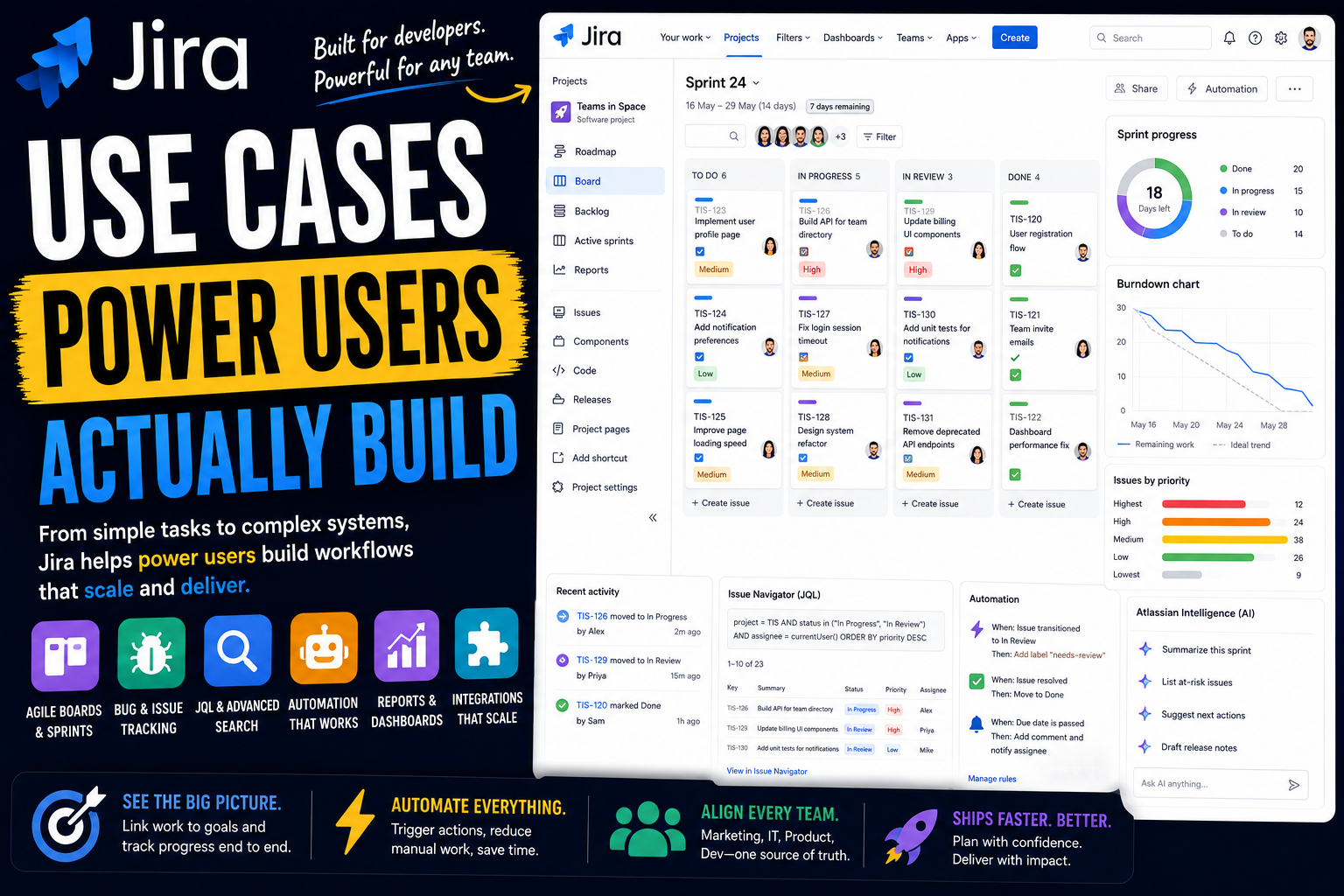
Jira has a reputation. To some people it is the gold standard for running software projects. To others it is the complicated tool their company forced on them, where they drag a card and hope it lands in the right column.
Both reactions usually come from the same place: most people only ever see a thin slice of what Jira does. They work inside one board, in one project, configured by someone else.
Power users see the whole machine. To them, Jira is a deeply configurable work tracking platform - one that can be shaped to mirror almost any process, queried like a database, automated end to end, and connected straight to the code being shipped. They do not just move tickets. They build the system the tickets move through.
Here is a full look at what Jira power users actually build, and how.
What separates a Jira power user from everyone else
The difference is not effort. It is understanding that Jira is configurable, and using that configurability on purpose.
Everything in Jira sits on the same foundation. A project holds issues - now also called work items - and those issues come in types: Epics for big bodies of work, Stories and Tasks for the work itself, Bugs for defects, and Subtasks for the pieces. Casual users just create and close them. Power users go deeper:
- Custom workflows. The real engine. Instead of a plain to-do and done, each process gets its own statuses and transitions - the exact stages work actually moves through.
- Boards, backlogs, and sprints. Scrum and Kanban boards built on top of the issues, with a backlog feeding planned work into time-boxed sprints.
- Custom fields and screens. Structured data on every issue, with screens controlling what people see and when.
- JQL. Jira Query Language, the search syntax that turns Jira into something you can interrogate precisely.
- Automation, dashboards, and Plans. The logic, the reporting, and the cross-project planning layer.
The mindset behind all of it: a power user configures Jira to match a real process, rather than forcing the team to work the way a default setup demands. Many Jira power users are effectively part-time administrators - and that is the point.
With that in mind, here is what people build.
How power users set up their own work in Jira
Jira is a team tool first, but a power user still shapes their own corner of it deliberately, so the daily grind of "what should I work on" answers itself.
A personal view of your own work
Every power user has a fast, reliable way to see just their own issues. Jira's built-in personal work view pulls everything assigned to you across every project into one place, so you are never digging through boards to find your tasks.
Some go further and run a personal board filtered to their own work, with their own columns for how they actually move through a day. It is a private workflow layered on top of the team's.
JQL filters for a personal queue
This is where JQL earns its keep at the individual level. Power users write saved filters that answer specific questions - everything assigned to me and due this week, anything where I am mentioned, bugs I reported that are still open.
Those filters become permanent, one-click views. Instead of scanning, you open a filter and see exactly the slice of Jira that is yours to act on right now.
A personal dashboard
Power users build a dashboard for themselves, assembled from gadgets that read their personal filters - open work, recently updated issues, items waiting on someone else, upcoming due dates.
It becomes a private command center. Open Jira in the morning and your own situation is laid out at a glance, separate from whatever the team board is showing.
Software teams: what Jira was built for
This is Jira's home ground. It has been the default tool for software development for two decades, and the depth here is the reason.
Agile and sprint management
The classic use case. Engineering teams run Scrum in Jira - a backlog of Stories and Bugs, estimated and prioritized, pulled into time-boxed sprints on a Scrum board.
Power users lean on the reporting that comes with it: burndown charts, velocity tracking, and sprint reports that show what was committed versus what shipped. Over time, that data makes planning the next sprint a measured decision rather than a guess.
Kanban and continuous delivery
Not every team works in sprints. Many run a continuous Kanban flow instead, with a board that moves work steadily from backlog to done and no fixed iterations.
Power users set work-in-progress limits to stop the team overcommitting, and use the cumulative flow diagram to spot bottlenecks - the stage where issues quietly pile up. It turns a board into a genuine picture of how work flows.
Bug and defect tracking
Tracking defects is what Jira was originally built to do, and it is still one of its strongest uses. Bugs are captured as their own issue type, with severity, steps to reproduce, environment, and linked issues.
Power users build a workflow specifically for bugs - triage, in progress, in review, verified - and use linking to connect a bug to the feature that caused it and the work that fixes it. Nothing gets lost between "reported" and "resolved."
Connecting code to work
This is a major reason engineering teams stay in Jira. It integrates tightly with development tools - GitHub, GitLab, Bitbucket, and CI/CD pipelines - so branches, commits, pull requests, and deployments all link back to the issue they belong to.
A power user can open a Story and see its entire development trail without leaving Jira. The work item and the actual code stop being separate worlds.
Release and version management
Jira power users use Versions and Releases to manage what ships and when. Issues are assigned to a version, and a release becomes a tracked container of work with its own progress.
Release reports show exactly what is done, what is at risk, and what is slipping before a ship date. For teams shipping on a schedule, it turns a release from a stressful unknown into something visible and managed.
Beyond engineering: other teams on Jira
Jira is no longer only for developers. Atlassian folded its general work management features into Jira, and power users now run all kinds of non-technical teams on it.
IT and service management
IT teams use Jira to handle requests, incidents, and service work. Tickets come in through a portal, move through a triage and resolution workflow, and route automatically to the right person.
Because IT work lives in the same platform as engineering, a service ticket can link directly to the bug or development task that resolves it. The request and the fix are connected, not scattered across two systems.
Marketing and creative operations
Marketing teams run campaigns and content production in Jira. A campaign is an Epic, individual deliverables are Stories, and a board shows everything in flight.
Power users build a workflow that matches a creative process - briefing, drafting, review, approved, published - and use custom fields for channel and owner. It brings the same structure engineering has long had to work that used to live in scattered documents.
Operations and recurring business processes
Operations teams use Jira for repeatable processes - vendor onboarding, approvals, compliance checks, procurement requests. Each process gets its own project and workflow.
Forms and automation handle intake and routing, so a request follows the same reliable path every time. The work becomes a tracked, auditable system instead of something that depends on someone remembering the next step.
HR and people operations
HR teams run employee onboarding, offboarding, and people requests in Jira. A new hire becomes an issue with subtasks for every setup step, assigned across IT, facilities, and the manager.
The workflow makes sure nothing is missed, and automation triggers the right tasks at the right time. It turns a checklist that used to live in a spreadsheet into a coordinated, trackable process.
Product management and discovery
Product teams use Jira to manage roadmaps and, with Jira Product Discovery, to handle the messy stage before the roadmap - capturing ideas, scoring them, and prioritizing.
Ideas connect to the Epics and Stories that deliver them, so strategy links cleanly to execution. The work a team commits to building stays tied to the reasoning behind it.
The advanced layer: JQL, automation, planning, and AI
This is where power users stop using Jira as it ships and start bending it to their will.
JQL: querying Jira like a power user
JQL is the single biggest power-user skill in Jira. It is a query language for searching and filtering issues with precision - combining statuses, assignees, dates, custom fields, linked issues, and more into exact, repeatable searches.
A power user can answer questions a normal search cannot: every high-priority bug untouched for two weeks, all work in the next release without an assignee. Those queries become saved filters, and saved filters power boards, dashboards, and automation. JQL is the thread that ties advanced Jira together.
Automation rules
Jira automation follows a trigger, condition, and action pattern, and power users use it heavily. When an issue is created, assign it. When all subtasks are done, move the parent. When a bug goes untouched too long, escalate it and comment.
With branching and smart values, these rules get genuinely sophisticated - syncing parent and child issues, looping through related work, keeping connected projects aligned. The routine coordination simply stops being manual.
Plans: roadmaps and cross-project planning
For anyone managing work across multiple teams, Jira's Plans feature is essential. It pulls issues from many projects into one timeline, with dependencies, milestones, and capacity planning.
Power users use it to see the bigger picture - how an initiative spans several teams, where the dependencies are, what happens to the schedule if priorities shift. It lifts Jira from tracking tasks to planning programs.
Rovo and agents in Jira
This is Jira's fastest-moving layer. Atlassian's AI, Rovo, is woven through Jira - summarizing issues, drafting updates, answering questions across your work, and turning documents and emails into structured issues.
The bigger shift is agents in Jira. AI agents now work as teammates inside projects: you can assign a work item to an agent, mention one in a comment, or have it pull in automatically when work hits a certain status. They run on Atlassian's Teamwork Graph for context, and power users can build their own in Rovo Studio. Because agents operate inside Jira's existing workflows, permissions, and audit trails, the work stays visible and governed. One practical note: Rovo's full capabilities sit on paid Cloud plans, so this is real power but not part of the free tier.
Where Jira is not the right tool
A roundup like this can make Jira sound like it handles everything. It is genuinely powerful, but power users are the first to name its limits.
The famous one is complexity. Jira's configurability is its strength and its curse - workflows, schemes, permissions, and custom fields can produce a setup so tangled that the team needs an administrator just to keep it running. A small team that wants a simple shared board will usually find Jira heavier than they need, and freelancers or solo users almost always find it overkill.
It is also not a documents or knowledge tool - that is Confluence's job - and it is not a flexible database or a personal life planner. Jira is a work tracking system, and it is happiest when there is a real, repeatable process to track.
The honest takeaway: Jira is exceptional for teams running structured, ongoing work, especially software delivery, and a poor fit for anyone who just wants something light and simple. Power users lean into the depth and accept that the depth has a cost.
The common thread
Look across all of these use cases and one pattern stands out. Jira power users are not trying to track tasks. They are trying to model a process.
The sprint board, the bug workflow, the release plan, the IT request flow - in a mature Jira setup these are not generic lists. They are deliberate reflections of how a specific team actually works, built from custom workflows, queried with JQL, and kept moving by automation. That is the real reason organizations commit to Jira despite the learning curve: almost no other tool can be shaped this precisely.
Worth one honest note to close on. That same configurability is the trap. It is genuinely easy to over-build Jira - too many fields, too many statuses, too many mandatory steps - until the tool becomes an obstacle the team works around rather than through. The best Jira power users treat configuration as something to keep lean. They model the process that exists, resist adding structure for its own sake, and remember that the goal is to help the work move, not to admire the workflow.
FAQ
What is Jira used for?
Jira is a work tracking and project management platform. It is best known for software development - agile sprints, bug tracking, and release management - but it is also used by IT, marketing, operations, HR, and product teams to manage structured, repeatable work.
Is Jira only for software teams?
No, not anymore. Jira began as a tool for software and bug tracking, and that is still its core strength. But Atlassian merged its general work management features into Jira, and it is now widely used by non-technical teams across a business.
What makes someone a Jira power user?
Power users go beyond moving tickets. They configure custom workflows, write JQL queries, build automation rules and dashboards, use Plans for cross-project planning, and understand Jira's schemes and permissions. Many act as part-time administrators for their teams.
What is JQL in Jira?
JQL, or Jira Query Language, is the syntax used to search and filter issues with precision. It can combine statuses, assignees, dates, custom fields, and linked issues into exact, repeatable queries, which then power saved filters, boards, dashboards, and automation.
What are agents in Jira?
Agents in Jira are AI teammates, powered by Atlassian's Rovo, that work inside projects. You can assign work items to them, mention them in comments, or have them activate when work hits a certain status. They operate within Jira's existing workflows, permissions, and audit trails.
Can Jira replace other project management tools?
For teams running structured, ongoing work - especially software delivery - it often does. It is less suited to lightweight needs, personal task management, or documentation, and it does not replace a knowledge tool like Confluence. The trade-off for its depth is real complexity.
What is the downside of using Jira?
The main downside is complexity. Jira's configurability makes it easy to over-build, and a tangled setup can require a dedicated administrator. Small teams and individuals often find it heavier than they need.
Do you need to know how to code to use Jira?
No. Workflows, JQL, automation, dashboards, and configuration are all no-code. The tool is popular with developers because it connects to code, but using Jira at a power-user level does not require programming.
Date-based AI Task Manager
Plan smarter, execute faster, achieve more
Create tasks in seconds, generate AI-powered plans, and review progress with intelligent summaries. Perfect for individuals and teams who want to stay organized without complexity.
Get started with your preferred account