
Airtable Use Cases: What Power Users Actually Build With It
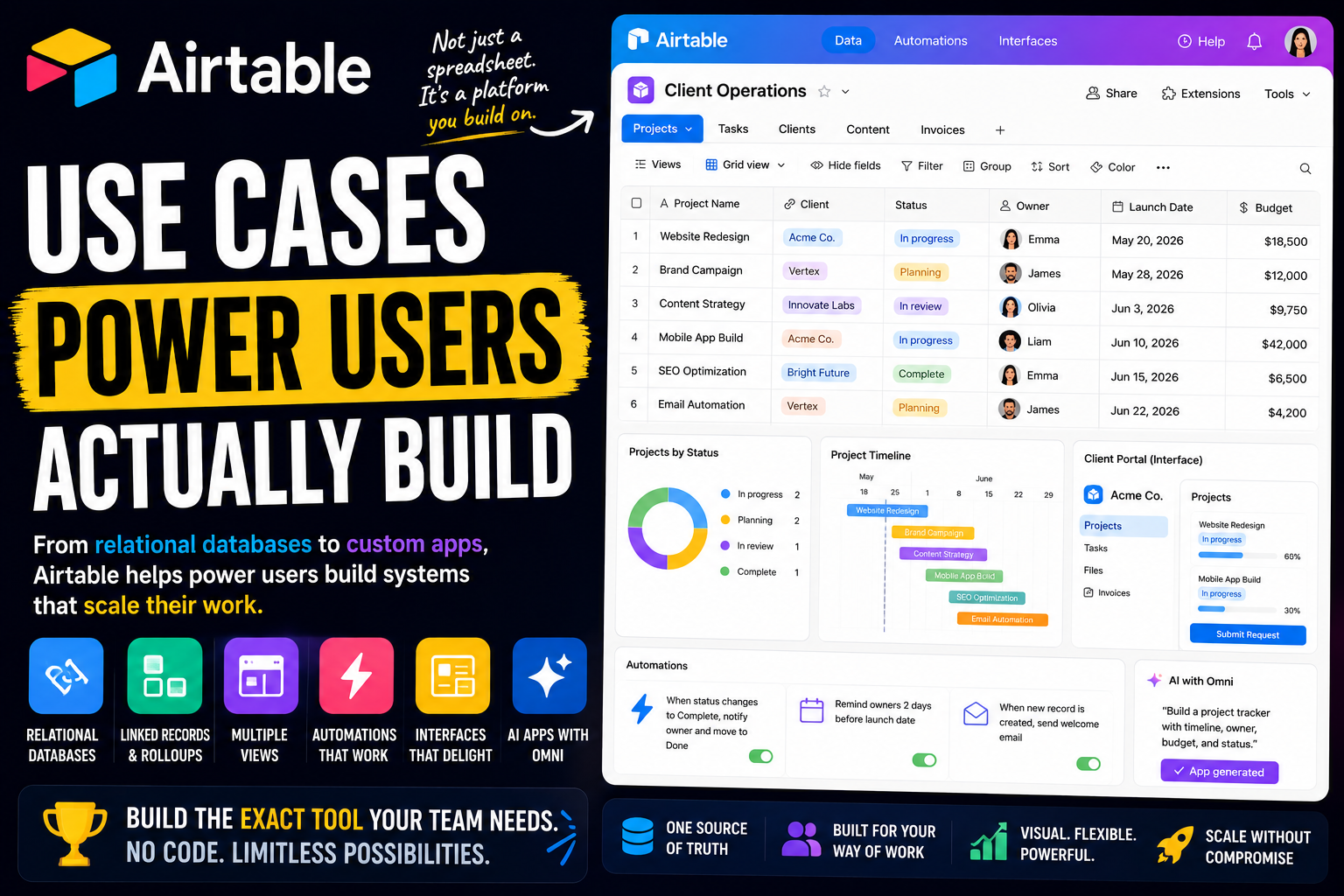
Airtable looks like a colorful spreadsheet. Most people who sign up treat it like one - a prettier Google Sheets with nicer cells. That works, but it misses what the tool actually is.
Power users see something else entirely. To them, Airtable is a relational database with a no-code app builder bolted on top. They do not just store data in it. They build software with it - custom CRMs, content systems, internal tools, operational dashboards - the kind of thing that used to require a developer.
That is the gap this article is about. Two people can open the same Airtable and have completely different experiences: one has a tidy table, the other has built an app their whole team runs on without ever realizing there is a database underneath.
Here is a full look at what Airtable power users actually build, and how.
What separates an Airtable power user from everyone else
The difference is not effort. It is understanding that Airtable is a database, not a spreadsheet.
In a spreadsheet, every cell is just a cell. In Airtable, the foundation is different: a Base holds Tables, Tables hold Records, and every Record has Fields with specific types. A field is not just text - it is an email, a date, an attachment, a single select, a checkbox. Airtable knows what kind of data it holds, which is what makes everything else possible.
From there, the real toolkit opens up:
- Linked records. The relational part. One table connects to another, so a project links to its client, a task links to its project.
- Lookups and rollups. Pull and summarize data across those links - show a client's total project value, or count how many tasks a project has.
- Multiple views. The same records appear as a Grid, Kanban, Calendar, Gallery, Timeline, or Gantt, with no data duplicated.
- Interfaces. The Interface Designer builds a real front-end app on top of a base - dashboards, portals, forms - so teammates use the tool without ever touching the raw database.
- Automations, sync, and the API. The logic and connective tissue that make a base run on its own.
And now Omni, Airtable's conversational AI builder, generates whole apps - tables, interfaces, and automations - from a plain-language description.
The mindset behind all of it: power users do not build spreadsheets in Airtable. They build applications. The base is the database, the Interface is the app, and automations are the logic.
With that in mind, here is what people build.
Personal productivity systems power users build
Airtable is built for teams, but power users often start by organizing their own life - and the relational structure makes it far more capable than a spreadsheet ever was.
A personal relational database
The foundation. Power users build a personal system where different kinds of information live in linked tables - projects connected to goals, notes connected to people, tasks connected to areas of life.
Because the tables are linked, the data answers questions a flat spreadsheet cannot. You can see every task tied to a goal, or everything connected to a particular person, in one click. It becomes a small personal database rather than a pile of disconnected sheets.
Collection and catalog tracking
This is one of Airtable's most natural personal uses. Books, films, recipes, wine, board games, plants - power users catalog all of it, with attachment fields for cover images and a Gallery view that turns the base into a visual library.
Each record holds ratings, notes, status, and tags. Filtered views answer "what should I read next" or "what have I not cooked yet" instantly. With a few hundred entries, that structure becomes genuinely useful.
A personal CRM
Power users track relationships in Airtable - contacts, friends, professional connections - with fields for last contact, how you met, and notes from past conversations.
A simple automation or a formula can flag people you have not spoken to in a while. It is a quiet, low-effort way to stay in touch with a network without anything slipping, and it bends exactly to how you think about your relationships.
Planning and tracking goals
Airtable suits goal and project tracking because everything connects. A goals table links to the projects supporting it, and those projects link to the tasks underneath.
Rollups show progress automatically as work completes, so a goal is not a vague intention - it is a live number fed by the actual work. The Timeline view lays personal projects out by date, giving structure to ambitions that would otherwise drift.
Solo operator and freelance workflows
This is where Airtable becomes a business tool. Freelancers, consultants, and agencies use it to run operations that would otherwise need several separate apps.
A custom client CRM and sales pipeline
You do not need a packaged CRM. Power users build their own in Airtable - a contacts table linked to a deals table, with custom fields for stage, value, and source, and a Kanban view that turns the pipeline into a visual board.
The advantage over an off-the-shelf CRM is fit. You design exactly the fields and stages your business uses, link clients to their projects and invoices, and end up with a system shaped to your work rather than someone else's idea of it.
Content and editorial operations
Writers, marketers, and agencies run content production in Airtable. One table holds every piece of content, with fields for status, channel, owner, and publish date, and a Calendar view for the schedule.
Linked tables connect content to campaigns, keywords, or clients. Attachment fields hold drafts and assets. The whole editorial operation becomes a connected system instead of a spreadsheet plus a folder plus a chat thread.
Client project trackers and portals
This is where Interfaces earn their place. Power users build a project base, then use the Interface Designer to create a clean front-end - one view for the team, and a separate, restricted portal for the client.
The client sees timelines, deliverables, and status in a polished interface without ever touching the underlying base. It looks like custom software, and it took an afternoon to build.
Freelance operations and intake
Power users run the back office in Airtable too. An inventory or asset table, an invoice tracker, an expense log - all linked to the relevant clients and projects.
Airtable Forms handle intake: a client or teammate submits a form, and a fully structured record appears in the base. No copy-paste, no missing details, and every request lands in the same organized place.
How teams run on Airtable
Personal use is one thing. The bigger story is teams running core operations on Airtable - often as the system of record for a whole department.
Marketing campaign and content operations
Marketing teams run on Airtable. A campaigns table links to content, assets, channels, and budgets, so everything connected to a launch is one click apart.
Interfaces give each role its own view - a calendar for the content team, an approvals screen for the creative director, a dashboard for the marketing lead. The same base serves the person producing the work and the executive tracking it.
Product roadmaps and feature tracking
Product teams use Airtable to manage roadmaps and feedback. A features table links to user feedback, customer requests, and the work in progress.
A rollup shows how many users asked for each feature, so prioritization rests on evidence. Interfaces turn the roadmap into a shareable view for stakeholders, and the messy raw input stays organized in the tables underneath.
Project and resource management
Teams run projects in Airtable with linked tables for projects, tasks, and people. Timeline and Gantt views show the schedule, and rollups surface workload across the team.
Because everything is relational, a manager can see every task tied to a project, every project tied to a client, and who is overloaded - all without rebuilding a single report by hand.
Inventory and operations tracking
Airtable is widely used to track physical things - inventory, equipment, products, supplies. A products table links to orders, suppliers, and locations.
Automations flag low stock or trigger reorders. Synced to an ecommerce platform, the base stays current across both systems. For operations teams, it replaces a fragile spreadsheet with a real, connected system of record.
Recruiting and applicant tracking
Hiring is a natural fit. A candidates table moves applicants through stages, with linked records connecting each one to the role they applied for and the interviewers involved.
Forms capture applications directly. Interfaces give hiring managers a clean review screen, and attachment fields hold resumes and scorecards. It is a functional applicant tracking system built from a base.
Event and program management
Teams run events, conferences, and programs in Airtable. Linked tables track sessions, speakers, vendors, attendees, and budget, so every moving part connects.
The Calendar view handles scheduling, Forms handle registration and submissions, and an Interface gives organizers a single control panel. When the event ends, the whole base becomes a template for the next one.
The advanced layer: Interfaces, automation, and AI
This is where power users stop managing data and start building real software.
Interfaces: turning a base into an app
The Interface Designer is the feature that most separates a power user. It builds a no-code front-end on top of a base - dashboards, record-detail pages, charts, forms - tailored to a specific audience.
The point is separation. The database stays complex and complete, while each person gets a clean, focused screen showing only what they need, with permissions to match. A well-built Interface is indistinguishable from custom internal software.
Automations and integrations
Airtable automations follow a trigger-and-action pattern - when a record is created, when a field changes, when a form is submitted. Power users chain them to handle routine updates, notifications, and record creation automatically.
Beyond that, the API and integrations connect Airtable to the rest of the stack, pulling in data from ad platforms, payment tools, or other systems. Live data plus automation is what turns a static base into a running operation.
Airtable as a backend and system of record
Because of its API and structure, Airtable is widely used as a backend. Power users and no-code builders use it as the data layer behind websites, apps, and internal tools, while the visible front-end lives elsewhere.
For prototypes, internal systems, and lightweight products, it removes a huge amount of setup - you get a real, editable database without standing up infrastructure.
Omni and AI agents
This is Airtable's biggest shift. The company refounded itself around AI, and Omni is the centerpiece - a conversational builder that generates complete apps, tables, interfaces, and automations, from a plain-language description.
Omni also analyzes data, researches the web, and creates records on request. Beyond that, AI agents can run a prompt across thousands of records inside a workflow - reading call transcripts to extract feature requests, enriching a list of companies, categorizing feedback at scale. For power users, Airtable is becoming a place where you describe the app you want and put AI to work across the whole database. One practical note: the AI features run on credits, and Omni is still better at scaffolding an app than building every complex automation end to end - treat it as a fast head start, not a finished product.
Where Airtable is not the right tool
A roundup like this can make Airtable sound limitless. It is powerful, but power users are usually clear about where it strains.
The main one is scale. Airtable is excellent up to a point, but performance noticeably degrades on very large bases - sorting, filtering, and loading slow down well before you reach the kind of volume a true database handles without blinking. Big datasets often need to be split across bases.
It is also not a documents or knowledge tool. Airtable is data-first - it is not the place for long-form writing, a wiki, or rich notes. Its AI works only on data already inside Airtable, so value drops if your core information lives elsewhere. And the most useful capabilities, including the AI features, can get expensive as a team and its usage grow.
The honest takeaway: Airtable is exceptional as a relational database and a no-code app builder, and a poor fit as a documents tool or a massive-scale data warehouse. Power users lean into the building strength and do not push it past where it belongs.
The common thread
Look across all of these use cases and one pattern stands out. Airtable power users are not tracking data. They are building software.
The CRM, the content system, the inventory tracker, the client portal - in a mature Airtable setup they are not spreadsheets. They are real applications, with a relational database underneath, an Interface on top, and automations running the logic. That is the genuine appeal: Airtable lets you build the internal tool you need without hiring anyone to code it.
Worth one honest note to close on. The risk with Airtable is the sprawling base. Because linking tables is so easy, it is tempting to keep adding until the base is tangled, slow, and hard for anyone but you to understand. The power users who get real value keep their bases focused and well-structured - building software that other people can actually use, not a private maze only the creator can navigate.
FAQ
What is Airtable used for?
Airtable is used to build relational databases and no-code apps. Common uses include CRMs, content and editorial planning, project management, inventory tracking, recruiting, product roadmaps, and custom internal tools that connect data across linked tables.
Is Airtable a database or a spreadsheet?
It is a database with a spreadsheet-style interface. It looks familiar like a spreadsheet, but underneath it works as a relational database - fields have specific types, and tables link together, which a normal spreadsheet cannot do.
Is Airtable good for personal use or only for teams?
Both. Many power users run personal databases in Airtable - collection catalogs, a personal CRM, goal and project tracking. The same relational structure that powers a team's operations works just as well for one person.
What makes someone an Airtable power user?
Power users treat Airtable as a database and app builder, not a spreadsheet. They use linked records, lookups, rollups, multiple views, Interfaces, automations, and the API - and increasingly Omni - to build functional internal software.
What is an Airtable Interface?
An Interface is a no-code front-end built on top of a base using the Interface Designer. It turns raw database tables into a clean, focused app - dashboards, portals, record pages - so teammates can use the tool without seeing or touching the underlying data.
What is Omni in Airtable?
Omni is Airtable's conversational AI builder. You describe an app, workflow, or agent in plain language, and Omni generates the tables, interfaces, and automations to match. It can also analyze data, research the web, and create records on request.
Can Airtable replace other tools?
For structured, data-driven work, often yes - it commonly replaces spreadsheets, lightweight CRMs, and simple internal tools. It is less suited to replacing a documents or wiki tool, and very large datasets can outgrow it, so teams sometimes pair it with other software.
What is the downside of using Airtable?
The main downsides are performance on very large bases, the fact that it is not a documents or knowledge tool, AI features that run on paid credits, and a tendency for bases to sprawl into something only the builder understands.
Date-based AI Task Manager
Plan smarter, execute faster, achieve more
Create tasks in seconds, generate AI-powered plans, and review progress with intelligent summaries. Perfect for individuals and teams who want to stay organized without complexity.
Get started with your preferred account