
Date-Based Planning: A Different Way to Think About Task Management
The Question Nobody Asks About Task Management Tools
When you pick a task manager, you usually compare features. Does it have subtasks. Does it have recurring tasks. Does it integrate with my calendar. Does it have AI. Does it look nice on mobile.
What almost nobody asks is the more important question: what is the unit of organization? What is the thing the tool is actually built around?
Because every tool has one, and the one it picks quietly decides what the tool is good at, what it is bad at, and whether it will still feel useful to you six months from now.
Trello’s unit is the board. Asana’s unit is the project. Notion’s unit is the page. Todoist’s unit is the list. Things 3’s unit is the area. Apple Reminders’ unit is the list. They all feel different, but they are all variations of the same basic idea — work is organized by a container, and you drop tasks into the container.
That idea is so common that most people never question it. It feels like the natural shape of productivity software. But it is not. It is a choice, and for personal project management, it is often the wrong one.
This article is about a different choice. Organizing work by day instead of by container. What changes when you do, why it fixes problems that feature lists cannot, and where this approach works best — and where it does not.
Boards, Lists, and Folders Don’t Know What Day It Is
Here is the problem with container-based tools, stated as plainly as I can say it.
A board, a list, and a folder are all shapes that have no relationship to time. They have columns, or nesting, or tags. But none of them have an opinion about when anything happened, when anything is happening, or when anything is supposed to happen. Time is a field you can add to a card — a due date, a label, a filter — but it is never the structure itself.
This creates a very specific kind of mess.
Open any task manager you have used for more than six months. Look at the “done” column, or the completed section, or the archive. It is a landfill. Tasks from January sit next to tasks from last week. There is no natural sense of when anything happened. You cannot easily answer the question “what did I do last Tuesday” without hunting and filtering and sorting.
Now look at your “doing” or “todo” column. It has tasks on it that are months old, that you have quietly given up on but never deleted. They stare at you every time you open the app. You feel a small amount of guilt, you ignore them, you close the app.
This is not a discipline problem. This is what happens when your tool has no sense of time. Without a time structure, nothing naturally ages out of your view. Nothing gets closure. Nothing feels finished.
The container was never built to answer the question “what is today,” so you start answering that question somewhere else — a paper list, a daily note, a second app, a whiteboard, whatever. When the paper is doing the real planning and the app is decorative, the app has failed, no matter how good its features are.
Personal Project Management Is Mostly About Time — So Why Don’t Our Tools Agree?
Step back from task management for a second and think about what you actually do with your days.
You work on multiple projects, usually at the same time. You have personal goals and professional goals and chores and appointments and ideas you want to come back to. You do not work on projects one at a time like a factory. You work on pieces of several projects every day, interleaved with meetings and errands and conversations and whatever else real life throws at you.
Your life is not shaped like a project. Your life is shaped like a sequence of days. Each day has a little bit of everything — work, personal, admin, learning, rest. And each day leaves a small trail of evidence — what you finished, what you decided, what you noticed, what you want to remember.
Team project management is different. On a team, work really is organized by project, because multiple people need to coordinate around a shared goal with a shared pipeline. A kanban board makes sense there, because everyone needs to see the same stages. The container is doing real work — it is coordinating people across time.
But for personal project management, there is only one person. You are not coordinating with anyone. You are trying to answer, day after day, a much simpler question: what am I doing today, and what did I do this week.
That question is fundamentally about time. And the tool you use to answer it should be built around time, not around containers.
Most are not. That is the mismatch.
What Date-Based Planning Actually Means
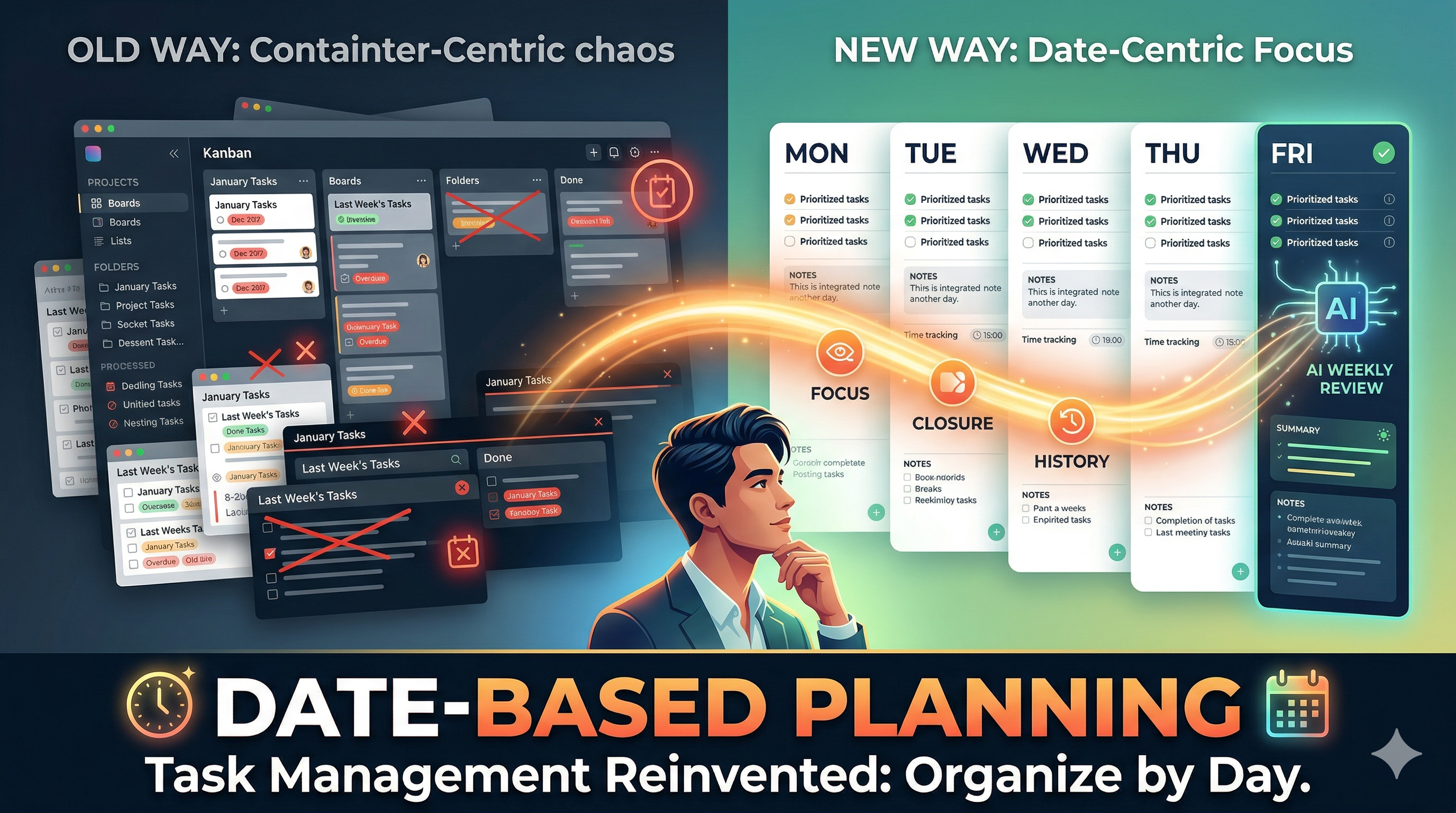
Date-based planning is exactly what it sounds like. The unit of organization is the day, not the project. Every day is its own container. Everything you plan, capture, or notice on a given day lives inside that day. Yesterday, today, tomorrow — each of them is a real thing you can open and read.
Concretely, in a date-based system, a day can hold:
- Tasks for that day
- Notes you took during it
- Images and screenshots you captured
- Time you tracked
- Comments from anyone you shared with
- Links to the bigger projects those tasks belong to
- Whatever else you want to remember about that day
You do not have one master “Work” list. You have Tuesday, and Wednesday, and Thursday, each with its own work. When Thursday ends, Thursday is done — it stays in the history as a complete record, and Friday starts fresh.
This sounds almost too simple to matter. But the second-order effects of that one choice are significant.
What Changes When the Day Is the Unit
Six things change, and they are the whole reason this approach works.
Today is never hidden. You open the app and you are on today. You do not scroll through columns, or pick a board, or filter a view. “What am I doing today” is the default question, and the app is built to answer it. The gap between opening the app and seeing what matters shrinks to zero.
Closure becomes automatic. When the day ends, it ends. You do not have to archive or reset or sweep. Friday’s tasks do not clutter Monday’s view, because Monday is a different object. You can still go back and look at Friday anytime you want, but it is not in your face. Closure is built into the structure instead of requiring discipline.
Your history is readable. Because every day is a complete record, you can open any past week, month, or quarter and actually see what happened. Not a filtered list of tasks that were completed in that range — the full context. Tasks, notes, screenshots, time, decisions, everything, in order, on the day they happened. This is rare in task management tools, and it turns out to be one of the most valuable things a personal system can give you.
Weekly and monthly reviews stop being homework. If your history is readable, reviewing the week is a 20-minute job instead of an hour of gathering. You do not need to compile a report — the report is the week itself. This is the whole reason date-based planning pairs naturally with AI summaries.
Cross-project context lives in one place. Because a day holds everything you worked on that day, you can see how your client work, your side project, your personal goals, and your errands all interacted. You stop switching between five boards to reconstruct your own Tuesday. The day is the reconstruction.
Projects still exist — they are just views, not containers. This is the part most people get wrong when they first hear about date-based planning. Projects do not disappear. You still have them. You can link tasks across days into a project view, see overall progress, and track completion. But the project is a view over your days, not a container that holds your days. That inversion is what makes the system work.
Why This Pairs Almost Magically with AI
AI is very good at summarizing structured, time-ordered data. Give it a week of tasks, notes, time logs, and completion status, and it can tell you what shipped, what slipped, where your time went, and what pattern it sees.
But to do that, the AI needs the data to already be organized by time. If your work is spread across five boards with no time structure, you have to gather it first — and gathering is exactly the step that kills weekly reviews. Nobody wants to manually compile their week on a Sunday evening.
In a date-based system, the data is already organized by time, because time is the structure. Asking the AI for a weekly review is one click. Asking it for a monthly review is the same. Asking it for a quarterly review is the same. The AI has a complete, ordered, contextual record of everything you did, and it can give you a real narrative in seconds.
This is the single biggest reason I built SelfManager.ai around date-based planning. I wanted AI reviews that I would actually use — and the only way to make them fast enough to use weekly was to make the data structure match what the AI needed.
Without date-based structure, AI summaries are a feature. With it, they become a habit.
Where SelfManager.ai Fits In
I am the founder of SelfManager.ai, and it is the app I built to run this approach. Every lesson in this article is something I learned by running my own life on containers for years and getting frustrated enough to build something different.
SelfManager’s core idea is exactly what I described. Each day has its own space. Inside that day, you can create as many tables as you want — a task list, a notes doc, a shopping list, a meeting log, a journal, a project tracker. Tables can hold tasks, rich notes, images, files, comments, and time tracking, all in one place. Tables can be linked across days to form project views. Important tables can be pinned so they stay visible. And on top of all of it, there is an AI layer with features including generating tasks from raw text, chatting with your tables, and generating weekly, monthly, and quarterly reviews with follow-up questions.
Pricing is deliberately simple. $8 a month for individuals, $30 a month flat for teams with unlimited seats. No per-seat fees, ever. Seven-day free trial with no credit card required.
Who This Approach Is Not For
I want to be honest about where date-based planning is not the right answer.
If you run a pure kanban team workflow, a board is probably still better. Kanban is about stages, not days, and stage-based visibility is genuinely useful for coordinating multiple people through a pipeline.
If your work is genuinely project-shaped and single-threaded — meaning you really do work on one project at a time for weeks before switching — container-based tools can still feel natural. Most people’s lives are not this shape, but some are.
If you are looking for a full-fledged developer issue tracker with commits, branches, and deep git integration, use Linear or something purpose-built. SelfManager is a planner, not a dev tool.
If you want a pure minimal list app with no tables, no images, no time tracking, and no AI, you might prefer Things 3 or Apple Reminders. The tradeoff is that you lose history, context, and memory.
For everyone else — freelancers, solo founders, people running their own life alongside their work, small teams that want to stop paying per seat, anyone tired of rebuilding their system every six months — date-based planning is worth a serious try.
How to Try It Honestly
If you want to test whether this approach clicks for you, do not commit to anything big. Do this instead.
Pick one week. Seven days. Use a date-based tool for that week and nothing else — no parallel board, no paper list, no backup system. The reason this matters is that container-based habits are sticky, and if you run two systems in parallel, you will fall back to the familiar one every time things get busy.
Set up today. Put your tasks, your notes, whatever you captured, whatever you decided. Tomorrow, do the same for tomorrow. Do it for five working days.
On the following Sunday, run the AI weekly summary. Read your own week back as a narrative. Ask it what slipped, where your time went, and what you should prioritize next. Spend 20 minutes on it.
By the end of that Sunday, you will know. Not from reading more articles — from having a week of your own data that answers the question for you. Either the day felt like the right unit, or it did not. Either the history felt useful, or it did not. Either the AI review felt worth it, or it did not.
SelfManager has a seven-day free trial with no credit card required, which is basically exactly the length of the experiment described above. That is not an accident.
Takeaways
- Every task manager has a unit of organization. Most pick containers. A few pick days.
- Boards, lists, and folders have no built-in sense of time, which is why they always become landfills.
- Personal project management is mostly about time, not stages — so the tool should be too.
- When the day is the unit, today is never hidden, closure is automatic, and your history becomes readable.
- Date-based structure is what makes AI weekly and monthly reviews fast enough to actually become a habit.
- Date-based planning is not for every workflow — pure kanban teams and single-project work still fit containers better.
- The only way to really know if this approach is for you is to run a real week on it, not to keep reading about it.
Date-based AI Task Manager
Plan smarter, execute faster, achieve more
Create tasks in seconds, generate AI-powered plans, and review progress with intelligent summaries. Perfect for individuals and teams who want to stay organized without complexity.
Get started with your preferred account