
The Best AI Task Manager in 2026
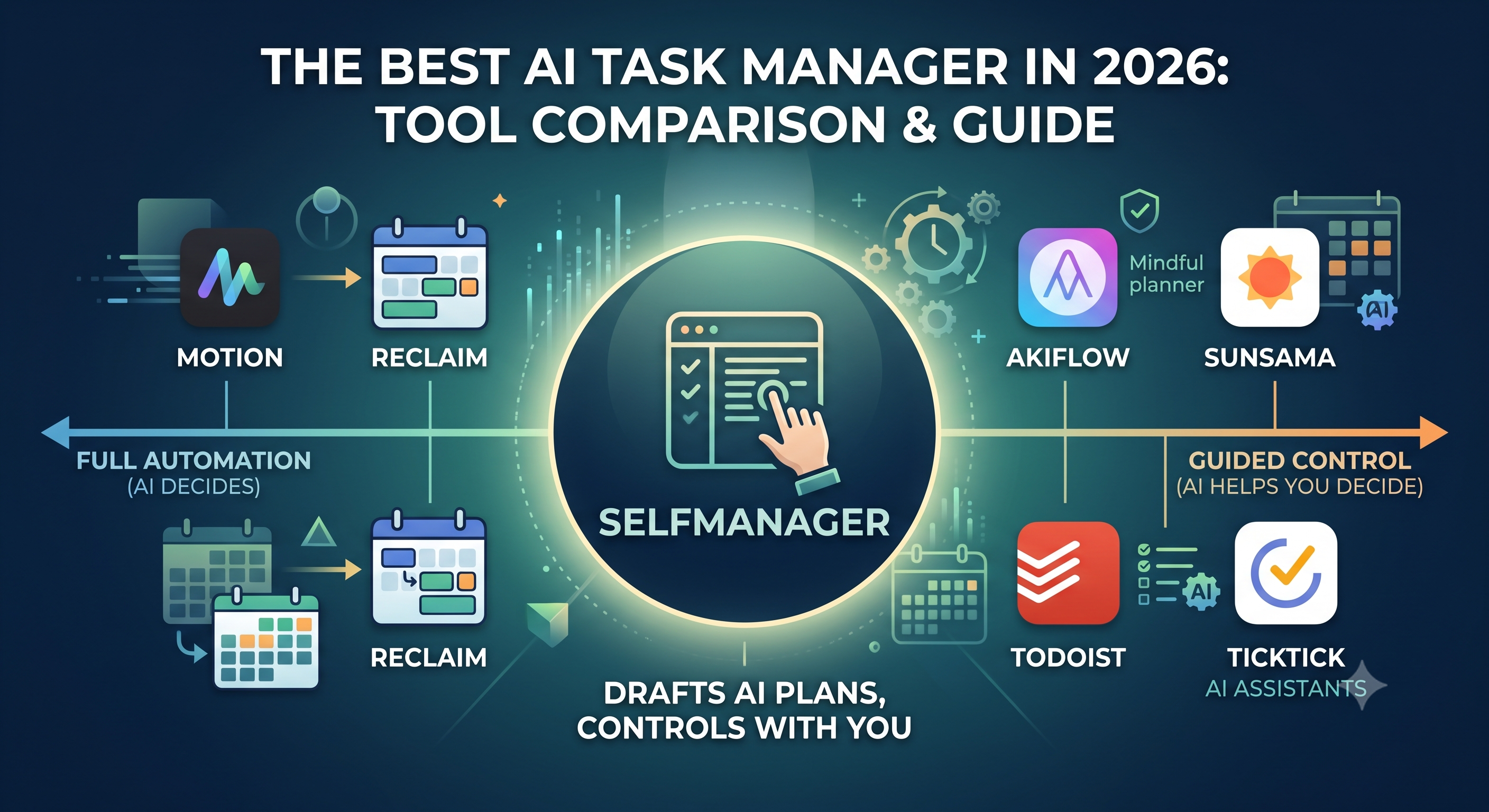
Every productivity app added AI in the last two years, and "AI task manager" went from a niche phrase to a category. The pitch is always the same: stop deciding what to work on, let the software figure it out. The problem is that the tools delivering on that pitch have quietly split into two camps, and both ask you to give something up.
One camp hands your whole day to an algorithm that time-blocks your calendar and rearranges it on the fly. The other keeps you in full control but makes you do all the planning yourself, with barely any AI under the hood. Powerful automation that feels rigid, or calm control that feels like work. Most people bounce between the two and never quite settle.
This is a field guide to the real options in 2026: what each tool actually does, who it fits, and the catch nobody mentions in the marketing. It starts with the pick that sidesteps the trade-off, then covers the rest of the field honestly so you can match a tool to how your brain works.
The short answer
An AI task manager is a tool that uses AI to help capture, plan, prioritize, or schedule your tasks, instead of leaving all of that to you. In practice the category divides on one question: does the AI decide for you, or does it help you decide?
Auto-schedulers like Motion and Reclaim sit at the automated end. They place tasks on your calendar by deadline and priority and reshuffle in real time when plans change. Guided planners like Sunsama and Akiflow sit at the manual end. They give you a structured planning ritual and keep you in the driver's seat. Todoist and TickTick are clean, focused task managers that have added AI features on top.
The best pick for most people is the one that refuses the trade-off: a date-based task manager where AI drafts the plan and you approve it, on a surface you control. That is the approach SelfManager takes, and it is the recommendation here. The rest of this guide explains why, then walks the full field, because the honest answer is that the right tool depends on whether your real problem is a chaotic calendar, an overwhelming workload, or just a messy list.
What an AI task manager actually does
Before comparing tools, it helps to know the concepts they are competing on, because the labels blur together fast.
Auto-scheduling and dynamic rescheduling is the headline feature. The AI looks at your tasks' deadlines, priorities, and rough durations, then drops them into open slots on your calendar, and when a meeting runs long or a new urgent task lands, it rebuilds the rest of the day automatically. It is the closest thing to an assistant reorganizing your time while you work.
Focus-time and habit defense is a related but narrower idea: the AI proactively blocks deep-work time and recurring habits on your calendar before meetings can swallow them.
Guided planning and reflection is the manual counterpart. Instead of automating, the tool walks you through choosing what matters today, estimating how long each thing takes, and checking whether the day's math actually works, then closes the day with a shutdown review.
Natural-language capture lets you type "gym tomorrow at 7" and have it parsed into a real task with a date and time. AI suggestions and breakdown turn a vague goal into subtasks or recommend what to do next. And the newest frontier, AI review, reflects across a stretch of days or weeks to show you patterns instead of just a single day's shutdown.
Hold onto the core tension as you read: every tool below lands somewhere on the line between the AI deciding and you deciding. That single choice matters more than any feature list.
Why SelfManager is the pick
Look closely at the two camps and you notice they share two hidden assumptions. Both treat the calendar's time grid as the unit of work, so everything has to become a timed block. And both treat habits as a separate thing you bolt on elsewhere. Those assumptions are exactly what make auto-schedulers feel anxious and manual planners feel heavy.
SelfManager starts from a different unit: the day. Everything belongs to a date. Each day is a single column holding that day's tasks, and you can build unlimited custom tables around it, so the structure matches how people actually think about their week rather than forcing every item into a calendar slot.
The AI is built around that model instead of fighting it. Its AI Plan feature drafts a structured plan across a date range, anywhere from three to thirty-one days, and hands it to you on a slider to review before you commit. That is the difference that matters. The plan is a draft you approve, not a silent rearrangement of your calendar you have to chase. You get the leverage of AI planning while keeping the final say, which is precisely the control that auto-scheduler users complain they lose.
It also reflects, not just plans. AI Review can look across any period up to about three months and tell you how it actually went, where most tools that offer reflection only do a single end-of-day shutdown. And because everything lives on the day, habits and tasks already share one surface. The recurring workout sits in the same place as today's deadlines, so you are not running a habit tracker in one app and a task list in another.
Put simply, SelfManager is for the large group of people who tried an auto-scheduler and found it too rigid, then tried a manual planner and found it too much work. It gives you AI that drafts and reviews, on a date-based surface you stay in charge of, with your habits and tasks already together. SelfManager has a 7-day free trial, then Individual is $8/month monthly or $6/month when billed annually, and Team is $30/month monthly or $25/month when billed annually with unlimited seats.
It is not the right tool for everyone. If you genuinely want to hand your calendar to an algorithm and never plan again, an auto-scheduler will suit you better. So here is the rest of the field, fairly.
The field: how the top AI task managers compare
Motion: full autopilot
Motion is the flagship of the automated camp, and the one most people mean when they say "AI task manager." You add tasks with deadlines and priorities, and its algorithm schedules every one onto your calendar, then dynamically reshuffles the day when a meeting overruns or something urgent appears. When it works, it feels like magic: miss a block, and minutes later the rest of your day has rearranged itself with a note explaining what moved.
Best for: people with task-heavy, deadline-driven work and a chaotic calendar who genuinely want the software to decide when everything happens.
The catch: it is a commitment. Motion runs about $19 per seat each month on its Pro AI plan with no free tier, and the AI-credit system it added in 2025 means heavy users burn through credits and have to upgrade or wait. Users also report that once Motion takes over, manual changes feel clunky, the interface can be confusing, and basics like recurring tasks and notifications feel unfinished as the product pushes deeper into team features. Expect roughly a week of training the AI before it feels dialed in.
Reclaim: the focus-time defender
Reclaim works differently from a full task manager. It is a calendar layer that sits on top of Google Calendar or Outlook, so your calendar stays the source of truth. Its signature move is defending your time: it automatically blocks focus sessions and recurring habits before meetings can fill the day, and reshuffles flexible events around new commitments.
Best for: people who already have a task manager they like and mainly want their deep work and habits protected automatically.
The catch: it is not a full planner, so you still need somewhere for your tasks to actually live. It does have a genuinely useful free tier, with paid plans starting around $10 a month. Worth knowing for context: Clockwise, a close competitor in focus-time scheduling, was acquired by Salesforce and shut down on March 27, 2026, with Reclaim widely seen as the closest replacement - a sign the calendar-automation space is consolidating.
Sunsama: the mindful ritual
Sunsama is the standard-bearer for the manual camp, and proudly so. Each morning it walks you through an intentional planning ritual: review your calendar, pull in tasks from your other tools, estimate how long each will take, and commit to a realistic day. It warns you when you have planned more than fits, and ends the day with a shutdown that surfaces what slipped.
Best for: people who want a calm, structured daily planning habit and find the act of planning itself valuable. It has a strong following among people who feel overwhelmed, because it forces realism.
The catch: it is deliberately slow, and it leans on guided planning over automation, so its actual AI is minimal. It runs about $17 a month billed yearly or $22 monthly, with no permanent free plan. If what you want is the AI moving things around for you, that is explicitly not what Sunsama does - you are the one dragging the blocks.
Akiflow: the keyboard power tool
Akiflow is built for the power user who lives in keyboard shortcuts and has tasks scattered across a dozen tools. A fast command bar handles capture, it consolidates tasks from many sources, and it pairs a guided planning routine with time-blocking. It also adds an AI chatbot, Aki, that lets you reorganize and talk through your tasks conversationally.
Best for: speed-obsessed planners who want to capture and schedule fast and keep everything in one keyboard-driven surface.
The catch: it looks premium but has drawn complaints about reliability, especially on iOS, with reports of missing notifications and capture issues, and it sits at the higher end, around $19 a month.
Todoist: the clean classic, now with AI
Todoist has been a favorite focused task manager for years, and for good reason. Its natural-language capture is excellent, the interface is clean and fast, and it has a genuinely strong free tier. More recently it has layered in AI features like task suggestions and an assistant, and pushed into light project and workspace capabilities.
Best for: people who want simple, reliable task management at a low price and do not need an automated scheduler. It runs roughly a quarter of Sunsama's price, which makes it the value pick of this group.
The catch: it is a task list first. It captures and organizes beautifully, but it does not plan your day or schedule for you the way the automated tools do. Pair it with a calendar and it becomes a manual time-blocker, but the AI here assists rather than drives.
TickTick: the all-in-one lightweight
TickTick packs a lot into one affordable app: tasks, a calendar view, and a built-in habit tracker, with some smart capture features. It is widely considered to have the best Android app in the category. For many people it is the closest thing to a single lightweight home for tasks, calendar, and habits without paying premium prices.
Best for: people who want an affordable, well-rounded app with a habit tracker included and a great mobile experience.
The catch: the AI is light, and as covered in detail elsewhere, its habit tracker lives in its own section, separate from your tasks and calendar, so habits and to-dos are not truly on one surface. It is a strong generalist rather than an AI-first planner.
How to choose
The fastest way to pick is to name your actual bottleneck, not the feature you find shiniest.
If your calendar is genuine chaos and you want AI to just handle scheduling, Motion is the most capable autopilot, as long as you accept the price, the credits, and the loss of manual control. If you already have a task home and only want your focus time and habits protected, Reclaim layers on cleanly and has a free tier to test it. If your real problem is overwhelm and you want a calm planning ritual that forces realism, Sunsama is the best in class, provided you do not need much automation. If you want raw speed and live in keyboard shortcuts, Akiflow is built for you. And if you just want clean, affordable task management, Todoist and TickTick are the dependable picks, with TickTick adding a habit tracker and the better mobile app.
If you want AI that drafts and reviews your plan while you keep control, on a date-based surface where habits and tasks already live together, that is where SelfManager fits, and it is why it leads this guide. It is the option for people who found the autopilots too rigid and the manual planners too much work, which turns out to be most people.
A simple test cuts through all of it: audit one real week. Count your meetings, your context switches, and the tasks that slipped. If your calendar changes several times a day, lean toward automation. If it is fairly stable and the planning itself helps you, lean toward control. If you want both, AI leverage without surrendering the wheel, choose the tool built around that middle.
Where this leaves you
The AI task manager market in 2026 looks crowded, but it really comes down to a single decision: how much of your day do you want to hand to an algorithm? The automated tools are genuinely impressive and genuinely rigid. The manual tools are calm and capable and genuinely slow. Both make you treat your calendar's time grid as the only unit of work, and both leave your habits in a different app.
The better answer for most people is not at either extreme. It is a tool that plans with AI but lets you approve the plan, reviews your weeks instead of just your days, and keeps everything on the day where your tasks and habits already belong. That is the case for a date-based approach, and the reason SelfManager is the pick here. Match the tool to your real bottleneck, and you stop fighting the software and start using it.
FAQ
What is an AI task manager?
An AI task manager is a task or planning app that uses AI to help capture, organize, prioritize, plan, or schedule your work, instead of leaving all of that to you. Some do it by automatically placing tasks on your calendar, others by drafting a plan you approve, and others by adding smart features like natural-language capture and suggestions to a regular task list.
What is the best AI task manager in 2026?
It depends on your bottleneck. For full automation of a chaotic calendar, Motion leads. For protecting focus time on top of an existing task app, Reclaim. For a calm manual planning ritual, Sunsama. For most people who want AI planning without giving up control, a date-based tool like SelfManager that drafts a plan you approve and keeps habits and tasks together is the better fit.
Do AI task managers schedule your day automatically?
Some do and some do not. Auto-schedulers like Motion and Reclaim place tasks on your calendar and rearrange them when plans change. Guided planners like Sunsama and Akiflow keep you in control and help you plan rather than doing it for you. A middle approach drafts a plan with AI and lets you approve it before anything is committed.
Is Motion worth it?
For the right person, yes. If your work is task-heavy and deadline-driven and your calendar shifts constantly, Motion's auto-scheduling can save real time. If you mostly have a stable calendar and a few projects, it tends to be overkill, and some users find it rigid and pricier once the AI-credit limits come into play.
What is the difference between Motion and Reclaim?
Motion is a full task manager that schedules your tasks and meetings together on your calendar and reshuffles automatically. Reclaim is a calendar layer that sits on top of your existing calendar and mainly defends focus time and habits, but it is not a full place for your tasks to live. Motion replaces your task system, Reclaim protects time around one you already have.
Can an AI task manager handle habits and tasks together?
Most keep them separate. TickTick includes a habit tracker but in its own section, and Reclaim defends habits on your calendar but is not a task home. A date-based tool that treats a habit as a recurring item on the same day as your tasks keeps them on one surface, which is closer to how a day is actually lived.
Date-based AI Task Manager
Plan smarter, execute faster, achieve more
Create tasks in seconds, generate AI-powered plans, and review progress with intelligent summaries. Perfect for individuals and teams who want to stay organized without complexity.
Get started with your preferred account