
Can One AI Task Manager Replace 6 Productivity Apps in 2026?
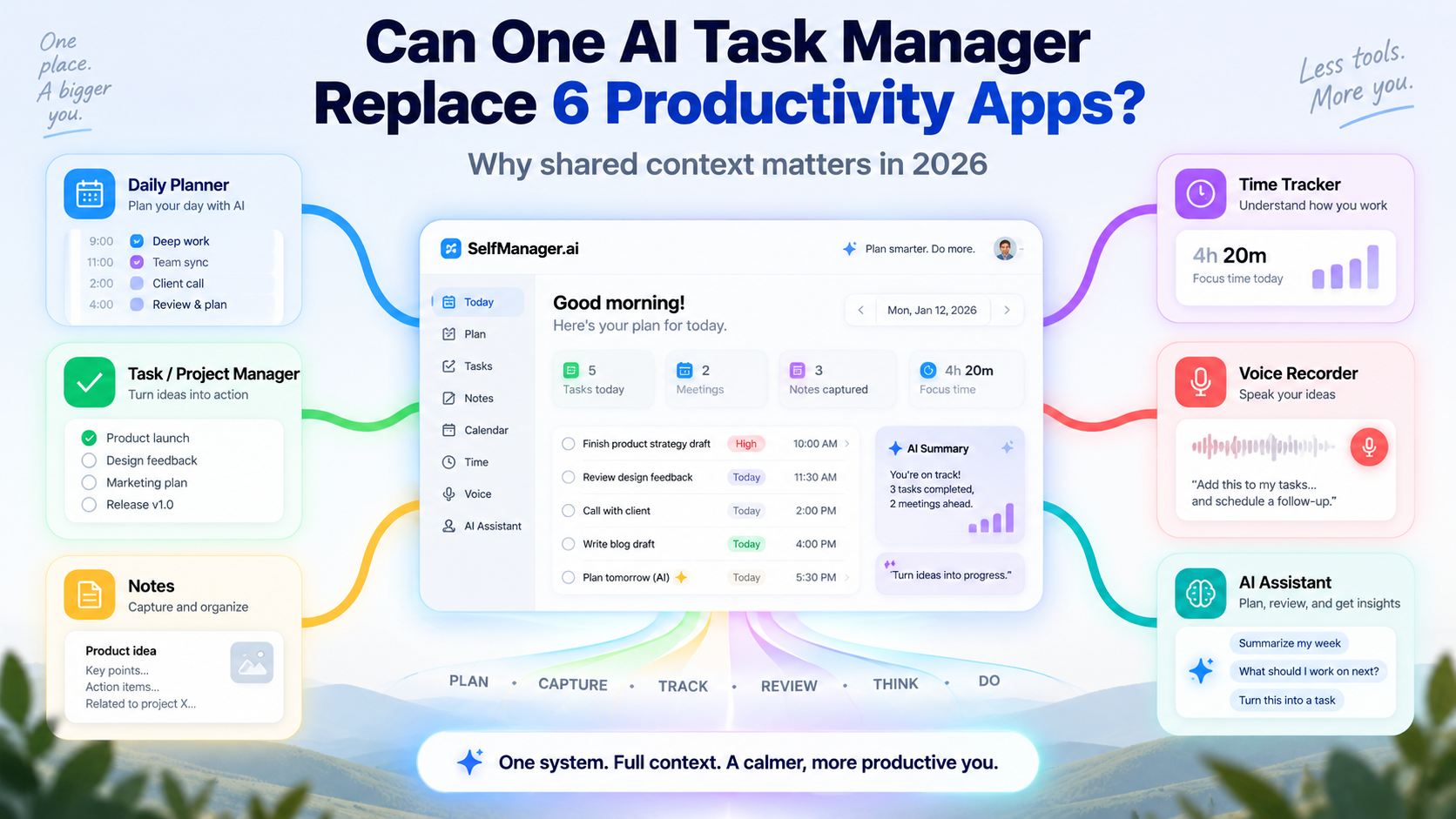
A lot of people do not intentionally build a complicated productivity system.
It happens one app at a time.
You start with a to-do list because you need somewhere to keep track of what has to be done. Then you want to plan your days more deliberately, so you add a daily planner. Work becomes more complex, so you start keeping notes. You want to understand where your hours are going, so you add a time tracker.
Then you realize that some ideas arrive faster than you can type them, so you start using voice recordings.
And now there is AI.
You use an AI assistant to brainstorm, structure ideas, summarize information, review decisions and help plan what comes next.
Before long, one person can easily have six separate productivity tools:
- A daily planner
- A task or project manager
- A notes app
- A time tracker
- A voice recorder
- An AI assistant
None of those apps has to be bad.
The problem is that the context of your work is now spread across all six of them.
Your task manager knows what you planned.
Your timer knows how long something took.
Your notes app knows why you made a decision.
A screenshot contains information about the problem you were solving.
Your voice recorder has the idea you had when you were away from your keyboard.
Then you open an AI assistant and explain the whole situation again because the AI does not automatically know any of it.
That fragmentation was inconvenient before generative AI.
In 2026, it matters much more.
The interesting question is no longer simply whether one application can copy the features of six others.
It is whether productivity software becomes more useful when planning, execution, notes, time, voice, images and AI all contribute to the same context.
That is the idea behind SelfManager.ai.
Not six specialized products copied into one dashboard.
One system where the information created while you work can remain useful when you plan, review and decide what to do next.
1. We Didn't Intentionally Build a Six-App Productivity Stack
Most productivity systems grow reactively.
You discover a problem and install something that fixes it.
Need to remember tasks? Install a task manager.
Need a better view of tomorrow? Add a daily planner.
Need somewhere for ideas? Add a notes application.
Want to understand your working hours? Add a timer.
Need to capture thoughts quickly? Use a voice recorder.
Want help making sense of everything? Open ChatGPT, Claude, Gemini or another AI assistant.
Individually, each decision makes sense.
The problem becomes visible only later.
You now have several different representations of the same work.
Imagine you are redesigning a client's website.
The task manager says:
Redesign checkout page.
The time tracker says:
2 hours 37 minutes.
The notes application says:
Client wants the mobile checkout simplified before launch.
A screenshot shows the layout issue.
A voice note contains something you remembered while you were away from the computer.
Then you ask an AI assistant:
What should I prioritize next on this project?
The AI does not know.
You become responsible for reconstructing the context.
That is the hidden job created by a fragmented productivity stack.
The apps store the information.
You store the relationships between the information.
2. The Six Productivity Apps Many Knowledge Workers End Up Using
There is a reason these six categories exist. They answer different questions.
The daily planner
The planner answers:
What am I actually going to do today?
A backlog can contain 100 tasks and still tell you almost nothing about Tuesday.
Planning is about making choices within a limited amount of time.
The task or project manager
This answers:
What needs to happen across everything I am responsible for?
Projects outlive individual days. Work needs priorities, completion states, deadlines and some structure.
The notes app
Tasks rarely contain enough context by themselves.
A task called "Fix pricing page" does not tell you:
- why it needs changing
- what was discussed
- what was already tried
- what information you discovered
- what decision was made yesterday
That context usually ends up in notes.
The time tracker
Planning tells you what you wanted to do.
Time tracking tells you something about what actually happened.
It helps answer:
Where did the day go?
The voice recorder
Sometimes typing is the wrong capture mechanism.
You may be walking, thinking through a problem or already concentrating on something else.
Stopping, opening a notes application and writing the idea properly can be enough to interrupt the thought.
Speaking is often faster.
The AI assistant
Then AI sits on top of all of this.
It can help answer questions such as:
What should I prioritize?
Turn this idea into actionable tasks.
Summarize what happened.
What am I overlooking?
Help me plan next week.
The problem is obvious once you look at the whole stack:
The AI is potentially the most powerful reasoning layer, but it often has the least persistent knowledge about the actual work.
3. The Real Cost Isn't Six Subscriptions - It's Fragmented Context
All-in-one software is often sold around price.
Why pay for six subscriptions when you could pay for one?
That can matter, but it is not the most interesting argument anymore.
The larger cost is context fragmentation.
Suppose you spent three hours solving a technical problem.
Your task manager knows the task existed.
Your timer knows that three hours passed.
Your notes app knows what you tried.
A screenshot shows the error.
A comment from someone else explains what changed.
Your AI conversation contains an earlier suggestion.
Every tool knows one piece.
No tool necessarily knows the story.
Humans therefore become the integration layer.
You remember:
This screenshot belongs to that task.
That three-hour timer was caused by this bug.
This note explains why the original approach failed.
That voice memo contains the idea I want to try next.
That mental integration has a cost.
It becomes particularly noticeable for people who work with many small pieces of information: founders, freelancers, consultants, developers, designers, individual contributors and small-business owners.
You are not necessarily managing one clean project.
You may have client work, internal work, personal administration, sales, development, research, emails and ideas competing for attention on the same day.
The information does not naturally live in six separate worlds.
Your apps created those boundaries.
4. AI Makes Context More Valuable Than Feature Count
This is where AI changes productivity software more fundamentally than adding a chatbot button.
Before modern AI, combining tasks, notes and time tracking mostly provided convenience.
You switched applications less often.
Your information was easier to find.
That was useful.
But AI creates a second effect:
Information created by one part of the workflow can improve another part of the workflow.
A note written Monday can matter when reviewing Friday.
A screenshot captured while fixing a bug can matter when asking what still needs attention.
Time spent on completed tasks can matter when reviewing whether your plan was realistic.
Comments from earlier in the week can matter when planning the next one.
A month of actual work can matter when deciding what the next month should look like.
This changes the competitive question.
Instead of asking only:
How many features does this productivity app have?
we can also ask:
How much useful context can those features create for one another?
SelfManager.ai stores tasks, priorities, statuses, timing information, table notes, comments, descriptions, dates and completion data as part of ordinary work. Depending on the AI surface, that accumulated information can later become AI context. Images can also be included explicitly, while daily Self Messages can become part of AI Review.
That is a different model from adding a generic AI chat box beside a task list.
The more interesting loop is:
Work creates context → context improves AI → AI helps with future work.
5. What an Integrated Productivity Workflow Actually Looks Like
This is where the six-app idea becomes something more useful than a feature checklist.
SelfManager can be thought of as a continuous loop:
Plan → Work → Track → Capture → Review → Adjust → Plan again
Each stage produces information that may become useful later.
Plan
SelfManager is date-based.
Instead of treating dates only as due dates attached to projects, the date itself is the organizing layer for daily work.
A day can contain multiple tables.
For example:
Client A
- Fix checkout bug
- Send revisions
- Review analytics
SelfManager Development
- Test AI image context
- Ship update
- Fix mobile issue
Agency
- Send proposal
- Reply to lead
Personal
- Gym
- Pay bill
- Book appointment
These activities do not belong to the same project.
But they do belong to the same Tuesday.
Week and Month views provide wider perspectives, while Pinned Tables allow longer-running work to remain accessible across dates.
AI Plan builds on that model.
It can propose real dated tables and tasks across a period of one to 31 days. The plan remains a proposal until the user approves it. Before saving, tables can be edited, skipped, moved to different dates or regenerated. Once approved, they become normal tables and tasks inside SelfManager.
That is different from asking a chatbot:
Plan my week.
and then receiving a paragraph you still have to copy into the place where the actual work happens.
AI Plan creates the proposed structure where the work will be managed.
It can also optionally use past work and work already sitting on the dates being planned as context.
Work
Once the plan exists, the application becomes the work record.
Tables contain tasks with priorities, statuses, timestamps and optional deadlines and reminders. Notes and comments add context around those tasks.
One important distinction is what SelfManager does not do.
It does not automatically decide that an unfinished task should move to tomorrow.
There is no automatic rollover or Motion-style rescheduling engine.
If something remained unfinished on Monday, it remains part of Monday's history unless the user deliberately changes the structure.
That matters because planning history remains meaningful.
Looking back at Monday should show what really happened on Monday, not a retroactively cleaned-up version of the week.
Track
Time tracking adds another layer.
Instead of having a separate timer that only knows the name of a project, timing data remains attached to the tasks where work occurred.
SelfManager stores task start and completion timestamps and derives durations from them. Time can then contribute to task, table and period-level understanding of the work.
This becomes especially useful later during review.
A completed task tells you:
I did this.
Timing adds:
This is how much of my working time it consumed.
Those are different pieces of information.
Capture
Not everything worth remembering belongs inside a task title.
SelfManager therefore also has several ways to preserve surrounding context:
- table notes
- comments
- images
- daily Self Messages
- voice recordings and transcripts
- activity history
- Quick Capture
Quick Capture is useful when you know something needs to leave your head immediately but you do not yet want to structure it into a complete task system. It creates a normal table containing the basic captured information, which can be expanded later.
This is important because capture should be cheap.
If capturing an idea requires five organizational decisions, people eventually stop capturing ideas.
Review
Now all of the previous stages begin to pay off.
AI Review can analyze a week, month, quarter or custom period using the work stored during that period.
That can include tasks, completion states, priorities, timing information, notes and other stored context. Comments are optional. Images are optional. Self Messages can also contribute personal context to the review.
Instead of reconstructing the week from memory, the user can review the record of what actually happened.
Questions can become more concrete:
What did I actually finish?
What remained open?
What consumed my time?
What kept slipping?
Where did I make progress?
What should change next?
Adjust
Review is only useful if it changes behavior.
Sometimes the answer is to do less.
Sometimes a supposedly small task repeatedly consumes hours.
Sometimes a project remains open because it is too vague.
Sometimes one area of work is quietly taking most of the week.
The AI can help identify patterns, but the user remains in control of what changes.
SelfManager does not currently have a direct button that automatically converts an AI Review into an AI Plan. The review and the next planning step remain separate actions.
That distinction is worth preserving.
The system assists with planning.
It does not automatically take control of the schedule.
6. Images Are Becoming Part of the Work Context
One of the most important recent changes is that the work record is no longer limited to text.
A large amount of modern knowledge work is visual.
A developer may work from screenshots of a bug.
A designer works with visual references.
A marketer may save an advertisement, landing page or analytics screenshot.
A freelancer may receive visual client feedback.
Someone managing personal administration may store a photograph, receipt or document image.
Previously, an AI task manager could know:
Fix mobile layout.
But the actual problem might be visible only in the screenshot attached beside it.
SelfManager now allows images both at the table level and inside comments. A table can hold up to 200 table images, while an individual comment can contain up to 10 images. Comment images do not count against the table-image limit.
More importantly, those images can be included as context for AI.
Images can be explicitly enabled for:
- AI Plan
- AI Review
- AI Chat on a table
- AI Summarize on a table
- AI Chat across Pinned Tables
- AI Summarize across Pinned Tables
The user decides when images should be included.
This turns screenshots into something more useful than attachments.
Imagine this workflow:
Task: Fix mobile checkout.
Comment: Client says the problem appears on smaller iPhones.
Image: Screenshot showing the broken layout.
Notes: Already tried reducing container padding.
Now AI Chat can reason about the text and visual state together when the user includes both comments and images.
The difference is subtle but important.
Uploading an image to a chatbot answers:
What is in this image?
Keeping the image inside the context of the work makes questions possible such as:
Considering this screenshot, the current tasks, our notes and the comments, what should we investigate next?
The image becomes part of the project's memory.
7. Voice Capture Works Better When It Stays Connected to the Work
Voice solves another type of context problem.
People often think faster than they type.
And sometimes stopping to type an idea properly breaks the thought that produced it.
Voice capture reduces that friction.
SelfManager separates temporary dictation from recordings that the user actually wants to keep.
When voice is used to dictate into certain input or AI surfaces, the audio can simply be transcribed without becoming permanent stored audio.
When voice is recorded into a table note or comment, the transcript is produced and the user can choose whether to preserve the original recording too. Recordings can be up to 10 minutes long, and retained recordings can be accessed centrally through All Recordings.
That gives the user both:
searchable/readable information
and, when useful:
the original recording
This can matter because the original voice recording contains things a transcript may not fully preserve: emphasis, pauses, uncertainty or the way the idea was originally expressed.
AI responses can also be read aloud, and a user can choose to save that generated audio for later listening.
The larger point is not that SelfManager contains a microphone.
It is that voice becomes another way of feeding the same work context instead of another isolated inbox that has to be processed later.
8. Repeating Work Creates Better Historical Context
Not all work is unique.
A surprising amount of life is repetitive.
Weekly reviews.
Daily administration.
Client outreach.
Publishing routines.
Exercise.
Maintenance.
Recurring business processes.
SelfManager's repeating tables create a reusable blueprint for this kind of work.
The structure repeats, but each occurrence becomes its own normal table.
That distinction matters.
The tasks can begin fresh each time rather than copying yesterday's completed states. Notes can form part of the repeated structure, while comments, images and logs are not blindly copied from one occurrence into the next.
Imagine a recurring weekday outreach routine:
- review new leads
- send proposals
- follow up with previous conversations
- update notes
Monday gets its own occurrence.
Tuesday gets its own.
Wednesday gets its own.
Each day starts with the same useful structure, but each day creates different history.
Over time, that becomes valuable context.
Instead of asking:
Was I consistent this month?
you can review what actually happened.
The recurring structure also avoids another common productivity problem: rebuilding the same checklist manually over and over.
The system handles repetition without rewriting history.
9. What Shared Context Looks Like in Real Work
The easiest way to understand the advantage is to follow a few workflows end to end.
A freelancer managing several clients
Imagine a freelancer who also needs to keep generating new business.
A repeating weekday table can contain the outreach routine.
A screenshot of an interesting job post can be pasted into a comment.
A comment can contain notes about what was sent.
Task timing builds a record of how much time the routine actually consumed.
At the end of the week, AI Review can examine the work with comments and images included.
When planning the next week, AI Plan can optionally use the previous week's work as context.
The workflow becomes:
Repeating structure → tasks → comments → screenshots → time → review → next plan
Those are not six disconnected pieces anymore.
A developer debugging a problem
A developer creates a table around an issue.
The task states what needs fixing.
The table notes contain previous attempts.
A screenshot is pasted into a comment beside the bug.
Another comment explains when it happens.
Table AI Chat can then receive the tasks, notes, comments and image together.
Instead of saying:
I have a mobile bug. Here is everything that happened...
the relevant information already lives around the work.
That does not mean the AI will magically solve every bug.
It means less effort is spent reconstructing the problem before asking for help.
A founder working across several areas
A founder may simultaneously have:
- product
- marketing
- sales
- customer support
- operations
- client work
- personal obligations
Trying to treat those as one giant project makes no sense.
Treating them as unrelated universes is not realistic either.
They all consume the same finite week.
Long-running areas can live in separate Pinned Tables.
Pinned-table AI Chat and Summarize can operate across the pinned set at once. The prompt includes information from each table and is explicitly designed to consider relationships between them.
So a founder can ask something closer to:
Looking across these areas, where am I making progress and what seems to be falling behind?
The individual tables remain separate.
The reasoning does not have to.
A content creator
A repeating publishing table can appear automatically on the relevant publishing days.
Ideas can arrive through Quick Capture.
A spoken thought can become a transcript in a comment, with the original recording kept if it is worth preserving.
Reference images can remain beside the work.
The publishing history accumulates.
When planning the next month, previous work can contribute context.
Again, the advantage is not any one feature.
It is the chain.
10. Can One App Really Replace Six Specialized Tools?
For some people, yes.
For everyone, no.
And pretending otherwise would make the argument weaker.
Specialized applications exist because some workflows genuinely need specialized depth.
SelfManager is not trying to replace every possible productivity product.
For example, it currently does not provide automatic calendar rescheduling or time-block scheduling.
There is no Google Calendar, Outlook or CalDAV integration.
It is not an advanced knowledge base with backlinks and knowledge graphs.
It does not provide invoicing, hourly billing or client rates.
It does not have Gantt charts, dependencies, sprints, custom fields or formulas.
There are no subtasks or tags.
There is currently no public API, Zapier integration or general webhook system.
Those limitations define where separate software can still be the better choice.
If you need professional time billing, use a professional billing tool.
If your development organization depends on sprints and dependency management, use software designed for that.
If your personal knowledge system contains thousands of interconnected notes, a dedicated knowledge-management system may still make sense.
If you want software to continuously rearrange your calendar for you, an auto-scheduler belongs to a different category.
The point of integration is not to eliminate specialization at any cost.
It is to ask whether you are actually benefiting from all that specialization.
11. Who Should Keep Separate Apps - and Who Benefits From Consolidation?
There are two very different types of productivity users.
Keep specialized apps if the specialization is essential
A separate stack still makes sense if your workflow depends heavily on:
- advanced calendar scheduling
- project dependencies
- complex software-development workflows
- invoicing and billable-hour reporting
- deep knowledge management
- extensive automation
- APIs and external integrations
- professional audio workflows
- enterprise project controls
In those cases, replacing specialized software can create more friction than it removes.
Consolidation makes more sense when context is the bigger problem
The calculation changes when your day mostly consists of:
- deciding what to do
- completing many small tasks
- keeping project context
- writing notes
- capturing ideas
- tracking time
- remembering what happened
- reviewing your progress
- planning what comes next
That describes many founders, freelancers, consultants, individual contributors, desk workers and small-business owners.
These users often do not need the deepest possible feature set in six categories.
They need enough functionality in each category for the pieces to work together.
Consider the difference.
Specialized stack
Planner knows the plan.
Task manager knows the tasks.
Timer knows the hours.
Notes app knows the context.
Recorder knows the spoken ideas.
AI assistant knows what you manually tell it.
Integrated system
The work itself becomes the source of context.
That can be more valuable than having six individually stronger applications.
12. From Six Apps to One Continuous Productivity Loop
The future of productivity software may be less about adding endless features and more about maintaining useful context.
AI makes that change more important.
A traditional productivity application might ask:
Can I store this task?
An AI-era productivity system increasingly needs to ask:
What does this task mean in relation to everything else the user has been doing?
Does the system know:
- what was planned
- what was actually completed
- what stayed unfinished
- how much time the work consumed
- what notes were written
- what was discussed
- what screenshots were attached
- what projects are related
- what happened last week
- what is already waiting next week
The AI does not need every piece of information every time.
In fact, users should have control over what context is included.
But the information has to exist somewhere before the AI can make use of it.
That is why the central idea behind SelfManager.ai is larger than replacing six subscriptions.
It is about reducing the number of times you have to reconstruct the story of your own work.
The workflow becomes:
Plan → Work → Track → Capture → Review → Adjust → Plan again
Planning creates work.
Work creates history.
Tracking adds reality.
Notes, comments, images and voice add context.
Review turns that accumulated information into understanding.
And that understanding can influence what you plan next.
So, can one AI task manager replace six productivity apps?
For someone who needs the deepest specialized capabilities from each category, probably not.
For someone whose real problem is keeping their work, thoughts, time and plans connected, it increasingly can.
The more important question may be:
How many separate apps do you really need when the information inside them is more valuable together than apart?
That is where AI changes the equation.
And that is the direction SelfManager.ai is being built around.
Frequently Asked Questions
Can one AI task manager really replace a daily planner, task manager, notes app, time tracker, voice recorder and AI assistant?
It can for some workflows, but not universally.
The advantage comes when the user primarily needs everyday planning, task management, contextual notes, time tracking, quick capture and AI analysis. Someone who depends on specialized features such as advanced project dependencies, professional invoicing or sophisticated knowledge management may still benefit from separate tools.
What makes an AI task manager different from using ChatGPT with a normal task manager?
The important difference is persistent work context.
A general AI assistant usually knows what you provide in the current conversation.
An AI task manager can potentially reason over information already created while working, such as tasks, statuses, priorities, notes, timing information and other project context.
In SelfManager, comments and images can also be explicitly included with supported AI features.
Can SelfManager.ai automatically reschedule unfinished tasks?
No.
There is currently no automatic rollover or rescheduling engine. An unfinished task remains where it was originally recorded unless the user takes action.
This preserves the historical difference between what was planned and what actually happened.
Can SelfManager.ai understand screenshots and other images?
Yes.
Images associated with tables and comments can be explicitly included in supported AI requests. AI Plan, AI Review, table AI and pinned-table AI can use images when the user enables them.
This can be useful for screenshots, designs, photographs, diagrams and other visual material associated with the work.
Does SelfManager.ai save everything I say to Voice to Text?
No.
Prompt dictation is transcribed without permanently storing the audio. When voice is used in a table note or comment, the user can choose whether to keep the original recording after transcription.
Does SelfManager.ai replace a full notes or knowledge-management app?
It can replace a separate notes app for some work-related use cases because notes, comments, images and other context can remain attached to the work.
It is not currently designed as an advanced knowledge base with backlinks, wiki-style structures or a knowledge graph.
Can SelfManager.ai replace a dedicated time tracker?
For someone mainly interested in understanding how long their tasks and work periods take, it may reduce the need for a separate tracker.
Timing information is associated with tasks and can contribute to later AI analysis.
For billable rates, invoicing and advanced client reporting, a dedicated time-tracking or billing application is still more appropriate.
What is the main advantage of combining these tools?
The biggest advantage is not simply reducing the number of apps.
It is keeping more of the context created during planning and work in one system.
That context can later help with reviewing what happened, understanding where time went, asking questions about ongoing projects and planning what comes next.
Date-based AI Task Manager
Plan smarter, execute faster, achieve more
Create tasks in seconds, generate AI-powered plans, and review progress with intelligent summaries. Perfect for individuals and teams who want to stay organized without complexity.
Get started with your preferred account