
The 2026 AI Productivity Tools People Actually Use (and Why the Stack Keeps Shrinking)
Search "best AI productivity tools" right now and you will get a hundred listicles describing a world that already moved on. Half the products got absorbed, repositioned, or quietly killed in the last twelve months. The other half are still listed with their 2024 feature sets.
This is a different kind of roundup. Instead of ranking tools by feature counts, it looks at what actually shifted in 2026, what real entrepreneurs are using day to day, and where the productivity stack is heading next.
What actually changed in the last year
Before getting into specific tools, it helps to name the underlying shifts. If you understand these, the tool choices make a lot more sense.
Reasoning is now the default, not a separate mode
In 2025, you had to pick between a fast model and a "thinking" model. That distinction is mostly gone. Claude, ChatGPT, and Gemini all blend reasoning into the main model now, and the old "thinking mode" branding has quietly disappeared. You no longer choose how hard the model thinks - it decides based on the task.
Agents stopped being a demo
This is the biggest shift. A year ago, "AI agent" usually meant an unreliable script that broke after three steps.
Today people are running agents that handle real work - email triage, market research, competitor monitoring, code reviews, multi-step research with deliverables. Some founders openly run eight or more agents in the background on any given day.
The flip side is real. Agents need supervision, governance, and clean inputs. Throwing autonomous tools at a messy workflow just produces mess at higher speed.
Memory and context became the actual bottleneck
Context windows kept growing - some models now offer millions of tokens - but accuracy still drops sharply once you push past a certain point. Bigger windows do not equal better recall.
The real problem is not capacity. It is that AI models are stateless. Every new chat starts from zero unless you rebuild context manually.
This is why "AI memory" became one of the hottest categories in productivity tooling. Browser extensions, memory layers, knowledge graphs, persistent agent frameworks - everyone is racing to solve the same problem: how do you give AI real, reliable context about your life and work without re-explaining yourself every session?
Voice and ambient interfaces went mainstream
Voice mode in the major assistants got good enough to actually use for thinking out loud, daily reviews, and quick captures. A growing number of operators do their planning while walking now, dictating into systems that turn the rambling into structured notes.
Pricing shifted toward per-usage
Big tech companies are now actively pushing employees to burn through AI credits. Pricing has moved from per-seat to per-usage in many tools. If you are building a stack, watch the unit economics carefully - it is easy to spend more on tokens than on staff.
Stack vs single system: what entrepreneurs are actually choosing
One of the most useful signals you can get on this is not from analyst reports. It is from watching what entrepreneurs say when they are asked directly what they use.
A recent r/Entrepreneur thread asked exactly that question - do you use one productivity system or a stack of different apps - and the responses were striking. The dominant pattern was consolidation.
Person after person described starting with an elaborate setup of Notion, Trello, Todoist, Slack, ClickUp, Asana, and AI assistants, then quietly cutting it down to a couple of tools they actually open every day.
The phrase "spent more time managing the system than doing the work" appeared in some form in nearly every reply. People who tried Notion-as-everything described it becoming a "junk drawer." People who tried multi-app stacks described week three as the breaking point - the moment they could not remember which app held which decision.
A few sharp arguments emerged from the discussion:
- The visible cost of a stack is context switching. The invisible cost is retrieval latency - how long it takes to find something later, and how much mental energy that search consumes.
- The real cost of a bloated stack is rarely the subscriptions. It is the cognitive load of deciding which tool a thing belongs in.
- Most people optimize the tool layer when the actual bottleneck is the input layer - the time spent finding, pulling, and organizing information before any work begins.
- Single-system setups survive memory decay. Multi-app stacks usually do not.
There were dissenting views too. A few operators argued that for regulated industries, centralizing everything in one system is a real confidentiality risk. Others argued for keeping a stack of specialized tools and using a frontier AI model as an orchestrator - using Claude or ChatGPT to route work between them. Both are valid, and which path fits depends a lot on team size and the kind of work you do.
You can read the full thread here: Do you use one productivity system for business?
The takeaway is consistent: in 2026, fewer tools beats more tools, as long as the tools you keep are the right ones.
The tools that keep showing up
Here are the tools that actually appear over and over when entrepreneurs describe what they use day to day, organized by what each one is responsible for.
Planning and life context: SelfManager.ai
This is the layer most stacks have a gaping hole in, and it is where SelfManager.ai sits.
SelfManager.ai is a date-centric productivity platform. Tasks, time tracking, journaling, linked tables, image storage, and embeds all live inside a single date-based structure. The whole point is that everything you do, think, capture, or reference lives on a date - so when AI later summarizes a week, a month, or a quarter, it has a real, structured record to work from instead of a scattered mess across ten apps.
This matters more in 2026 than ever before. The "memory problem" everyone is now trying to bolt onto AI - through extensions, knowledge graphs, and prompt hacks - is solved upstream when your life and work are already structured by date. AI does not need to guess what mattered last Tuesday. It can just look.
What makes SelfManager.ai different from Notion, Trello, or ClickUp:
- The date is the unit of organization, not the project or the database.
- Tasks, time tracking, journaling, and reference content all live together in one place.
- AI summaries pull from a unified structure, so weekly, monthly, and quarterly reviews actually mean something.
- It is designed for people who run business and personal life from the same calendar - because that is how time actually works.
AI Plan: where the context advantage really shows
The newest piece, AI Plan, takes the same date-centric foundation and pushes it forward. Instead of just helping you understand what you already did, it generates a complete, dated plan for what you are about to do.
You give it three things: a period to plan for, a brief in plain English, and optionally a window of past context - the last week, month, or three months of your real work.
It hands back one editable table per day, each with prioritised tasks. You review the plan in a horizontal slider, tweak whatever does not fit, skip the days you do not want, and hit Approve. The tables get written to your account on the right dates, ready to start.
The part that makes it different from a generic AI planner is the 3-month lookback. When you toggle on past context, the AI sees your actual recent work before it generates anything.
It notices that you do strength training on Mondays and Thursdays. That your weekends are usually empty. That you have been pushing on a side project for six weeks. It schedules around the rhythm you have actually established - not the rhythm a generic productivity AI assumes.
This is exactly the gap the rest of the AI tooling industry is trying to close with bolted-on memory layers. SelfManager.ai already had the data, in the right shape, on the right dates. AI Plan just turns that into forward motion instead of only retrospective insight.
The bigger pattern is the one to pay attention to. Most "AI productivity" features today are still chat in a side panel - useful, but disconnected from where you actually work. Tools that put AI inside the structure you already use, with full access to your real context, are the ones that compound.
Thinking partner: Claude, ChatGPT, Gemini
Most operators rotate between the frontier models depending on the task. The honest truth in 2026 is that the gap between top models has narrowed for most everyday work, and switching between them is normal.
- Claude for long-form writing, nuanced thinking, coding, and anything where tone matters.
- ChatGPT for quick general tasks, brainstorms, and image work.
- Gemini for deep integration with Google Workspace and very long documents.
The "pick one and go all in" approach has fallen out of favor. The lock-in cost is higher than people admit, and each model has real strengths the others do not match.
Search and research: Perplexity
Perplexity changed shape significantly this year. Their browser, Comet, went free across platforms. Their Deep Research now produces actual deliverables - presentations, spreadsheets, dashboards - directly from a research prompt, not just a wall of text.
For anything that starts with "I need to understand X market or topic before I act," Perplexity is faster than spinning up a chat model and pasting links manually.
Coding: Claude Code, Cursor
For developers and technical founders, agentic coding tools became table stakes in 2026. The shift here is enormous - a year ago, AI coding meant autocomplete with extra steps. Today it means handing off entire features to an agent and reviewing the result.
Claude Code dominates the agent end of the spectrum. Cursor remains the favorite for in-IDE flow. The data is starting to back this up - tools with persistent memory of your codebase have meaningfully higher merge rates than stateless ones.
Notes and documentation: Notion, Obsidian, Apple Notes
Despite the stack-shrinking trend, notes apps stayed sticky. Notion is still the dominant choice for people who want structured docs and databases. Obsidian wins among operators who prefer local files and graph thinking.
There is also a quiet but real movement back to default apps - Apple Notes, Google Keep - where the value is "good enough" plus zero friction.
Voice and capture
Voice capture is the underrated shift of 2026. Quick voice notes about ideas, problems, or decisions now land directly into structured systems through native voice modes in the major AI assistants.
The friction between thinking something and recording it is the lowest it has ever been.
Background agents
This is the newest layer for most people. Caution is warranted - most agent demos work great in a controlled environment and fall apart in real workflows. But specific use cases have proven worth it:
- Morning news and Reddit digests delivered to inbox.
- Competitor monitoring with change alerts.
- Email triage with draft replies for routine threads.
- Research agents that produce briefs overnight.
Most experienced operators will not turn agents loose on anything customer-facing or anything that touches money without serious guardrails.
The principle behind the 2026 stack
If there is one idea that runs through every part of this, it is that the bottleneck in AI productivity in 2026 is not model quality - it is context.
The frontier models are all good enough. The agents work. The voice interfaces are usable. What separates a stack that compounds over time from a stack that resets every week is whether your AI tools have access to a structured record of your life and work.
Most people are trying to solve this with bolted-on memory layers, browser extensions, and prompt engineering. Those help, but they are patches on the symptom.
The deeper fix is to start from a planning system that is already structured the way AI needs to read it - by date, by project, by linked entities. That is the case for tools like SelfManager.ai sitting at the foundation of a 2026 stack rather than as just another app in the mix. A planning layer that gives every other AI tool real context to work with - and increasingly, plans your next week using that same context - is more valuable than any single model upgrade.
How to think about building your 2026 stack
If you are sitting on a 2024 or early 2025 AI workflow and wondering where to start:
- Pick one frontier AI model as your default, but keep a second one available for when the first one stalls.
- Move research out of generic chat and into a tool built for it - Perplexity, or one of its alternatives.
- Get a real planning system that gives AI structured context about your work, not just a notes app.
- Add agents only where you can clearly define the input, output, and failure mode.
- Build a weekly review ritual where AI summarizes your actual recorded data, not your memory of the week.
- Watch your spend - per-token pricing rewards intentional usage and punishes lazy prompting.
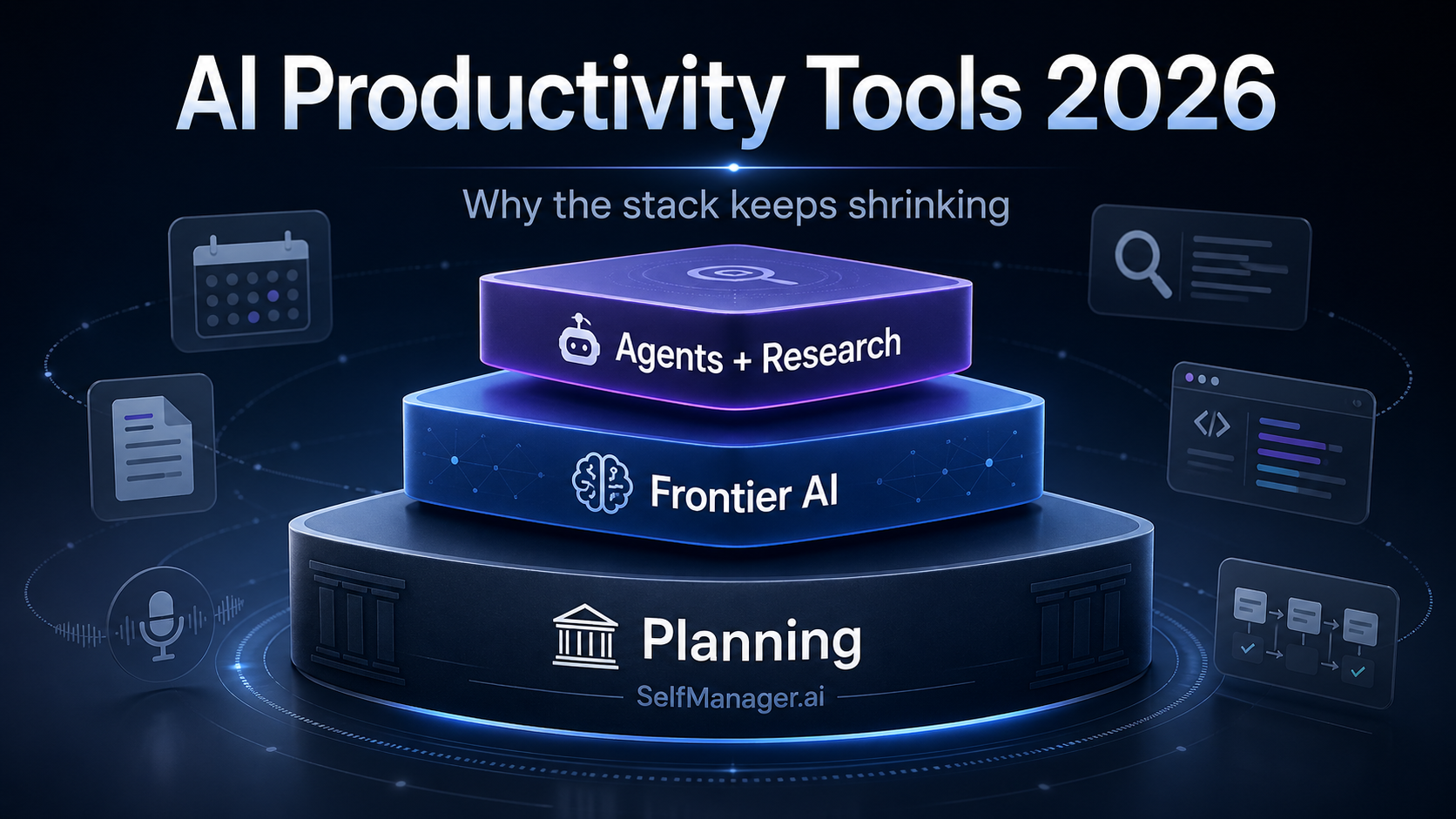
The stack will keep changing. It has changed multiple times for most operators in the last year alone. But the shape of a good stack - planning at the bottom, frontier model in the middle, agents and research at the edges - is starting to feel stable enough to bet on.
Takeaways
- Reasoning, agents, and ambient interfaces are no longer experimental - they are baseline expectations in 2026.
- Memory and context are the new bottleneck, and bigger context windows alone will not fix it.
- The dominant trend among real entrepreneurs is fewer tools, not more - the stack keeps shrinking.
- The most leveraged investment is not a smarter model. It is a planning layer that gives every other AI tool real context to work with.
- Tools that put AI inside the structure you already use - like SelfManager.ai's new AI Plan feature - are starting to outpace the ones that bolt AI onto the side.
- If your stack from a year ago still looks the same, you are almost certainly leaving real productivity on the table.
Date-based AI Task Manager
Plan smarter, execute faster, achieve more
Create tasks in seconds, generate AI-powered plans, and review progress with intelligent summaries. Perfect for individuals and teams who want to stay organized without complexity.
Get started with your preferred account