
Which Productivity Apps Benefited From AI - And Which Ones Started to Feel Outdated?
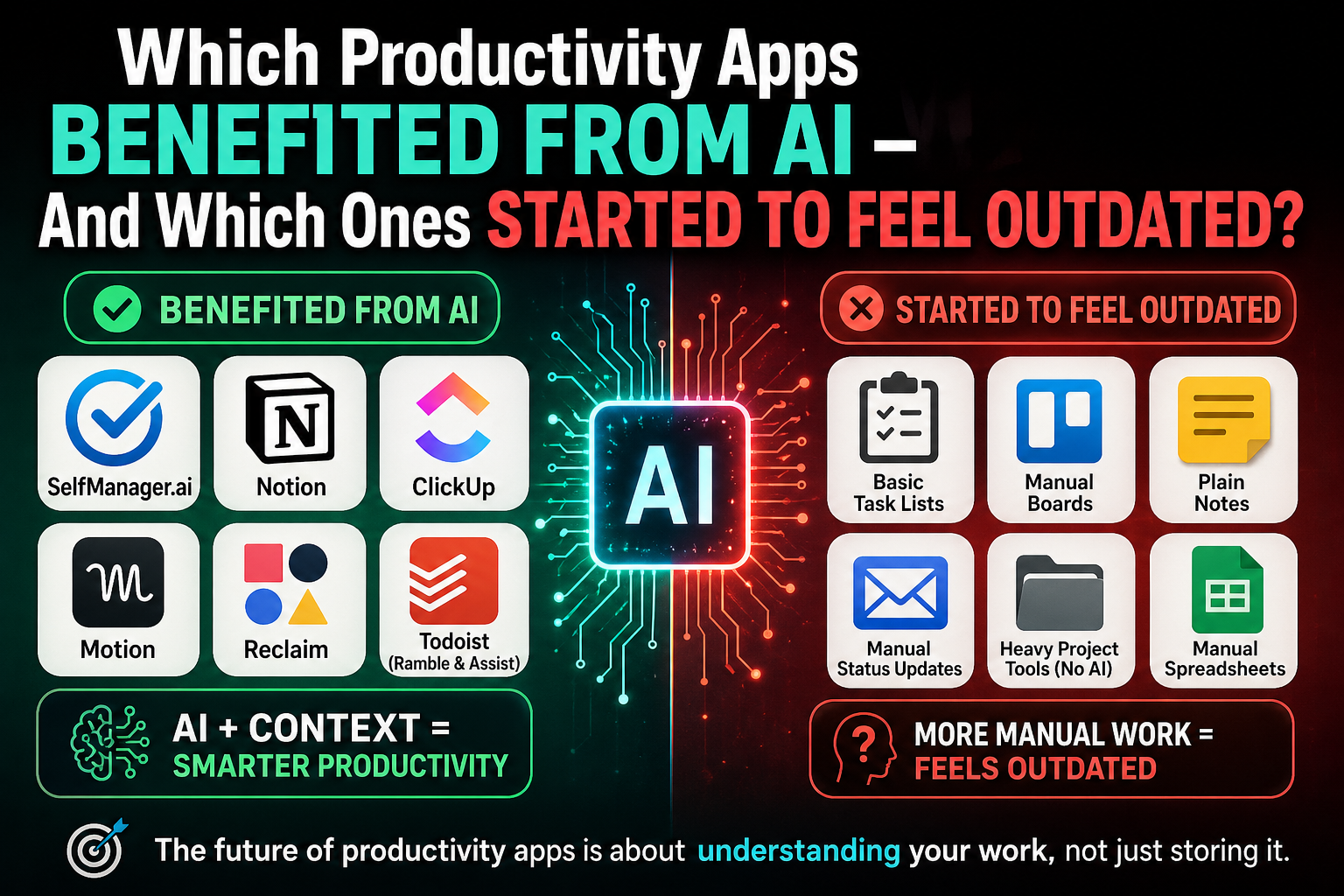
AI did not make productivity apps irrelevant.
It made the differences between them more obvious.
Before AI became part of everyday software, most productivity apps competed on fairly familiar features: task lists, calendars, notes, boards, reminders, projects, comments, and integrations.
That was enough for a long time.
If an app helped you capture tasks and organize them into lists, it was useful. If it helped a team assign work and track status, it was useful. If it gave you a clean place to write notes, it was useful.
But AI changed what people expect from productivity software.
Now users increasingly expect their tools to do more than store information. They expect them to summarize, plan, prioritize, organize, review, suggest, search, and sometimes take action.
That does not mean every old productivity app is dead.
It means some apps became stronger because AI fits naturally into their core product. Others still work, but they feel more limited than they did before.
The big shift: AI made context more valuable
The most important change is not simply that AI models became better.
The bigger change is that AI became more useful when connected to real work context.
A blank chatbot can help you think, write, summarize, or brainstorm. But a productivity app with tasks, notes, dates, projects, comments, documents, time tracking, and work history gives AI something more useful to work with.
That is why some productivity apps benefited more than others.
AI is much more powerful when it can answer questions like:
- What did I work on this week?
- What slipped?
- Which project is taking too much attention?
- What should I plan for next week?
- What tasks came out of this note?
- What changed in this project?
- What should be summarized for the team?
The apps that benefited most from AI are usually the ones that already had meaningful context inside them.
1. Apps that became stronger because AI fits their core product
Some productivity apps were in a good position when AI improved because their structure already gave AI useful material.
These are apps where users already store work context: tasks, projects, notes, documents, comments, calendar events, plans, and history.
SelfManager.ai fits this category.
SelfManager.ai, formerly Self-Manager.net, was already built around date-centric planning. The product is designed as a modern AI task manager for individuals and teams, combining task management and project management in a date-centric workflow. It includes AI Plan for drafting a week or month, task generation from brain dumps, and AI Review for weekly, monthly, or quarterly reviews.
That matters because AI works better when work has structure.
A simple task list gives AI a list of tasks.
A date-centric productivity system gives AI more context:
- what was planned for a specific day
- what was completed
- what slipped
- what notes were attached
- which projects were active
- how much time was tracked
- what happened across a week, month, or quarter
That is a different level of productivity data.
SelfManager.ai benefited from AI because its core structure was already useful for planning and review. AI did not need to be added as a random feature sitting on top of the product. It fits the way the product works.
The same general pattern applies to apps like Notion and ClickUp.
Notion has moved strongly toward becoming an AI workspace, with features around AI search, agents, meeting notes, documents, projects, and app connections. Notion's Enterprise Search can search across connected tools like Google Drive, Slack, Jira, and GitHub while respecting user permissions.
ClickUp has also benefited from AI because its product already contains tasks, docs, comments, projects, people, and company knowledge. ClickUp Brain is positioned as an AI layer that connects projects, docs, people, and company knowledge inside ClickUp.
This is the main lesson:
AI works best when the app already knows something about your work.
That is why tools with structured work context became more valuable after AI.
2. Simple task apps are still useful, but less impressive than before
Simple task apps are not going away.
Todoist, TickTick, Apple Reminders, Microsoft To Do, Google Keep, and Apple Notes are still useful because quick capture still matters.
People still need a place to write:
- buy groceries
- call someone
- send invoice
- reply to email
- book appointment
- publish article
- fix bug
- follow up with client
There will always be value in simple capture.
The problem is that AI raised the standard.
A task app that only stores tasks can still be useful, but it may feel less powerful compared with tools that can plan, summarize, review, or understand context.
Todoist has clearly understood this shift. Todoist Ramble can understand natural speech in 40 languages and extract project names, dates, times, priorities, labels, and other task details from natural input. Todoist Assist is also positioned around turning scattered tasks into clearer action plans.
That is smart because the future of simple task apps is not just "let me type a task."
It is:
- let me speak naturally
- turn my thought into a task
- detect the date
- detect the priority
- organize it correctly
- help me act on it
Still, there is a limit.
A simple task app can help you remember what to do. But it may not help you deeply understand how your work unfolded across a week, month, or quarter.
That is where a product like SelfManager.ai has a different angle.
SelfManager.ai can also handle basic tasks, but its stronger use case is when tasks need to connect to dates, projects, notes, time tracking, comments, and reviews.
In other words:
Todoist is strong when the task is the center.
SelfManager.ai is strong when the day is the center.
3. Calendar-first apps became more relevant because AI can schedule work
Another category that benefited from AI is calendar-based productivity.
Apps like Motion, Reclaim, Akiflow, and Morgen became more relevant because calendars are naturally structured.
A calendar already knows:
- when you are busy
- when you are free
- what meetings you have
- what deadlines are coming
- where focus time can fit
- what needs to move when the day changes
That makes AI scheduling useful.
Motion, for example, positions itself around taking projects and tasks, prioritizing them, time-blocking them on your calendar, and dynamically optimizing your schedule automatically. Its help documentation describes auto-scheduling as AI placing tasks in the best time slots based on priorities, deadlines, and availability.
This is one of the clearest AI productivity use cases.
Instead of manually dragging tasks around a calendar, the app can help decide where the work should go.
That is useful for people with many meetings, deadlines, calls, and time-sensitive tasks.
But calendar-first tools are not the same as date-centric productivity tools.
A calendar-first app asks:
When should I do this?
SelfManager.ai asks something broader:
What should this day contain?
What happened on this day?
How does this day connect to my week or month?
That difference matters.
Some people need precise time blocking. For them, Motion or Reclaim may make sense.
Other people need a daily workspace where tasks, notes, project work, comments, time tracking, and AI reviews live together. That is closer to the SelfManager.ai use case.
4. Notes and workspace apps had to become smarter
Notes apps also changed after AI.
Before AI, a notes app could be valuable just by giving you a clean place to write and organize information.
That still matters.
But plain notes now feel more limited if they do not help users extract meaning from the information.
A modern notes or workspace app is expected to help with things like:
- summarizing long notes
- turning notes into tasks
- finding information across documents
- creating outlines
- organizing scattered ideas
- answering questions from saved context
- connecting notes to projects or workflows
This is why Notion had a strong AI opportunity.
Notion was never only a simple notes app. It already combined pages, documents, projects, wikis, tables, and team knowledge. Once AI is added to that kind of workspace, it can do more than rewrite a paragraph. It can search, summarize, organize, and help users work across connected information.
This is also why basic note-taking tools may feel more exposed.
Apple Notes and Google Keep are still useful for quick notes. But if someone is trying to manage projects, weekly reviews, content plans, product work, or team workflows, basic notes alone often are not enough.
AI made that gap more visible.
5. Manual project management started to feel heavier
Project management tools are still important.
Teams still need:
- owners
- deadlines
- comments
- statuses
- attachments
- priorities
- views
- reporting
- accountability
But AI changed expectations here too.
If a project management app still depends entirely on manual updates, manual summaries, manual status reports, and manual organization, it can start to feel heavy.
People now expect more.
They want project tools to help answer:
- What changed since last week?
- What is blocked?
- What is at risk?
- What should be summarized?
- What tasks came out of this discussion?
- What should the team focus on next?
- Which deadline is likely to slip?
ClickUp, Asana, Notion, and other work platforms are moving in this direction because AI fits naturally into project work. ClickUp Brain, for example, is built around the idea of AI connected to projects, docs, people, and company knowledge.
The important point is not that project management disappeared.
The opposite is true.
Project management became more important, but manual project management became harder to justify.
If the tool has all the project information, users increasingly expect the tool to help interpret that information.
6. The apps that started to feel outdated
The productivity apps that feel most outdated after AI are not necessarily the oldest apps.
They are the apps that still make the user do all the thinking, sorting, planning, and reviewing manually.
That includes tools where the workflow is basically:
- write everything down
- move things between lists
- manually update statuses
- manually summarize progress
- manually review the week
- manually decide what matters next
- manually turn notes into tasks
- manually rebuild the plan when things change
That style of productivity software still works, but it feels less impressive now.
A few years ago, a clean checklist or board was enough.
Today, users are asking different questions:
- Why can't this app summarize my week?
- Why can't it help me plan tomorrow?
- Why can't it turn this note into tasks?
- Why can't it show what slipped?
- Why can't it review my month?
- Why can't it understand the context of my work?
This is the real reason some traditional productivity apps feel outdated.
It is not because tasks, notes, and calendars stopped mattering.
It is because users now expect those things to become more intelligent.
7. Why SelfManager.ai fits the post-AI productivity shift
SelfManager.ai fits the post-AI productivity shift because it is not only trying to add AI to a task list.
Its bigger idea is that work should be organized around dates.
That sounds simple, but it changes how AI can be used.
If your tasks, notes, time tracking, projects, comments, and daily plans are connected to specific dates, AI can help with more useful questions:
- How did my week go?
- What did I actually do this month?
- What should I focus on next week?
- Which tasks should be moved forward?
- What patterns keep repeating?
- What did I plan but not finish?
- What work deserves more attention?
That is very different from asking a generic chatbot for productivity advice.
Generic AI can give you ideas.
SelfManager.ai can use your actual date-based work context.
This is where the product fits naturally into the new productivity landscape.
It is not trying to replace every tool for every person. A simple checklist app is still fine for groceries. A calendar-first app is still useful for aggressive time blocking. A large project management system may still fit bigger companies.
But if your work happens across days, weeks, and months, and you want AI to help you plan and review that work, SelfManager.ai has a clear place.
8. The future of productivity apps is not just more AI features
The next phase of productivity software will not be won only by adding more AI buttons.
The better question is:
Does the app give AI enough context to be useful?
That is the real divide.
A weak AI feature inside a shallow app is still weak.
But AI inside a system with real work context can become much more useful.
That context can come from:
- dates
- tasks
- projects
- notes
- comments
- documents
- calendar events
- time tracking
- team activity
- work history
- weekly and monthly reviews
This is why some productivity apps became stronger after AI.
They already had the right foundation.
AI gave them a new layer of usefulness.
Final takeaway
AI did not kill traditional productivity apps.
It raised the standard.
Simple task apps are still useful for capture.
Calendar apps became more useful because AI can schedule work.
Workspace apps became more powerful because AI can search, summarize, and organize information.
Project management tools became stronger when AI could understand tasks, comments, docs, and team activity.
But tools that still depend entirely on manual organization started to feel more outdated.
The future of productivity apps is not just about storing work.
It is about helping people understand their work.
That is where SelfManager.ai fits.
It is built around the idea that productivity is not only about checking boxes. It is about planning your days, tracking what happened, reviewing your weeks and months, and using AI to understand your real work over time.
Date-based AI Task Manager
Plan smarter, execute faster, achieve more
Create tasks in seconds, generate AI-powered plans, and review progress with intelligent summaries. Perfect for individuals and teams who want to stay organized without complexity.
Get started with your preferred account