
Introducing AI Plan: SelfManager.ai Now Plans Your Week, Not Just Reviews It
For 1 year, SelfManager's AI has been excellent at one thing: helping you understand what you already did.
Summarize this table. Review last week. Chat about your pinned projects. Continue the conversation about last month's work.
Useful, often essential. But it kept stopping at the same question.
"This is great for understanding what I did. But what about helping me decide what to do next?"
Today I'm shipping the answer.
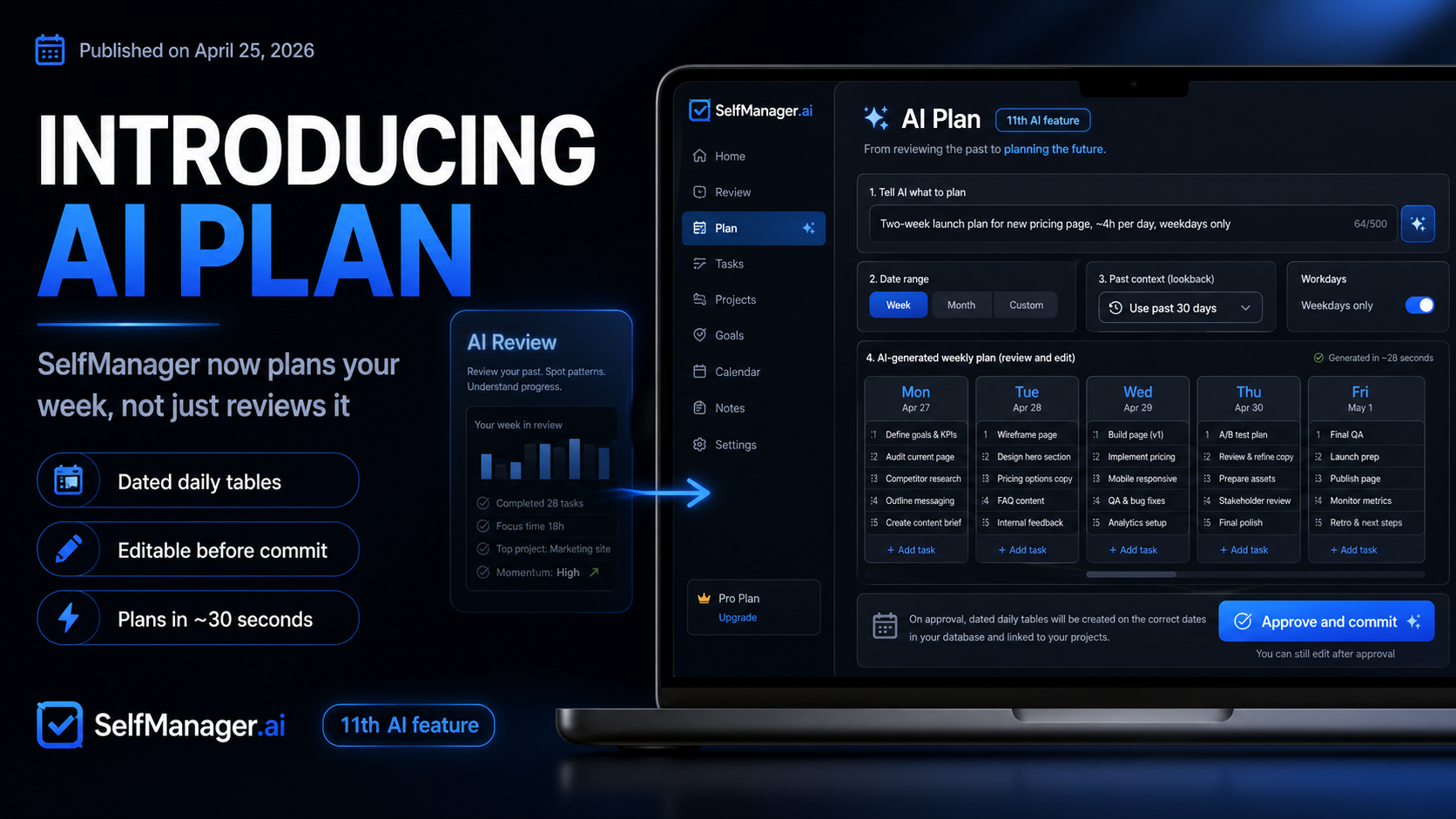
AI Plan is the 11th AI feature in SelfManager.ai
You describe what you want to achieve, and it generates a complete, dated plan - ready to edit, ready to ship.
What AI Plan does
You give it three things:
- A period to plan for - a single day, a week, a custom range up to 31 days, or a full month
- A brief, in plain English. "Two-week launch plan for the new pricing page, ~4h per day, weekdays only"
- Optionally, a window of past context - the last week, month, or three months of your actual work in SelfManager
It hands back a complete plan: one table per day, each with 3 to 20 prioritised tasks.
You review the plan in a horizontal slider, one editable card per day, and tweak anything you don't like before you commit.
Then you hit Approve, confirm, and the tables are created on the right dates. You land on day one, ready to go.
That's the whole loop. From "I have no idea what next week looks like" to "I have eight tables, dated, prioritised, ready to start" in roughly 30 seconds.
Don't like the output? Continue the discussion with the AI and re-generate.
Want a small change? You can do it right on the results the AI gave you.
Ready to save the plan? Just click Approve & commit.
Why I built it this way
There are plenty of AI tools that will give you a plan. Type a prompt, get a wall of text.
They're fine for inspiration, but nothing actually lands in your task manager.
You still have to copy it, reformat it, decide which tasks belong to which day, and create the entries yourself. By the time you're done, half the energy is gone.
I wanted the opposite: the AI does the structural work, and the output goes directly into the system you already use to manage your days.
That's why AI Plan generates tables, not text.
Same shape as the rest of SelfManager - tasks, priorities, statuses, dates. The moment you commit, you're back in your normal workflow.
No copy-paste step. No "now translate this advice into actions". The advice is the actions.
How the review flow works
When AI Plan returns a proposal, you see one card per day.
Each card looks exactly like a real SelfManager table - same row chrome, same priority chips, same status pills - because it is a real table, just one that hasn't been committed to your account yet.
On each card you can:
- Rename the table or its description
- Rename any task by clicking into it
- Cycle a task's priority (0 to 5)
- Cycle a task's status
- Delete a row
- Add a new row at the bottom
You can also approve or skip individual days.
Maybe the AI's weekend looks great but its Wednesday is off. Hit Skip on Wednesday's card, the dot in the indicator strip turns red, and that day won't be created when you commit.
Skipped cards gray out and strike through, so you can see at a glance what won't ship.
When you're happy, the bottom of the page shows a summary - "5 of 7 tables approved" - and a single Approve and commit button. Click it, confirm, and SelfManager writes the approved tables to your account, then redirects you to the earliest one.
Why past context is the part I like most
The optional 3-month lookback is my favourite piece, because it's where AI Plan starts to feel like it actually knows you.
If you toggle on past context, the AI sees your real recent work before it generates.
It notices that you do strength training on Mondays and Thursdays. That your weekends are usually empty. That you've been pushing on a side project for the last six weeks. That you journal every weekday morning.
Then it builds a plan that respects all of that.
It doesn't put a new gym session on Wednesday because Wednesdays are when you do deep work. It doesn't suggest "start journaling daily" because you're already doing it.
It schedules around the rhythm you've actually established - not the rhythm a generic productivity AI assumes.
For windows over a month, the system summarises your past work first (no extra credit cost), then feeds the summary into the planning prompt. You can use up to 90 days of context without bloating anything.
This is the piece a generic AI planner can't replicate. It needs your data, in your shape, with your dates - and SelfManager already has it.
Fast and Thinking modes
AI Plan supports both model tiers - Fast for quick iteration, Thinking for higher-quality reasoning when the plan is more complex.
The default is Thinking, since planning a real week or month benefits from deeper context handling. Switch to Fast if you're iterating on a brief and just want a quick pass.
Either way, you can keep the conversation going. If the first plan isn't quite right, refine your prompt, regenerate, and the slider updates with the new proposal.
Some real use cases
The framing is open enough that you can use AI Plan for almost anything that benefits from a dated, structured plan. Some patterns I've seen in early testing:
Side-project sprints
Two weeks. Goal is X. Roughly four hours a day on weekdays. Day 1 is research, day 14 is launch.
You get a clean ramp from discovery work to shipping work.
Workout planning
One month. Strength split. Three rest days per week. No equipment beyond dumbbells.
You get a card for every training day with specific exercises, sets, and reps. Rest days stay deliberately empty (or filled with mobility work, if you ask).
Habit building
Build a daily reading and journaling habit. 30 minutes reading, 10 minutes journaling, weekdays only.
You get tables that recur across the month with the right tasks on the right days.
Skill onboarding
Learn TypeScript over the next 14 days. ~1 hour per evening, project-based.
You get a study schedule with concrete topics dated to specific evenings.
The boring admin week you keep putting off
30 small tasks I've been avoiding. Spread them across two weeks in 1-hour blocks.
You get a sane, dated schedule that turns the mountain into hills.
What's coming next
AI Plan is live and fully usable today, but I'm not done with it. A few things on the near-term roadmap:
- "Regenerate just this day" - re-run a single card without throwing away the rest of the plan
- Per-row editing for notes, image attachments, and deadlines in the review slider
- "Save as template" - reuse a workout split or weekly cadence next month
- Smarter handling of conflicts when committing to a date that already has tables
If you have other ideas, the easiest path is the SelfManager subreddit, or just hit reply on the launch email if you got it.
How to try it
If you have a paid plan or an active free trial, AI Plan is in the top nav now. The Plan link sits right next to AI Review.
If you don't have a subscription, the trial is 7 days, no card required. AI Plan is included from day one.
AI actions start at 1 credit on the Fast model or 5 on the Thinking model, and rise with how much data the request carries — a long lookback window costs more than a plain week. Pick the model on the input pill before sending — Fast for everyday plans and chats, Thinking for deeper multi-step planning. You always see the exact number and confirm before anything above the starting price is charged. Your weekly allowance refills every Monday.
What this changes
For two years, SelfManager's AI was excellent at understanding what you already did. It could summarize your week, surface patterns across months, help you debrief a quarter.
That's still here. Reflection is still half the loop.
But it was only half.
AI Plan closes the other half. Now SelfManager doesn't just understand your past - it shapes what you do next, in the same structure you already use, with the same dates you already plan around.
This is the 11th AI feature in SelfManager. The next ones I'm working on build on the same idea: less time spent translating intent into structure, more time spent doing the actual work.
- Marian Sorca
Founder, SelfManager.ai
Date-based AI Task Manager
Plan smarter, execute faster, achieve more
Create tasks in seconds, generate AI-powered plans, and review progress with intelligent summaries. Perfect for individuals and teams who want to stay organized without complexity.
Get started with your preferred account